Write down every DNS record your domain has today before you let Cloudflare near it, because the scan it runs at sign-up is not guaranteed to find them all, and a record it misses is a part of your site or your mail that stops answering the day the switch goes live.
Short answer: what is the safe order?
Copy your records, add the domain on the Free plan, compare the scanned records line by line, keep everything that is not a website (mail, verification, SSH, FTP) on DNS only, make sure your server already has a valid HTTPS certificate, remove DNSSEC at the registrar, swap in the two Cloudflare nameservers, and only then set the encryption mode to Full (strict) and turn on Always Use HTTPS. Budget two calendar days: up to one for the old DNSSEC record to expire and up to one for the nameserver change, per Cloudflare's own setup guide.
The steps below follow that order. Each one ends with a check that proves it worked and the mistake that most often breaks it.
Copy every record you have now
Open the DNS panel where your domain lives today (your host or your registrar; ICANN Lookup names the registrar if you are not sure) and export the zone file, or copy each row into a sheet: type, name, value, priority. Look hard for the rows that are easy to forget: the MX lines for your mailbox, the TXT lines for SPF, DKIM and DMARC, any TXT or CNAME a service asked you to add to prove you own the domain, and subdomains such as shop or book that point at another company's platform.
You have a numbered list, and its count matches the number of rows in the old panel.
a DKIM key under an unusual selector name or a verification record nobody remembers is gone after the switch, and you find out when mail starts landing in spam.
Add the domain and compare the scan
In the dashboard choose Onboard a domain, type the bare domain (example.com, not www), let it scan, and pick the Free plan. Cloudflare's guide says plainly that the quick scan "is not guaranteed to find all existing DNS records", so put your list from the last step next to the scanned table and add every missing row by hand, with the same value and priority.
The two lists have the same count, and the root (@) and www rows point where they pointed before.
visitors get DNS_PROBE_FINISHED_NXDOMAIN for any name you left out, which Cloudflare lists as the result of activating a domain without the right records.
Sort each record into orange or grey
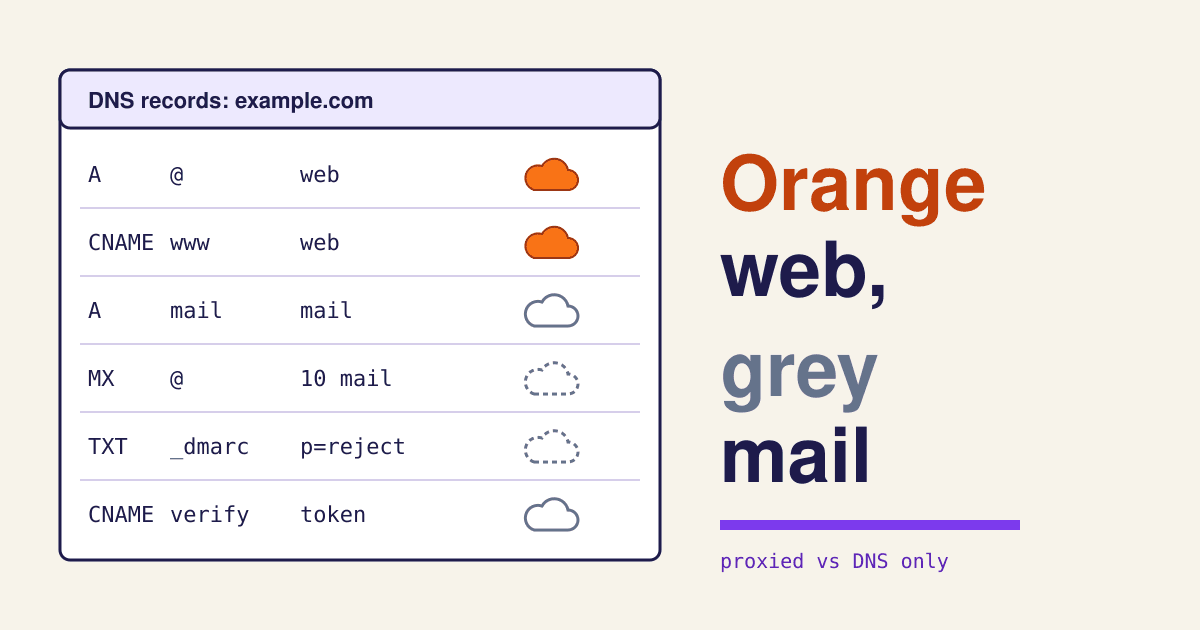
Every A, AAAA and CNAME row has a cloud switch. Orange (Proxied) sends web visitors through Cloudflare, which answers with its own addresses and hides your server's. Grey (DNS only) hands out your real address and nothing else. Proxying is on by default when you add a domain in the dashboard, and only web traffic can pass through: the proxy carries HTTP and HTTPS on a fixed list of ports (80 and 443 among them), not mail, SSH or FTP. MX and TXT rows are always DNS only. The sorting table after the steps shows where each common row goes.
Every row that serves a web page is orange; the host name your mail program connects to, and anything you reach by SSH or FTP, is grey.
a mail host left orange stops taking connections from your phone and laptop, and a domain verification CNAME left orange can fail its check, which is why Cloudflare says those should not be proxied.
Check the certificate your server already has
Before any nameserver moves, open https:// plus your domain and click the padlock. The strict mode you will set in step seven needs your own server to present a certificate that is unexpired, issued by a public certificate authority or by Cloudflare's Origin CA, and naming the host being asked for. Most hosts issue a free Let's Encrypt certificate from their panel. If yours cannot, Cloudflare will issue a free Origin CA certificate for you to install, with one catch: browsers do not trust it, so visitors see a certificate warning whenever traffic skips Cloudflare (a paused zone, a grey row).
The padlock shows a valid certificate for both example.com and www.example.com, and its expiry date is weeks away, not days.
you are tempted by the Flexible mode, which talks to your server over plain HTTP. Cloudflare's own page says do not use Flexible if your server redirects HTTP to HTTPS: the two redirects chase each other and the site stops loading.
Switch DNSSEC off at the registrar
If your registrar shows DNSSEC as on, or lists a DS record, remove it first. Cloudflare's guide is blunt about the reason: changing nameservers while DNSSEC is active "can cause your domain to become unreachable", because the old signature no longer matches the new servers. You can switch it back on through Cloudflare once the domain is active.
dig ds example.com +short prints nothing. Then wait a day: the .com registry hands out DS records with a lifetime of 86,400 seconds (24 hours, read with dig on 2026-11-12), so resolvers can hold the old one that long.
validating resolvers, the ones that check signatures, refuse to answer for your domain at all, and every visitor behind them sees a site that does not exist.
Swap in the two nameservers
Cloudflare assigns two nameserver names to your domain; you cannot choose them. At the registrar, delete the old nameservers and paste in the two new ones, copied exactly. Leave no third name in the list: for a standard setup only the assigned Cloudflare nameservers may be listed. The dashboard now shows Pending Nameserver Update. Cloudflare checks the first time after 60 seconds and then at growing intervals, the change can take up to 24 hours, and a Free domain that is still pending after 28 days is deleted.
dig ns example.com @1.1.1.1 lists only the two new names, and Cloudflare sends an email when the status turns Active.
a typo in one name or a leftover old nameserver keeps the domain pending, and Cloudflare's checklist names those two before anything else.
Set Full (strict) and Always Use HTTPS
Once the domain is active, Cloudflare issues the certificate visitors see within 15 minutes to 24 hours. Open SSL/TLS and choose Full (strict), the mode Cloudflare recommends for the best security: HTTPS from the visitor to Cloudflare and from Cloudflare to your server, with your server's certificate checked. Newer accounts may show Automatic SSL/TLS instead; it never moves you to a weaker mode and raises the mode step by step, starting with 1% of traffic. Then, under Edge Certificates, turn on Always Use HTTPS so every http:// request is sent to https:// at Cloudflare's edge.
curl -I http://example.com returns a 301 to the https:// address, and curl -I https://example.com returns 200 with a server: cloudflare line.
pick Full (strict) before your server has a valid certificate, and every page shows error 526, invalid SSL certificate.
Give your server the visitor's real address back
Behind the proxy every request reaches your server from a Cloudflare address, so your logs, your form's spam filter and any security plugin that blocks by address now see a handful of Cloudflare machines instead of your visitors. Cloudflare passes the real one in a header called CF-Connecting-IP; the code block below shows the lines that tell Apache or nginx to read it. Most managed hosts and the common WordPress security plugins have a setting for it instead. While you are in there, make sure no firewall or plugin is blocking Cloudflare's published address ranges.
Submit your own contact form, then find the entry in the server log or the form's entry list: it shows your own address, not one from Cloudflare's list.
one rate-limit rule that blocks a Cloudflare address blocks everyone behind it, which shows up as error 521, web server is down.
Test mail, forms and a fresh page
Send a message from an outside address to your domain and one back out. Submit every form on the site. Then change something small on a page and look for it. Cloudflare's CDN does not cache HTML by default, only files such as images, CSS and scripts by their extension, so a stale page usually means a stale stylesheet: purge the cache, or switch on Development Mode, which bypasses the cache for three hours.
Both test messages arrive, every form sends its notice, and the change you made shows in a private window.
the first person to tell you mail is broken is a customer whose order confirmation never came.
Which records get the orange cloud?
A sorting table for the rows a small business site usually has. "Orange" means proxied through Cloudflare; "grey" means DNS only, your real address handed out.
| Row | Typical value | Cloud | Why |
|---|---|---|---|
A @ | your server's IPv4 address | Orange | Your home page: the traffic the proxy exists for. |
CNAME www | example.com | Orange | Same site, second name. |
CNAME shop | a store platform's host name | Grey | The platform runs its own HTTPS and often its own protection; keep it grey unless its connection guide says to proxy. |
A mail | the mail server's address | Grey | Mail programs connect on ports the proxy does not carry. |
MX @ | 10 mail.example.com | Always DNS only | Cannot be proxied. |
TXT @, _dmarc, *._domainkey | SPF, DMARC, DKIM | Always DNS only | Text records are read, not visited. |
CNAME for a verification | a token from a service | Grey | Cloudflare advises against proxying ownership checks. |
A ftp, A ssh, A cpanel | your server's address | Grey | Not web traffic on a supported port. |
One trade-off to know: a grey row that points at the same server as your orange website reveals your server's real address to anyone who looks it up. If mail and website share one machine, that is the cost; moving mail to a separate provider removes it.
The lines to type
The checks from the steps in one place, then the server lines that restore the visitor's address. Replace example.com with your domain.
# DNSSEC gone? (step 5: should print nothing)
dig ds example.com +short

# Nameservers swapped? (step 6: only the two new names)
dig ns example.com @1.1.1.1
dig ns example.com @8.8.8.8

# HTTPS at the edge? (step 7)
curl -sI http://example.com | head -n 3
curl -sI https://example.com | grep -iE "^HTTP|^server|^cf-cache-status"

# Apache: read the visitor's address from Cloudflare's header
# (run a2enmod remoteip, then in the site config:)
RemoteIPHeader CF-Connecting-IP
RemoteIPTrustedProxy 173.245.48.0/20
# ...one RemoteIPTrustedProxy line per range on cloudflare.com/ips

# nginx: the same, in the http or server block
real_ip_header CF-Connecting-IP;
set_real_ip_from 173.245.48.0/20;
# ...one set_real_ip_from line per range on cloudflare.com/ips
Copy the full, current list of ranges from cloudflare.com/ips rather than from this page; Cloudflare publishes the IPv4 and IPv6 ranges there.
What each error means you skipped
ERR_TOO_MANY_REDIRECTS- The mode is Flexible and your server also redirects to HTTPS. Set Full (strict) as in step 7. Cloudflare walks through every cause.
DNS_PROBE_FINISHED_NXDOMAIN- A name is missing from the Cloudflare table, or DNSSEC is still on. Steps 2 and 5.
- Error 521
- Your server refused Cloudflare: it is down, or a firewall or plugin blocks Cloudflare's addresses. Step 8.
- Error 522
- Cloudflare got no answer in time: no reply to its connection within 19 seconds, or no reply to the request within 90. Often the same firewall, or a server that is overloaded.
- Error 525
- The HTTPS handshake with your server failed under Full or Full (strict): the server is not serving HTTPS on port 443 properly. Step 4.
- Error 526
- Full (strict) is on, but your server's certificate is expired, self-signed or for another name. Step 4, then step 7.
- Mail stopped, site fine
- The mail host row is orange, or an
MXorTXTrow never made it across. Steps 1 to 3.
If it goes wrong: unfold
In the domain's Overview, under Advanced Actions, choose Pause Cloudflare on Site. Traffic goes straight to your server again, and Cloudflare says pausing takes five minutes or less, against the hours a nameserver change back can take. Pausing only works cleanly if your server's own certificate is publicly trusted, one more reason to fix step 4 with Let's Encrypt rather than an Origin CA certificate when you can.
Questions before you start
Does the Free plan cost anything later?
Nothing in these nine steps needs a paid plan. The full setup used here is the only setup Free and Pro plans can use; paid plans add features on top, not a different route.
Do I have to move my domain registration to Cloudflare?
No. Your registrar stays the same; only the nameservers it lists change. Domains bought through Cloudflare's own registrar skip the nameserver step because they use its DNS from the start.
Will my site be down during the switch?
Not if steps 1 to 5 are done first: while the change spreads, some visitors reach your server through the old DNS and some through Cloudflare, and both lead to the same server with the same records.
My site is on Squarespace, Wix or Shopify. Should I do this?
Usually not for the main site. Hosted platforms run their own HTTPS and protection, and their connection guides tell you which records to create and whether they may be proxied. Moving the nameservers is still possible; leave their rows grey unless the platform says otherwise.
Sources
- Cloudflare Docs: Set up a primary zone (Full setup), read 2026-11-12.
- Cloudflare Docs: Zone status (pending checks, 28-day deletion).
- Cloudflare Docs: Proxy status and Exposed IP addresses.
- Cloudflare Docs: Network ports.
- Cloudflare Docs: Encryption modes, Flexible and Full (strict).
- Cloudflare Docs: Cloudflare origin CA.
- Cloudflare Docs: Enable Universal SSL and Always Use HTTPS.
- Cloudflare Docs: ERR_TOO_MANY_REDIRECTS.
- Cloudflare Docs: Restoring original visitor IPs and Cloudflare IP ranges.
- Cloudflare Docs: errors 521, 522, 525 and 526.
- Cloudflare Docs: Default cache behavior and Development Mode.
- Cloudflare Docs: Pause Cloudflare.
- DS record lifetime:
dig dsagainst a.comregistry server, 2026-11-12, TTL 86400.