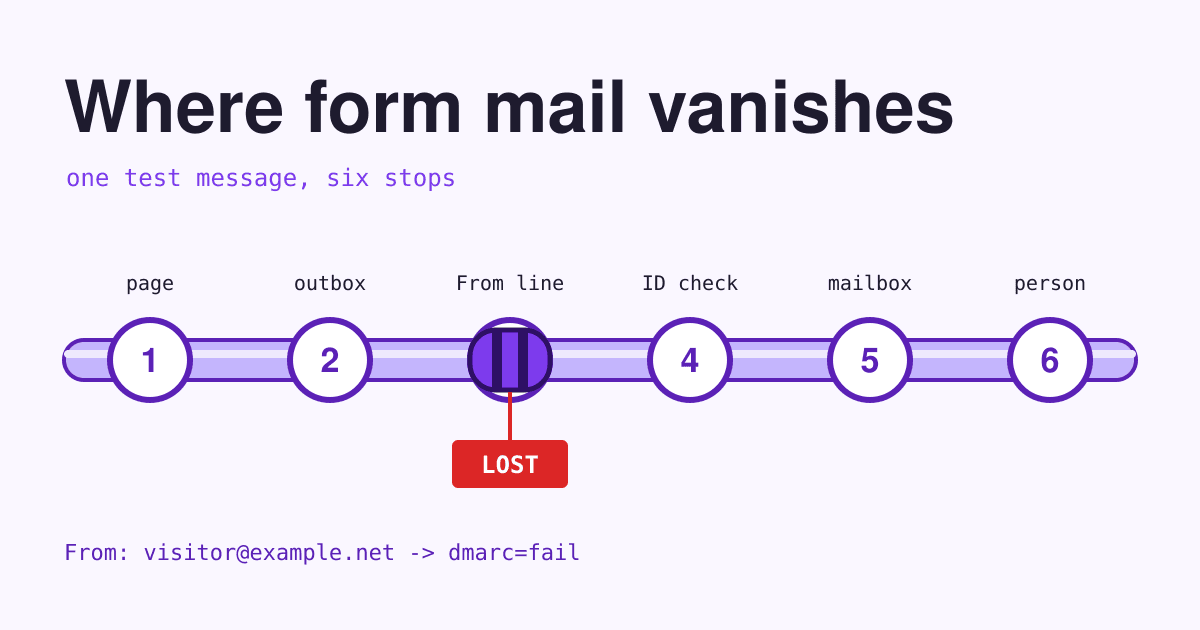
If your contact form has gone quiet, do not trust its green thank-you message: send it one message of your own and follow that message through six stops, because each stop loses mail in its own way and none of them tells the visitor.
Short answer: most lost form mail dies at stop 3 or stop 4. The form sends the message "from" the visitor's own address, which your server has no right to use, or your domain has no SPF or DKIM record for the server that sends it, and Gmail has refused unauthenticated mail from every sender since February 2024. Send from an address on your own domain, put the visitor in Reply-To, route the mail through an email service your domain authorises, and keep a copy of every entry on the site so nothing depends on email alone.
Six stops between Send and your reply
Run this with a real test: open the contact page on your phone, fill it in as a stranger would, with a subject like "Test 1117" you can search for later, and press Send. Then walk the stops in order. The first stop where the test goes missing is your fault line; fix it and send the test again.
-
1 The page
- What happens here
- The browser sends what the visitor typed to your site. The form tool checks it, saves it if it is set up to, and shows the thank-you message.
- How the message gets lost
- A page cache serves an old copy of the form with an expired security token, so the site throws the entry away. WordPress tokens of this kind, called nonces, live between 12 and 24 hours, and a cached contact page can easily be older. A spam check that rejects real people, or a script error that stops the button, loses the message here too.
- How to see it
- Look for the test in the form tool's own list of entries, if it keeps one. If the test is in the list, stop 1 passed. If it is not, the message never left the page, and nothing later in this post will bring it back.
- The fix
- Turn on stored entries, so the site keeps a copy of every message whatever happens to the email. Keep the contact page out of the page cache, and after any change to the spam check, send a test from a phone that has never visited the site.
-
2 The outbox
- What happens here
- The site hands the message to its mail function. On WordPress that is
wp_mail(), which by default sends from wordpress@ and your domain through the server's own mail program. - How the message gets lost
- Many servers are not allowed to send mail directly. DigitalOcean blocks ports 25, 465 and 587 on its Droplets, and Google Cloud blocks port 25 to anything outside its network. The form still says thank you; the mail just never leaves the building.
- How to see it
- Install an email log on the site, or read the form tool's error notices, and look for the test. A log line with an error, or no line at all, puts the fault here.
- The fix
- Stop using the server's own mail program. Send through an email service you sign in to, either your mailbox provider's SMTP on port 587 with a password, or a sending service's API, set up in an SMTP plugin or in the form tool itself.
-
3 The From line
- What happens here
- The form writes the envelope: who the message is To, who it is From, and the subject.
- How the message gets lost
- Many forms put the visitor's address in From, so that Reply goes to them. The message then claims to come from, say, a Yahoo address while leaving your server, which Yahoo never authorised. On 12 November 2026 yahoo.com and aol.com published a DMARC policy of
p=reject, which asks receiving servers to refuse such mail. gmail.com publishedp=none, but Google tells senders not to impersonate Gmail From headers and says it will move to quarantine. So the same form delivers some messages and loses others, depending on the visitor's address, which is why the fault hides for months. - How to see it
- Send two tests, one with a Gmail address and one with a Yahoo or AOL address. If the first arrives and the second does not, the From line is the fault.
- The fix
- Put an address on your own domain in From, such as forms@ and your domain, and the visitor's address in Reply-To. Reply-To tells mail programs where replies go, so pressing Reply still writes to the visitor.
-
4 The ID check
- What happens here
- The receiving server checks that your domain allowed this server to send for it: SPF lists the servers allowed to send, DKIM signs each message, and DMARC says what to do when both checks fail.
- How the message gets lost
- Since 1 February 2024 Gmail requires every sender to pass SPF or DKIM, from a server with valid forward and reverse DNS, over TLS. Mail that fails is refused with the error 550 5.7.26, "This email has been blocked because the sender is unauthenticated", or filed as spam. An SPF record that needs more than 10 DNS lookups counts as an error, and DMARC only passes when the From domain matches the domain that passed SPF or DKIM.
- How to see it
- Open the test message's full header (the next section shows how) and read the SPF, DKIM and DMARC results. If the test was refused instead, the bounce message to the sending address quotes the error.
- The fix
- In the sending service, add your domain and publish the DKIM records it gives you. Add the service to your one SPF record, and publish a DMARC record, starting with
p=noneand a report address, so you can see who sends as your domain before you tighten it.
-
5 The mailbox
- What happens here
- Your mail provider accepts the message and files it: inbox, spam, a folder, or on to another address.
- How the message gets lost
- It lands in spam, a filter files it away, or the notification address forwards to a second mailbox and the forward fails its checks there: Google says DKIM is especially important for forwarded mail. Often the To address in the form settings is simply old: the designer's address, or someone who has left.
- How to see it
- Search for "Test 1117" in every folder, spam included, of every mailbox the form might send to. Then open the form settings and read the To line word for word.
- The fix
- Send to an address on your own domain that someone reads every day, with no forward in between. Mark the test "not spam" and add a filter that never sends the form's From address to spam.
-
6 The person
- What happens here
- The message sits in an inbox until someone reads it and replies.
- How the message gets lost
- It arrives in a shared inbox everyone assumes someone else reads, or under a subject like "New form submission" that looks like every notification before it.
- How to see it
- Ask whoever should have answered the test whether they saw it, and when.
- The fix
- Send each message to two people, and put the visitor's topic in the subject, so a real enquiry does not look like a robot's notice.
Read the header of your test message
Every delivered message carries a header with the result of the checks at stop 4. In Gmail, open the message, choose More next to Reply, then Show original; the page lists SPF, DKIM and DMARC at the top and the raw header below. Other mail programs call it "view source" or "message source". These are the lines to find, as they look when the fixes above are in place, with example.com standing for your domain:
-
From: Website form <[email protected]>Stop 3 passed: the message comes from your own domain, not from the visitor.
-
Reply-To: Dana Test <[email protected]>The visitor's address, used only for replies.
-
dkim=pass [email protected]Your sending service signed the message with your domain's key, the same domain as in From.
-
spf=pass smtp.mailfrom=mail.example.comThe sending server is listed in SPF. A subdomain of your domain is fine here: DMARC's default relaxed mode counts it as a match.
-
dmarc=pass (p=NONE) header.from=example.comStop 4 passed. If this reads
dmarc=failwith a visitor's domain after header.from, go back to stop 3; with your own domain, go back to the DKIM and SPF records.
The two fixes, written out
The form's mail settings, in the shape most form tools ask for them. The square brackets stand for the field codes your tool uses for the visitor's name, address and topic.
To:        [email protected], [email protected]
From:      Website form <[email protected]>
Reply-To:  [visitor-name] <[visitor-email]>
Subject:   Website enquiry: [topic]
The three DNS records for your domain. The SPF include and the DKIM name and target come from your sending service; copy them from its setup page rather than from here. Keep one SPF record only, and add new services to it instead of publishing a second.
example.com.                 TXT    "v=spf1 include:_spf.mail-service.example ~all"
s1._domainkey.example.com.   CNAME  s1.dkim.mail-service.example.
_dmarc.example.com.          TXT    "v=DMARC1; p=none; rua=mailto:[email protected]"
A five-minute test, every Monday
Forms break without warning: a plugin update, a new host, a changed DNS record, a mailbox that fills up. A test once a week catches the break within days instead of when a customer phones to ask why nobody answered.
- Minute 1. On your phone, send the form a message from a Gmail address, subject "Test" and the date.
- Minute 2. Send a second one from a Yahoo, AOL or Outlook address. This one tests stop 3.
- Minute 3. Check that both are in the site's list of entries. That is stop 1.
- Minute 4. Check both are in the inbox, not spam, and open the header of one: DMARC should pass for your own domain.
- Minute 5. Press Reply and check it addresses the visitor, then write the date and "pass" or the failed stop in a note you keep.
A pass is two messages in the inbox within five minutes, dmarc=pass for your domain, and Reply going to the visitor.
Questions about form emails
Why do some form messages arrive and others never do?
Look at the visitor addresses. If the form puts the visitor in From, messages from domains with a strict DMARC policy, such as yahoo.com and aol.com, are refused, while others get through. Stop 3 fixes it.
Does a small website need DMARC?
Gmail requires SPF or DKIM from every sender, and DMARC only from senders of more than 5,000 messages a day to Gmail accounts. Google still recommends all three, and a p=none record costs nothing and sends you reports of who mails as your domain.
Will an SMTP plugin fix my form?
It fixes stop 2, and stop 4 once the sending service is set up for your domain. It does not fix a cached form at stop 1, a visitor address in From at stop 3, unless the plugin forces its own From address, or anything in the mailbox.
Can the form send from my Gmail address?
Only if the mail goes out through Gmail's own servers with your sign-in. A website server that sends mail marked From a gmail.com address is the impersonation Google warns about. An address on your own domain avoids the question.
Sources
- Google: Email sender guidelines, SMTP error reference, Trace an email with its full header and Best practices for forwarding email to Gmail, read 2026-11-12.
- WordPress developer docs: wp_mail() and Nonces, read 2026-11-12.
- DigitalOcean: Why is SMTP blocked? and Google Cloud: Sending email from an instance, read 2026-11-12.
- IETF: RFC 7208 (SPF), section 4.6.4, RFC 7489 (DMARC), section 3.1 and RFC 5322, section 3.6.2.
- DMARC policies of yahoo.com, aol.com and gmail.com: the TXT records at _dmarc of each domain, looked up 2026-11-12.