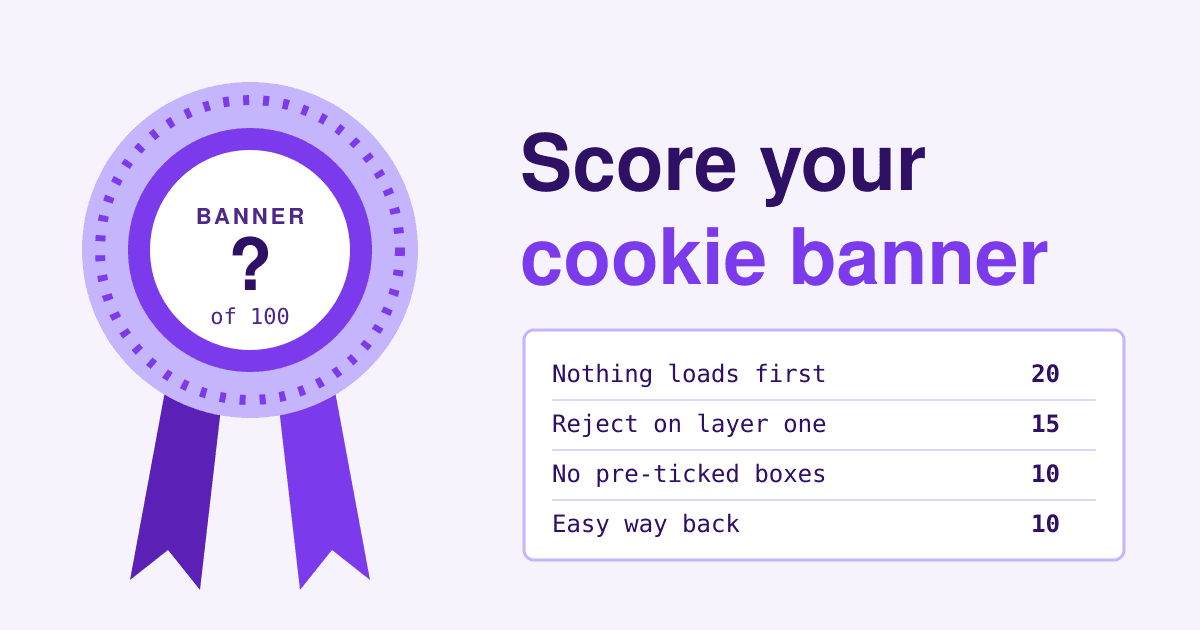
A cookie banner earns most of its points before anyone clicks it, in the seconds between the page opening and the visitor making a choice, when nothing that needs consent is allowed to load.
The colours, the wording and the little cookie icon come later. This card scores the parts regulators actually look at, in ten lines worth 100 points in total. Each line says what earns full marks, what earns part marks and what scores zero, with the rule behind it, so you can judge your own banner the way a complaint would.
- Judge as a stranger. Open your site in a private window, so no earlier choice is remembered.
- Judge before you click. Lines 1 to 3 are scored with the banner still open and untouched.
- Judge the phone too. Score the banner again at phone width: a Reject button that only shows on a laptop is half a button.
This scores against the EU rules: the ePrivacy Directive as each EU country applies it, plus the GDPR for what counts as consent. The UK and other countries set their own versions. It is general information, not legal advice.
The judging card, line by line
Lines are weighted by how much they decide. Line 1 alone is worth a fifth of the card, because a banner that lets trackers run before the choice has already lost the point of asking.
Nothing optional loads before a choice
The EU rule is short: storing or reading information on a visitor's device needs their consent, unless it is strictly necessary for a service they asked for. A shopping cart, a login session or the cookie that remembers the banner choice itself pass that test. Analytics, ad pixels, heatmaps and chat widgets that set identifiers do not.
The taskforce of European data protection authorities put it plainly in its 2023 report: by default, no cookies that need consent can be set without consent. Watch for the cookies a plugin labels essential when they are not: the same report names "inaccurately classified essential cookies" as a practice it found and rejected.
- Full marks
- No analytics, ad or tracking cookies and no requests to those services before the visitor chooses.
- Part marks
- One minor third-party request fires early (a font or an embed that sets nothing), everything else waits.
- Zero
- Analytics or ad cookies such as
_ga,_fbpor_gcl_auappear in a fresh private window before any click.
Rule ePrivacy Directive Article 5(3); EDPB cookie banner taskforce report, points 7 and 26.
Reject sits on the first layer, next to Accept
The most common shortcut is a banner with Accept all and Settings, where refusing takes a trip into a second screen. A vast majority of the authorities in the taskforce said a banner with no refuse option on the layer that holds the consent button is not in line with valid consent.
- Full marks
- Accept and Reject (or Refuse, or Continue without accepting) as buttons on the first screen of the banner.
- Part marks
- Reject is on the first layer but only as a text link set apart from the buttons.
- Zero
- Accept all plus Settings, and refusing needs a second screen.
Rule EDPB taskforce report, point 8 (Type A practice).
Reject looks like a real choice
A Reject button can exist and still be built to be missed. The taskforce did not set a colour standard and judges contrast case by case, but it gave examples that do not lead to valid consent: a refuse link buried in the paragraph of banner text without visual support, a refuse link placed outside the banner, and a refuse button whose text contrast is so low it is unreadable.
- Full marks
- Reject is a button the same size and weight as Accept, readable, inside the banner.
- Part marks
- Reject is a readable button but clearly smaller or greyed next to a bright Accept.
- Zero
- Reject is a link inside the paragraph, outside the banner, or pale text on a pale button.
Rule EDPB taskforce report, points 14 and 18 (Type C, D and E practices).
No pre-ticked boxes, no switches on by default
The EU Court of Justice settled this in the Planet49 case on 1 October 2019: consent is not valid when cookies are allowed through a pre-ticked checkbox the user must untick to refuse. The taskforce applied it to the switches in the settings screen of a banner. Watch for a second set of switches under "legitimate interest" that start in the on position: the taskforce said the placing or reading of cookies cannot rest on legitimate interest.
- Full marks
- Every optional category starts off. Only the strictly necessary row is on, and it is locked and labelled.
- Part marks
- Categories start off, but a separate legitimate interest tab starts on.
- Zero
- Analytics or marketing switches start on, or a box is ticked for the visitor.
Rule CJEU, Planet49, C-673/17, ruling 1; EDPB taskforce report, points 10 and 24.
Only a click on Accept counts as yes
Some banners count scrolling, a second page view or closing the banner with its X as agreement. The EDPB consent guidelines say actions such as scrolling or swiping through a page will not under any circumstances satisfy the need for a clear, affirmative act.
- Full marks
- Nothing loads until Accept (or a category switch plus Save) is clicked. Closing the banner counts as no.
- Part marks
- Closing with the X leaves the choice open and the banner comes back on the next page.
- Zero
- Scrolling, browsing on or closing the banner turns trackers on.
Rule EDPB Guidelines 05/2020 on consent, paragraph 86.
A choice per purpose
A visitor may be happy with visit counting and not with advertising. Consent has to be specific to a purpose, so a single Accept all with no way to split it fails the visitor who wants one and not the other. The split belongs in the settings layer: analytics, marketing, personalisation, and any other purpose you actually use.
- Full marks
- A settings layer with one switch per purpose, each named in plain words.
- Part marks
- Purposes can be split, but one switch bundles unrelated purposes such as analytics and advertising.
- Zero
- All or nothing: Accept all is the only way to allow anything.
Rule EDPB Guidelines 05/2020 on consent, section 3.1.3 on granularity.
It says what, who and for how long
Planet49 added a detail many banners still skip: the information given to the visitor includes how long the cookies last and whether third parties can access them. A purpose line such as "to improve your experience" tells the visitor nothing about either.
- Full marks
- Each purpose names the services behind it (for example, the analytics or ad provider) and how long their cookies last.
- Part marks
- Purposes and services are named, but durations are missing or only in a long cookie policy.
- Zero
- Only vague words like "experience" or "performance", with no services and no durations.
Rule CJEU, Planet49, C-673/17, ruling 3.
An easy way back to change the answer
The GDPR says it must be as easy to withdraw consent as to give it. If saying yes took one click on a banner, taking it back cannot mean finding an email address in a privacy policy. The taskforce named a small permanent icon or a link in a visible, standard place, such as the footer, as ways to do it, and said a specific form cannot be imposed.
- Full marks
- A "Cookie settings" link or icon on every page reopens the banner, and turning a category off takes about as many clicks as turning it on.
- Part marks
- The settings can be reopened, but only from the cookie policy page.
- Zero
- No way to reopen the choice short of clearing the browser or writing in.
Rule GDPR Article 7(3); EDPB taskforce report, points 32 to 35.
The content stays open after a no
A cookie wall blocks the page until the visitor accepts. The EDPB uses exactly that case as an example of consent that is not freely given, since the visitor has no genuine choice.
- Full marks
- After Reject, every page works, with only the optional extras (a video embed, a map) asking again where they appear.
- Part marks
- Pages work, but a non-essential part such as a contact form refuses to load until the visitor accepts tracking.
- Zero
- The page stays blurred or blocked until Accept is clicked.
Rule EDPB Guidelines 05/2020 on consent, paragraphs 39 to 41.
A record of each choice
Where processing rests on consent, the GDPR puts the burden of showing it on the site owner. The taskforce also noted that site owners are responsible for keeping their list of cookies and showing why each one counted as essential. A consent tool usually logs this for you; check that it does, and for how long.
- Full marks
- Each choice is logged with date, time, banner version and the categories chosen, and your cookie list is current.
- Part marks
- Choices are logged, but the cookie list has not been checked since the last new plugin or tag.
- Zero
- No log, and nobody knows which cookies the site sets today.
Rule GDPR Article 7(1); EDPB taskforce report, point 28.
Your tally sheet
Copy the sheet, fill in the last column as you go through the test below, and add it up. Score the phone view separately if it differs.
| Line | What is judged | Max | Yours |
|---|---|---|---|
| 1 | Nothing optional loads before a choice | 20 | |
| 2 | Reject on the first layer | 15 | |
| 3 | Reject looks like a real choice | 10 | |
| 4 | No pre-ticked boxes or switches | 10 | |
| 5 | Only a click counts as yes | 5 | |
| 6 | A choice per purpose | 10 | |
| 7 | Says what, who and how long | 10 | |
| 8 | Easy way back | 10 | |
| 9 | Content open after a no | 5 | |
| 10 | A record of each choice | 5 | |
| Total | 100 |
What your total means
One rule overrides the total: a zero on line 1 or line 2 puts the banner in the bottom band whatever else it scores, because without them the banner is not really asking.
- 90 to 100Blue ribbon
Keep it. Rescore after every new plugin, tag or embed, since each one can bring its own cookies.
- 75 to 89Red ribbon
Sound at the core. Fix the part-mark lines this month; most are settings in your consent tool, not new code.
- 50 to 74White ribbon
The banner asks, but the answer is steered or incomplete. Rework the first layer and the defaults before anything else.
- Under 50No ribbon
The banner is decoration. Turn optional tags off until it works, then rebuild it line by line from this card.
Small sites are not out of scope. France's data protection authority, the CNIL, lists cookie consent fines under its simplified procedure of 15,000 euros for a chain of shoe and sportswear stores (25 April 2024), 3,000 euros for a catalogue seller (18 June 2025) and 5,000 euros for a shoe retailer (13 November 2025), next to a 150 million euro fine for an online clothing retailer on 1 September 2025.
Score it in ten minutes
You need a desktop browser with its developer tools (F12, or right-click and Inspect) and a phone.
- Fresh window. Open a private window, open the developer tools on the Network tab, tick Preserve log, then load your home page. Do not touch the banner.
- Count the cookies (line 1). In the Application tab (Storage in Firefox), open Cookies and look at every domain listed. Note anything that is not your cart, login or banner choice.
- Count the calls (line 1). In the Network tab, type the names of the services you use one at a time into the filter box, for example
google-analytics,googletagmanager,facebook,clarityorhotjar. A request before your click costs points. - Read the banner (lines 2 to 4). Is Reject a button on the first screen? Is it as readable as Accept? Open Settings: is every switch off?
- Click Reject, then browse (lines 1, 5 and 9). Visit three pages. The cookie list and the network log should stay clean, and every page should work.
- Find the way back (line 8). From any page, reopen the choice. Count the clicks to turn analytics off after turning it on.
- Try scrolling as a yes (line 5). New private window, scroll, click a link, close the banner with its X if it has one. Check the cookies again.
- Phone pass (lines 2 and 3). On a phone, is Reject visible without scrolling inside the banner, and big enough to tap?
Two snippets that move points
If you run Google tags yourself with gtag.js, Google's consent mode sets the default before anything is measured. Its setup guide says to call the default command on every page before any command that sends measurement data:
<script>
  window.dataLayer = window.dataLayer || [];
  function gtag(){dataLayer.push(arguments);}
  gtag('consent', 'default', {
    'ad_storage': 'denied',
    'ad_user_data': 'denied',
    'ad_personalization': 'denied',
    'analytics_storage': 'denied'
  });
</script>
Consent mode comes in two kinds. In basic mode, Google tags do not load until the visitor uses the banner and no data is sent before that. In advanced mode, the tags load with everything denied and send cookieless pings that Google uses for modelling. Basic mode is the one that scores full marks on line 1 without argument; whether those pings are allowed before a choice depends on how your country reads the ePrivacy rule.
For line 10, this is the kind of record a consent tool should keep for each choice. Check that yours stores these fields and no more than you need:
{
  "choice_id": "c-7f3a91",
  "time": "2026-12-01T09:14:22Z",
  "banner_version": "2026-11-a",
  "page": "/pricing",
  "analytics": false,
  "marketing": false,
  "action": "reject_first_layer"
}
Questions owners ask
Do I need a banner if my site sets no optional cookies?
The consent rule covers storage that is not strictly necessary. If your site only sets cookies for a cart, a login or a remembered setting, the rule's exception covers them and there is nothing to ask for. Say what they are in your privacy notice, and rerun line 1 whenever you add a tool.
My consent plugin is popular. Is that not enough?
A consent tool gives you the parts; the score depends on how it is set up. The same tool can show Reject on the first layer or hide it in settings, start switches off or on, and block tags or let them run. Score the banner, not the brand.
Do the rules apply to a business outside the EU?
EU regulators apply them to sites that serve people in the EU. If your customers are there, score against this card; if they are elsewhere, check your own country's rules, which may be looser or stricter.
Does a cookie-free analytics tool change the score?
A tool that stores and reads nothing on the device takes the analytics question out of line 1 altogether. Check it in the test above: no cookies, no local storage entries and no identifiers in its requests.
How often should I rescore?
After any new plugin, tag, embed or theme update, and once a quarter otherwise. New tools are the usual way a clean banner starts leaking.
Sources
- Directive 2002/58/EC (ePrivacy Directive), Article 5(3), as amended by Directive 2009/136/EC.
- Regulation (EU) 2016/679 (GDPR), Article 7, conditions for consent.
- European Data Protection Board: Report of the work undertaken by the Cookie Banner Taskforce, adopted 17 January 2023.
- European Data Protection Board: Guidelines 05/2020 on consent under Regulation 2016/679, version 1.1.
- Court of Justice of the EU: Judgment in Case C-673/17, Planet49, 1 October 2019.
- CNIL: Sanctions issued by the CNIL, read 2026-11-12.
- Google for Developers: Set up consent mode on websites and Consent mode overview, read 2026-11-12.