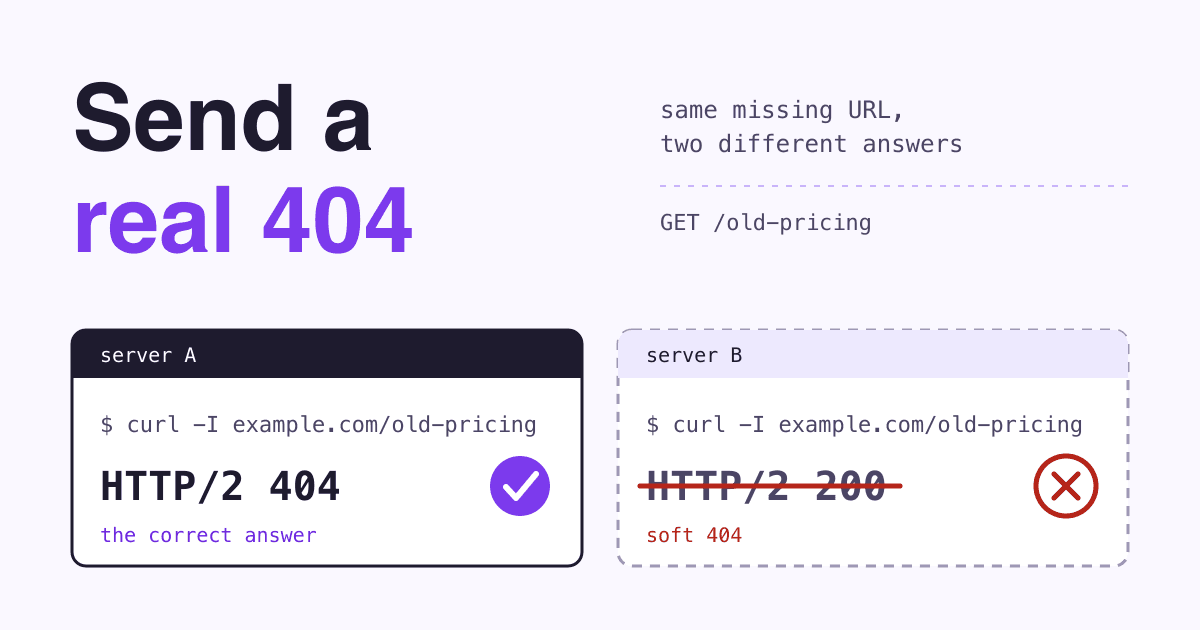
The same dead link has two readers: a person who wants to know where to go next, and a browser or crawler that reads only the three-digit status code at the top of the response.
What should a 404 page do?
Short answer
Send the HTTP status code 404 Not Found (or 410 Gone for a page you removed for good), and in the same response show a page in your site's design that says plainly the page is not here and offers a way on: a search box, links to your main sections and a link home. The code is for search engines; the page is for people. A page that says "not found" but sends 200 OK is a soft 404: people see the message, but search engines get a success code and may keep the URL.
Three terms, in the words of the people who define them:
- 404 Not Found: "the origin server did not find a current representation for the target resource or is not willing to disclose that one exists" (RFC 9110, section 15.5.5).
- 410 Gone: access "is no longer available at the origin server and that this condition is likely to be permanent" (RFC 9110, section 15.5.11).
- Soft 404: a page that "returns a user-friendly 'not found' message but not a 404 HTTP response code" (Google Search Console Help, Page indexing report).
What should a custom 404 page say?
WordPress puts the goal in one line: your 404 page should give "your visitors a way to arrive at the right place", and its own example adds "some text and a search form" (WordPress Theme Handbook, 404 pages). MDN allows some personality: "Feel free to make your 404 page humorous and human, but don't confuse your visitors as to why they are seeing something unexpected" (MDN, 404 Not Found). Here is the page we would build, part by part:
- Your normal header and menu. The visitor should see at once they are still on your site, with the navigation they already know.
- A plain headline. "We can't find that page" beats a bare "404": many visitors do not know the number.
- One line of help. Say the link may be old or mistyped, and what they can do next.
- A search box. The tool the WordPress example puts on the page.
- Three to five links. Your most visited pages, not the whole sitemap.
- A way to report it. An email link catches broken links you did not know about.
Which status code should a missing page send?
It depends on what happened to the page. Google's rule for the codes in the 400s is short: "All 4xx errors, except 429, are treated the same", and in Search "the indexing pipeline removes the URL from the index if it was previously indexed" (Google crawling docs, HTTP status codes).
| What happened | Send | What Google does |
|---|---|---|
| The page moved to a new URL | 301 to the new URL | "If your page has moved, use a 301 redirect to the new location" (Page indexing report help). |
| You removed it, no replacement | 404 or 410 | Removes it from the index; "Currently Google treats 410s (Gone) the same as 404s (Not found)" (Search Console Help, 404 errors). |
| The URL never existed (a typo) | 404 (a 301 if it is a common misspelling of a real URL) | "Newly encountered 404 pages aren't processed" (HTTP status codes doc). For common misspellings, Google suggests you "map" them to the right page with redirects (404 errors help). |
Missing page shown with 200 OK | Nothing to choose: this is the bug | Search Console reports a soft 404 when a 2xx page shows "an empty page or an error message" (HTTP status codes doc). |
| Every missing URL redirected to the home page | Nothing to choose: this is the bug | Google calls redirecting "to another page, such as the homepage, instead of returning a 404" a soft 404 (404 errors help). |
Do 404 errors hurt SEO?
Not by themselves. Four beliefs we see often, each next to what Google says:
MythEvery 404 in Search Console drags my rankings down.
Fact"Many (most?) 404 errors are not worth fixing because 404s don't harm your site's indexing or ranking" (Search Console Help, 404 errors). The Page indexing help adds that 404s "are not necessarily a problem, if the page has been removed without any replacement".
MythRedirecting every missing URL to the home page saves its value.
FactGoogle lists "redirect to your homepage" among the things that make it "harder for us to recognize your site's structure" and calls the result soft 404 errors. Redirect only to a page that replaces the old one.
MythBlocking dead URLs in robots.txt cleans them up.
FactGoogle asks for the opposite: make sure invalid URLs "return a proper 404 HTTP response code, and that they are not blocked by the site's robots.txt file" (404 errors help). A blocked URL cannot be crawled, so Google never sees its 404.
MythA 410 gets a page out of Google faster than a 404.
FactGoogle says it currently treats the two the same. Send 410 if it is true for your page (RFC 9110 calls it "likely to be permanent"); do not rebuild your server rules for it.
Should a removed page redirect, 404 or 410?
Answer two questions, in order, for every URL you take down:
Q1Does another page on your site answer the same need (the new version, the product that replaced it)?
Yes
301 redirect to that page. Visitors land where they meant to go.
No
Q2Is it gone for good, and do you know it?
Yes
410 Gone (a 404 works too: Google treats them the same).
No, or not sure
404 Not Found, with your helpful 404 page.
How do I set up a 404 page that sends the right code?
Most setups send a real 404 by default. Each one below also has a setting that quietly turns it into a redirect or a 200: that is the line to check.
Apache
ErrorDocument 404 /errors/not-found.htmlTrapPoint it at a full URL (https://...) and Apache sends a redirect, so "the client will not receive the original error status code" (Apache httpd docs, ErrorDocument). Use a path that starts with /.
Nginx
error_page 404 /404.html;TrapWith a full URL, "by default, the response code 302 is returned to the client", and the =response syntax can change the code, as in the docs' own error_page 404 =200 /empty.gif; (Nginx docs, error_page). Never write =200 on a 404 page.
Next.js (App Router)
// app/not-found.tsx
export default function NotFound() {
  return <h1>We can't find that page</h1>
}Trap"Before streaming starts, Next.js returns a 404 status code. After streaming starts, the status code remains 200", with a noindex tag added in both cases (Next.js docs, not-found.js). Check the code of the live URL with curl (check 1 below).
WordPress (classic theme)
wp-content/themes/your-theme/404.phpNoteClassic themes look for "404.php index.php" in that order (WordPress template hierarchy). Edit 404.php to add the search form and links. Block themes use a 404.html template instead (block theme template hierarchy), edited in the Site Editor.
Netlify
# a file named 404.html at the site root
# _redirects, the single-page app rule:
/* /index.html 200TrapA 404.html "will be picked up and displayed automatically for any failed paths" (Netlify docs, redirect options). The single-page app rewrite serves "the index.html instead of giving a 404 no matter what URL the browser requests" (Netlify docs, rewrites).
Cloudflare Pages
# a file named 404.html at the top level
# of the build output folderTrap"If your project does not include a top-level 404.html file, Pages assumes that you are deploying a single-page application" and serves the root for unknown paths (Cloudflare Pages docs, serving pages). Without that file, a dead link shows your home page.
For a single-page app that cannot send a 404 from the server, Google names two fixes: "Use a JavaScript redirect to a URL for which the server responds with a 404 HTTP status code", or add a noindex robots meta tag to error pages with JavaScript (Google, JavaScript SEO basics).
How do I test my 404 page?
Make up a URL that cannot exist, such as /this-page-does-not-exist-2026, and score your site, one point per check:
- The code is 404 (or 410). Run
curl -s -o /dev/null -w '%{http_code}\n' https://example.com/this-page-does-not-exist-2026with your domain. It sends a normal GET, like a browser or crawler, and must print404or410. Single-page app that cannot send one? It also passes if the page carriesnoindexor redirects with JavaScript to a URL that returns 404; check the rendered HTML in Search Console's URL Inspection tool. - No redirect. The address bar still shows the made-up URL, unless you use that JavaScript redirect to a real 404 URL.
- It looks like your site. Header, menu, fonts and footer load.
- There is a way on. The search box returns results and every link opens a real page.
- It works on a phone. Open it at phone width: no sideways scrolling, buttons easy to tap.
- Search Console is quiet. In the Page indexing report, the "Soft 404" reason lists none of your real pages.
6 of 6: done. Test again after every redesign, framework change or move to a new host.
Checks 1 and 2 pass, one or more of 3 to 6 fail: the code is right; improve the page this week.
Check 1 or 2 fails: fix that first, whatever the score. A pretty page with the wrong code is still a soft 404.
Questions site owners ask about 404 pages
How long until Google drops a dead URL?
Google gives no deadline. It removes an indexed URL that returns a 4xx code (HTTP status codes doc), and in Search Console "The report should stop showing the 404 after about a month" (Search Console Help, 404 errors). There is "no way to tell Googlebot to permanently forget a URL, although it will crawl it less and less often" (Page indexing help).
Does my 404 page need a noindex tag?
Not if it sends a real 404: "Google doesn't index URLs that return a 4xx status code" (HTTP status codes doc). The tag matters for JavaScript apps that answer missing pages with 200, as above.
I fixed a page that returned 404. Why do some visitors still see the error?
Caches may have kept it. RFC 9110 says "A 404 response is heuristically cacheable", which lets a browser or CDN store it for a while even without cache headers (RFC 9110). Purge the URL in your CDN after you publish it.
Is it fine to make the 404 page funny?
Yes, if the message stays clear: MDN calls custom 404 design "a good thing in moderation". Keep the plain headline and the way on above the joke.
Sources
- Google crawling docs: How HTTP status codes affect Google crawlers
- Google Search Console Help: 404 (Page Not Found) errors
- Google Search Console Help: Page indexing report
- Google Search Central: JavaScript SEO basics
- RFC 9110: HTTP Semantics, sections 15.5.5 and 15.5.11
- MDN: 404 Not Found
- WordPress Theme Handbook: 404 pages
- WordPress Theme Handbook: template hierarchy (classic themes)
- WordPress Theme Handbook: template hierarchy (block themes)
- Apache HTTP Server 2.4: ErrorDocument
- Nginx: error_page
- Next.js: not-found.js
- Netlify: redirect options (custom 404 page) and rewrites and proxies
- Cloudflare Pages: serving pages
All pages checked on 23 October 2026.