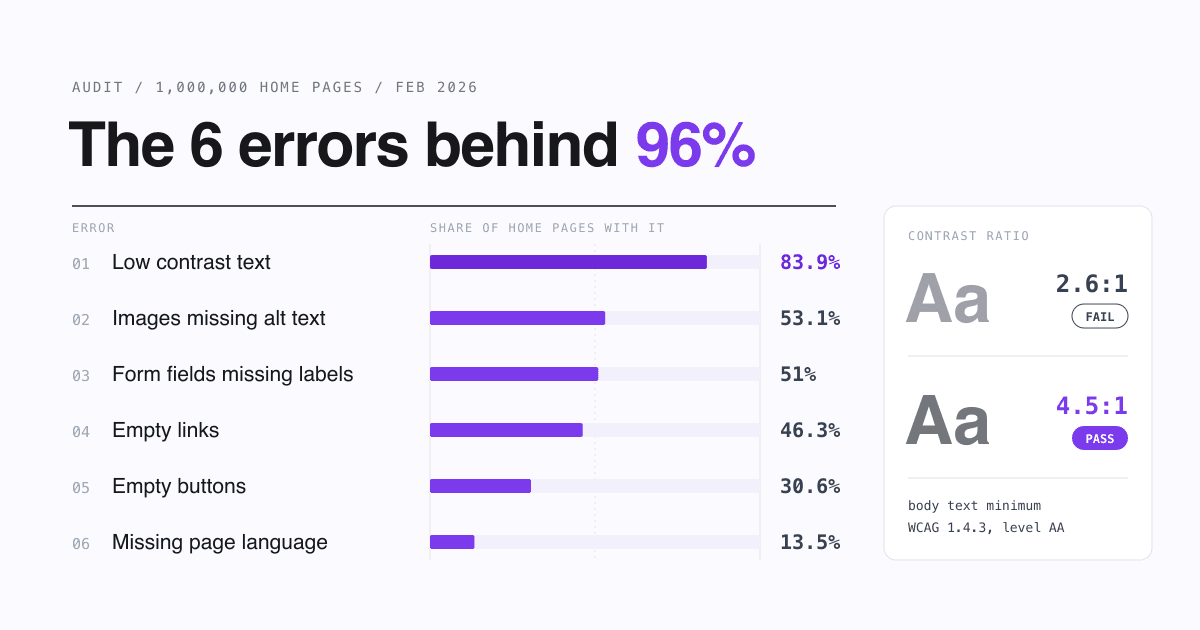
Most websites fail basic accessibility checks, and almost all of the detected errors are the same six: low contrast text, images without alt text, form fields without labels, empty links, empty buttons and a missing page language. In February 2026, WebAIM found these six behind 96% of all errors it detected on the top one million home pages (WebAIM Million 2026). Each one is a small fix you can check yourself today.
Fix contrast, alt text, form labels, link text, button names and the lang attribute, most common first. Together they made up 96% of the errors a checker found across the million pages. Then test with a keyboard, because no tool catches everything.
What is web accessibility, in one sentence?
Web accessibility means people with disabilities can perceive, use and understand your site, whether they use a screen reader, a keyboard instead of a mouse or zoomed text. It helps everyone else too, like someone reading a phone in bright sunlight. The shared yardstick is the W3C's Web Content Accessibility Guidelines (WCAG), now at version 2.2; audits usually test its Level A and AA rules.
Are websites getting more accessible or less?
Less, this year. The share of home pages with detected WCAG failures rose from 94.8% to 95.9%, ending six years of small improvements, and the average page had 56.1 detected errors, up 10.1% from 51 in 2025. WebAIM links the reversal to heavier, more complex pages and more ARIA code: the average home page now has 1,437 elements, 14.3% more than a year earlier.
| Year | Errors per home page | Home pages with detected WCAG failures |
|---|---|---|
| 2019 | 59.6 | 97.8% |
| 2020 | 60.9 | 98.1% |
| 2021 | 51.4 | 97.4% |
| 2022 | 50.8 | 96.8% |
| 2023 | 50.0 | 96.3% |
| 2024 | 56.8 | 95.9% |
| 2025 | 51 | 94.8% |
| 2026 | 56.1 | 95.9% |
Which six accessibility errors are the most common?
The same six have topped the list for seven years running. Here is the share of home pages that had each one in February 2026:
What does each error mean, and what is the fix?
Keep this table next to you while you go through your own home page. The rule column names the WCAG 2.2 success criterion each error breaks.
| Error | WCAG rule | What the visitor runs into | The fix |
|---|---|---|---|
| Low contrast text | 1.4.3 Contrast (Minimum), AA | Grey-on-white or text over photos that is hard to read, for anyone with low vision and for everyone outdoors | Body text needs a contrast ratio of at least 4.5:1; large text (18pt, or 14pt bold) needs 3:1 |
| Missing alt text | 1.1.1 Non-text Content, A | A screen reader announces a file name, or nothing, where your product photo or logo should be | Add an alt that says what the image shows or does; use alt="" only for pure decoration |
| Missing form labels | 1.3.1 Info and Relationships and 3.3.2 Labels or Instructions, A | A field read out only as "edit text", with no hint of what to type | Give every input a visible <label> tied to it with for and id |
| Empty links | 2.4.4 Link Purpose (In Context), A | An icon link announced as just "link", often a social icon or a logo | Put text inside the link, or alt text on the image inside it |
| Empty buttons | 4.1.2 Name, Role, Value, A | A menu, search or close button with no name, so a screen reader says only "button" | Add visible text or an aria-label to icon-only buttons |
| Missing page language | 3.1.1 Language of Page, A | A screen reader may read your text with the wrong accent and rules | One attribute: <html lang="en"> (or your language code) |
Contrast thresholds and rule names are from WCAG 2.2 (W3C Recommendation, 12 December 2024).
What does a fix look like in the code?
Three of the six are small markup changes. Before and after:
Icon button with no name
<!-- Before: read out as "button" -->
<button class="menu-toggle">
  <svg aria-hidden="true">...</svg>
</button>

<!-- After: "Open menu, button" -->
<button class="menu-toggle"
  aria-label="Open menu">
  <svg aria-hidden="true">...</svg>
</button>
Newsletter field with only a placeholder
<!-- Before: the hint vanishes
     once someone types -->
<input type="email"
  placeholder="Your email">

<!-- After: a real label -->
<label for="news-email">
  Your email
</label>
<input type="email" id="news-email"
  autocomplete="email">
Social icon link
<!-- Before: read out as "link" -->
<a href="https://example.com/you">
  <img src="/icons/social.svg">
</a>

<!-- After: says where it goes -->
<a href="https://example.com/you">
  <img src="/icons/social.svg"
    alt="Our Instagram page">
</a>
Does your site builder change the picture?
Somewhat. WebAIM's 2026 data shows home pages built with hosted site builders had fewer detected errors than the average page, and ecommerce platforms had more:
WebAIM notes that more errors alongside a technology cannot always be blamed on that technology. Your theme, apps, sliders and ad scripts can matter as much as the platform. WebAIM also found that pages with ads from most of the networks it tracked, and pages with carousels such as Slick or OWL Carousel, had more errors than average.
Does the European Accessibility Act apply to my website?
The European Accessibility Act (EAA) is EU Directive 2019/882. Its rules have applied since 28 June 2025 (Article 31) and cover, among other services, e-commerce: services provided through websites and apps "with a view to concluding a consumer contract" (Article 3). Walk through it like this:
-
Do consumers in the EU buy or book through your site?
No, and you do not provide one of the other covered services (telecom, access to audiovisual media such as streaming, passenger transport, consumer banking or e-books; the full list is in Article 2): the e-commerce rules do not reach a site that only informs, like a portfolio or a brochure site. Fixing the six errors is still worth it for your visitors. Yes: go to the next question.
-
Is your business a microenterprise?
The directive defines it as fewer than 10 people and an annual turnover or balance sheet total of no more than EUR 2 million (Article 3); partner and linked companies can count towards those limits. Yes: microenterprises providing services are exempt from the accessibility requirements (Article 4(5)). No: go to the next question.
-
Then the requirements apply to your shop
Start with the six errors above: they are the most common detected failures and usually quick to fix. Then plan a full WCAG 2.2 AA review of your checkout flow.
This is a reading of the directive, not legal advice. Each EU country writes the EAA into its own national law and may add details, so check your country's version before you decide you are exempt.
What can you check on your own site in 15 minutes?
No developer needed for this pass. Tick each line on your home page:
- Run a free checker. Paste your address into WAVE, the same engine WebAIM used for its study, and note both the Errors and the Contrast Errors counts.
- Test your brand colours. Put your text and background colours into the WebAIM contrast checker and aim for 4.5:1 or higher. Check text placed over photos by eye: checkers often cannot read it.
- Read your images. In WAVE, every image without alt text shows up; write one short phrase for each that carries meaning.
- Click into every form field. Each needs a visible label that stays after you start typing.
- Find your icons. Menu, search, cart, close and social icons all need a text name.
- Unplug the mouse. Press Tab through the page: you should always see where you are and reach every link and button.
Is an automated checker enough?
What a free checker does well
- Flags all six error types in seconds
- Shows each problem in place on the page
- Costs nothing and is easy to re-run after every redesign
What it cannot tell you
- Whether your alt text is actually useful
- Whether the page works with a keyboard from start to finish
- That a page is accessible: WebAIM says the absence of detected errors does not mean the page is accessible or conformant
[I]mproving accessibility at scale will require both better practices and simpler systems. - WebAIM, The WebAIM Million 2026
For a small site that is good news. Fewer plugins, fewer sliders and plain HTML for buttons and forms are cheaper to run and easier for every visitor. A site that is clear for a screen reader user is usually clearer for everyone. When yours passes these checks, it is in better shape for new visitors, including the ones who find it through a listing on SitePatent.
Questions site owners ask about accessibility errors
What is the most common accessibility error on websites?
Low contrast text. WebAIM found it on 83.9% of the top one million home pages in February 2026, with 34 instances per page on average.
What contrast ratio does WCAG require?
At least 4.5:1 for normal text and 3:1 for large text (at least 18 point, or 14 point bold), under WCAG 2.2 success criterion 1.4.3 at Level AA.
Should every image have alt text?
Every image needs an alt attribute. Images that carry meaning get a short description; purely decorative images get an empty one, alt="", so screen readers skip them.
Are small businesses exempt from the European Accessibility Act?
Microenterprises that provide services, meaning fewer than 10 people and no more than EUR 2 million in annual turnover or balance sheet total, are exempt from its accessibility requirements under Article 4(5) of Directive 2019/882. Check your country's national law for details.
If a checker shows zero errors, is my site accessible?
Not necessarily. Automated tools only catch part of the problems; WebAIM states that the absence of detected errors does not mean a page is accessible. Follow up with a keyboard test and, ideally, a test by a screen reader user.
Ready to list your website?
Submit to SitePatent and get a free public listing with a link to your site - or upgrade to a paid plan for featured placement and priority visibility in front of relevant visitors.
Submit Your WebsiteWritten by
SitePatent Editorial Team
The SitePatent team writes about launching, product discovery, and distribution. Advice in these articles is editorial opinion unless a source is linked next to it.