An optician checks your eyes with a card of shrinking print, and every visitor runs the same check on your website, on a phone held at arm's length, without telling you when they fail it.
What settings make body text easy to read?
Rx Short answer for body text
- Size
- 16px or larger, set as
1remso the reader's own browser setting still counts. - Line height
- About 1.5 for paragraphs; tighter only for short headings.
- Line length
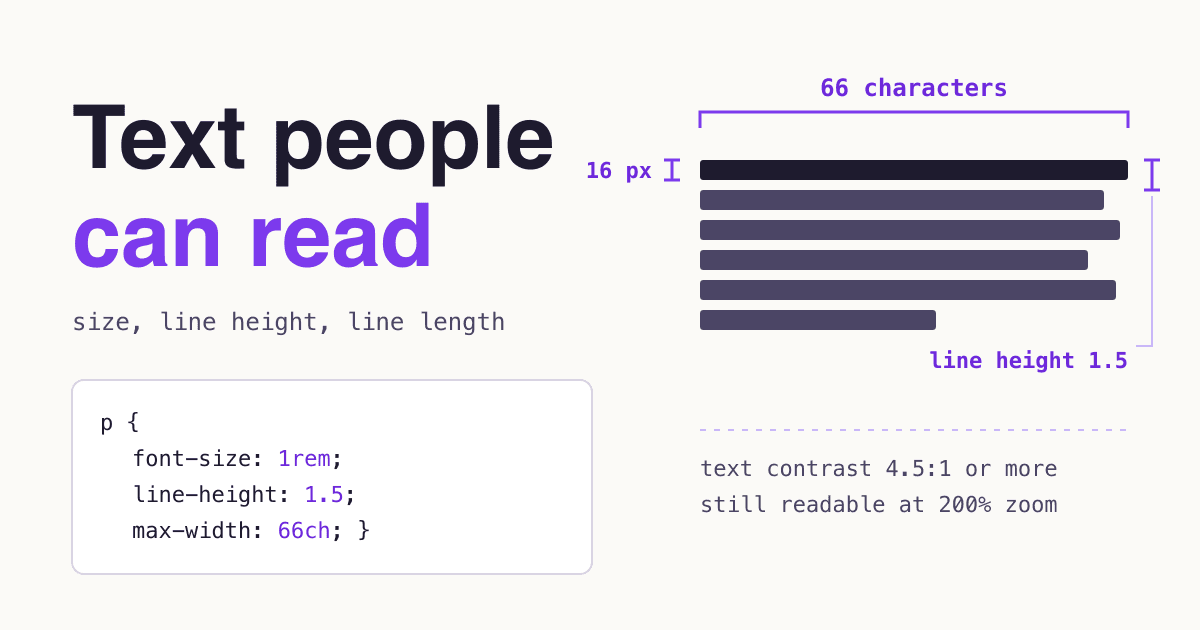
- 45 to 75 characters per line, with about 66 as a common target.
- Contrast
- At least 4.5:1 against the background (3:1 only for large text).
- Zoom
- Still works at 200% text size and at 320 CSS pixels wide.
Size, line height and line length are starting points from published design guidance. Contrast, zoom and reflow are WCAG 2.2 level AA rules.
None of these numbers is a font choice. A good typeface set too small, too tight or too wide still reads badly, and an ordinary system font set with these values reads well. The rest of this page shows where each number comes from and how to check it on your own site.
What do font size, line height and line length mean?
- Font size
- The size of the text in CSS pixels. MDN: if no ancestor sets a size, "1em will equal the default browser font-size, which is usually 16px" (MDN, font-size).
- Line height (leading)
- The height of each line, best written without a unit so it scales with the text. USWDS: "a line height of 1.5 on 16px text results in a line height of 24px" (USWDS, Typography).
- Line length (measure)
- How many characters fit on one line, counting letters and spaces.
- The ch unit
- A CSS width based on "the advance measure of the glyph 0" in the element's font (MDN, <length>). Letters are not all as wide as a zero, so treat
66chas an estimate: Baymard notes the value "will need to be adjusted slightly up or down depending on the font used" (Baymard). Count a real line. - Contrast ratio
- How far the text color stands out from its background, from 1:1 (same color) to 21:1 (black on white); W3C: contrast ratios "can range from 1 to 21" (W3C, Understanding 1.4.3).
How big should body text be on a website?
Start at 16px and go up, not down. The U.S. Web Design System says: "For most text, including body copy, use at least an effective size of 16px" (USWDS, Typography). The same sentence at five sizes:
- 12px
Your visitor decides in a few lines whether this page is worth the effort of reading.
Lighthouse used to flag pages where 40% or more of the text was below 12px; the audit was removed in Lighthouse 13. - 14px
Your visitor decides in a few lines whether this page is worth the effort of reading.
Material 3 "body medium", one step below body large. - 16px
Your visitor decides in a few lines whether this page is worth the effort of reading.
Usual browser default, USWDS minimum, Material 3 "body large". - 18px
Your visitor decides in a few lines whether this page is worth the effort of reading.
The size of the paragraphs on this page. - 19px
Your visitor decides in a few lines whether this page is worth the effort of reading.
GOV.UK body text, on phones and desktops alike.
Each plate is set in rem, so if you have raised your browser's default size, every plate above has grown with it. That is the point: the pixel sizes are what most readers get, not a ceiling.
The Lighthouse rule reads: "Lighthouse flags pages on which 40% or more of the text has a font size smaller than 12 px", and its page now notes that the audit "has been removed as of Lighthouse 13" (Chrome for Developers, Document doesn't use legible font sizes). Losing the warning did not make 12px body text easier to read.
What sizes do the big design systems use for body text?
Large public design systems land on the same range. Apple's sizes are in points on its own platforms, not CSS pixels, so read them as a comparison, not a conversion.
| System | Body size | Line height | Line length |
|---|---|---|---|
| Browser default (MDN) | usually 16px | set by the browser | none |
| USWDS (Typography) | at least 16px | at least 1.5 for longer texts | 45 to 90 characters, 66 for long texts |
| GOV.UK (Type scale, Layout) | 19px | 25px (about 1.3) | usually no more than 75 characters |
| Material 3 body large (tokens) | 1rem (16px) | 1.5rem (24px) | not set in the tokens |
| Apple iOS body (HIG) | 17 pt default, 11 pt minimum | 22 pt leading | not given |
Two things stand out. None of the four web sources puts its largest body style below 16px. And 1.5 is common but not universal: GOV.UK runs 25px lines on 19px text, about 1.3, and keeps lines short with its two-thirds layout instead.
How much space should sit between lines and paragraphs?
For paragraphs, a line height of about 1.5. USWDS: "Longer texts should have a line height of at least 1.5", while headings "no longer than a line or two can have a line height between 1 and 1.35" (USWDS, Typography). The same paragraph, tight and open:
Your visitor decides in a few lines whether this page is worth the effort of reading. Long paragraphs with tight lines make the eye work to find the start of the next line, and readers lose their place when they jump back.
Your visitor decides in a few lines whether this page is worth the effort of reading. Long paragraphs with open lines give the eye a clear lane back to the start of the next line, so readers keep their place.
Two WCAG 2.2 rules touch spacing, and they ask different things:
- Text Spacing, 1.4.12 (level AA) does not make you use any value. It asks that nothing is lost when a reader overrides yours with a line height of 1.5 times the font size, paragraph spacing of 2 times, letter spacing of 0.12 times and word spacing of 0.16 times (W3C, Understanding 1.4.12 Text Spacing). Text cut off inside a fixed-height box is one common way to fail it.
- Visual Presentation, 1.4.8 (level AAA) asks that a way exists to get line spacing of "at least space-and-a-half within paragraphs", paragraph spacing "at least 1.5 times larger than the line spacing", text that "is not justified", and lines of "no more than 80 characters" (W3C, Understanding 1.4.8 Visual Presentation). The browser can provide that way, so this is a target, not a test most sites are held to.
How long should a line of text be?
Between 45 and 75 characters for most body text. The sources below agree on the middle of that range; the widest, USWDS, allows up to 90:
- Bringhurst45 to 75, 66 ideal
- Ruder (via Baymard)50 to 60
- Baymard50 to 75
- GOV.UKusually up to 75
- WCAG 1.4.8 (AAA)no more than 80
- USWDS45 to 90, 66 for long texts
Watch the column below narrow to a readable measure as it scrolls into view. On a phone it is already narrow, because the screen does the job; long lines are a desktop problem.
Your visitor decides in a few lines whether this page is worth the effort of reading. On a wide monitor, a column that runs the full width of the window can carry 120 characters or more per line. The eye has to travel a long way back to find the start of the next line, and it is easy to land on the wrong one. A maximum width in ch or em keeps the column at a readable measure, and it keeps that measure when the reader enlarges the text.
What the research on screens found
A 1998 screen-reading study found that "Long lines (100 characters) were found to be read faster than very short lines (25 characters), while comprehension remained constant", yet readers judged "moderate line lengths (55 characters per line) easiest to read" (Dyson and Kipping, Visible Language 32(2), 1998). In that study, longer lines were not read more slowly. Treat 45 to 75 as a comfort default that readers prefer, not as a speed rule.
Set the width with a unit that follows the text. web.dev: "Don't set your line-lengths with a fixed unit like px ... Use a relative unit like rem or ch" (web.dev, Typography). Baymard suggests "around 70ch or 34em" to keep lines under 80 characters, adjusted for the font (Baymard).
How much contrast does body text need?
At least 4.5:1. WCAG 2.2 level AA: text needs "a contrast ratio of at least 4.5:1", and large text "at least 3:1", where large means "18 point text or 14 point bold text": about 24px, or about 18.5px if bold (W3C, Understanding 1.4.3 Contrast (Minimum)). Pale grey text is a common way to miss it:
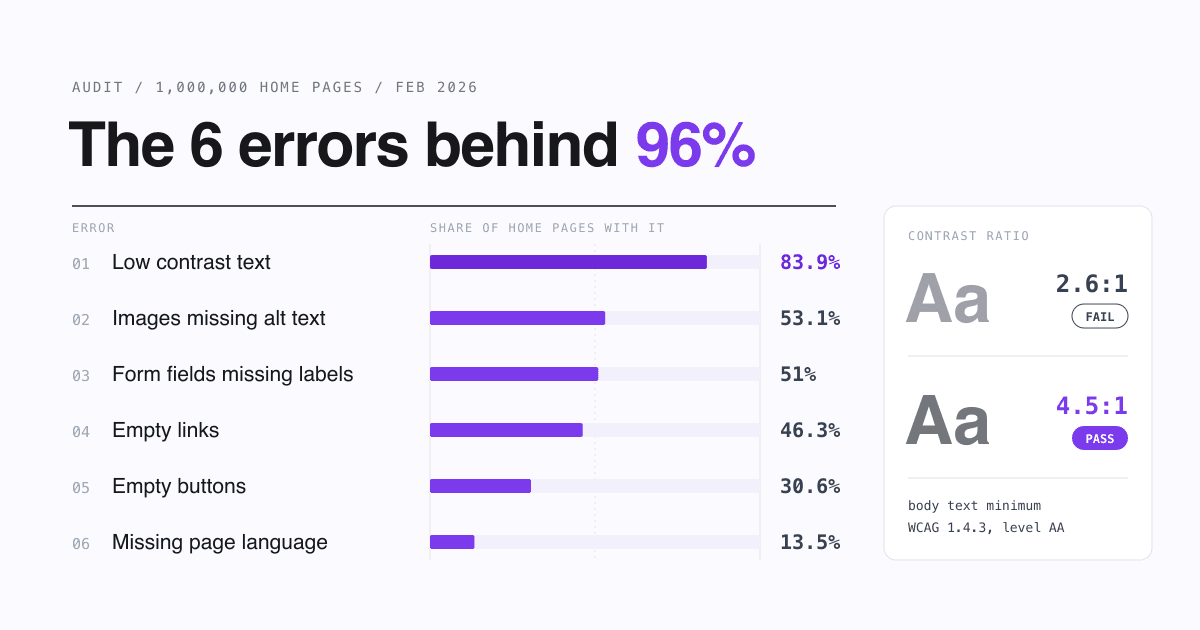
The three ratios were computed with the WCAG formula; check your own pair in the WebAIM Contrast Checker. WebAIM found low-contrast text on 83.9% of home pages, "the most commonly-detected accessibility issue", up from 79.1% in 2025 (WebAIM Million 2026). For the other common failures, see SitePatent's guide to the six accessibility errors behind most detected errors.
What CSS sets readable body text?
A starting point. It leaves the root font size alone, sizes everything in rem, em or ch, and keeps form fields at 16px or more:
/* No font-size on html: keep the reader's own default (usually 16px). */
body {
  font-size: 1rem;             /* or 1.125rem, as on this page */
  line-height: 1.5;            /* unitless, so it scales with the text */
}
.article {
  max-width: 66ch;             /* 66 zeros wide; count a real line */
}
.article p {
  margin-block: 0 1.5em;       /* paragraph gap larger than the line gap */
}
h1, h2, h3 {
  line-height: 1.2;            /* short headings can be tighter */
}
input, select, textarea {
  font-size: max(1rem, 16px);  /* 16px or more: iOS Safari may zoom smaller fields */
}
Why rem and not px for text: "If you don't define a font-size on your html element, this user-preferred system font size will be honoured if you use relative lengths, such as em and rem. If you use px units for sizing text, this preference will be ignored" (web.dev, Sizing Units). MDN is blunter: "Defining font sizes in px is not accessible, because the user cannot change the font size in some browsers" (MDN, font-size). Page zoom still enlarges pixel text; the reader's default size setting is what px ignores.
The form field line: Safari on iOS can zoom the page when a field with small text gets focus. We found no Apple documentation of a threshold, but WebKit's zoom-to-field code uses 16 as its standard font size (webViewStandardFontSize = 16 in WebKit source, WKWebViewIOS.mm), so in current WebKit code a field at 16px or more needs no zoom to reach it.
How do you test your own pages in ten minutes?
- Size. In the browser's developer tools, select a body paragraph and read its computed font size: 16px or more at the default setting.
- Default setting. Raise the browser's default font size in its settings and reload: body text should grow. If it does not, the text size is probably fixed in px, or set in px on
html. - Line length. On a desktop window, copy one full line of a paragraph and count its characters, spaces included: 45 to 75.
- Contrast. Check body text and every grey label against their backgrounds in a contrast checker: 4.5:1 or more.
- Zoom. Zoom to 200%: no text cut off, overlapping or hidden (WCAG 1.4.4).
- Narrow screen. Make the window 320 CSS pixels wide, or zoom a 1280px window to 400%: text reflows with no sideways scrolling (WCAG 1.4.10).
- Spacing override. Apply line height 1.5, paragraph spacing 2, letter spacing 0.12 and word spacing 0.16 times the font size with a user style sheet or extension: nothing is clipped (WCAG 1.4.12).
- Alignment. Body text is left-aligned, not justified.
Questions site owners ask about text size
Is 16px too small on a big desktop screen?
16px is the floor, not the target. USWDS asks for "at least" 16px, GOV.UK uses 19px on every screen, and Apple's iOS body default is 17 pt.
Should text be smaller on phones?
Not below 16px. GOV.UK keeps its 19px body on small and large screens alike, and Apple's iOS default body size is 17 pt. Shrink headings on phones, not paragraphs.
Does WCAG set a minimum font size?
No. WCAG 2.2 at level AA asks for contrast (1.4.3), text that resizes to 200% (1.4.4), reflow at 320 CSS pixels (1.4.10) and room for text spacing overrides (1.4.12). The size itself comes from design guidance like the table above.
Is justified text a problem?
WCAG 1.4.8 (AAA) lists text that "is not justified" among its readable presentation goals. Justified text stretches the spaces between words to fill each line; left-aligned text keeps them even.
Sources
- W3C: Understanding SC 1.4.12 Text Spacing
- W3C: Understanding SC 1.4.8 Visual Presentation
- W3C: Understanding SC 1.4.4 Resize Text
- W3C: Understanding SC 1.4.3 Contrast (Minimum)
- W3C: Understanding SC 1.4.10 Reflow
- U.S. Web Design System: Typography
- GOV.UK Design System: Type scale and Layout
- Material Design 3 type scale tokens (material-web)
- Apple Human Interface Guidelines: Typography
- Choose a comfortable measure, The Elements of Typographic Style Applied to the Web
- Baymard Institute: Readability, The Optimal Line Length
- Dyson and Kipping: The Effects of Line Length and Method of Movement on Patterns of Reading from Screen
- MDN: font-size and <length>
- web.dev: Sizing Units and Typography
- Chrome for Developers: Document doesn't use legible font sizes
- WebKit source: WKWebViewIOS.mm
- WebAIM: The WebAIM Million, 2026 report
All pages checked on 25 October 2026. Contrast ratios computed with the WCAG 2 relative luminance formula.