Paste your home page into a chat and the app decides in a second what to show: a picture with a title and a line of text, or a bare grey link.
Short answer
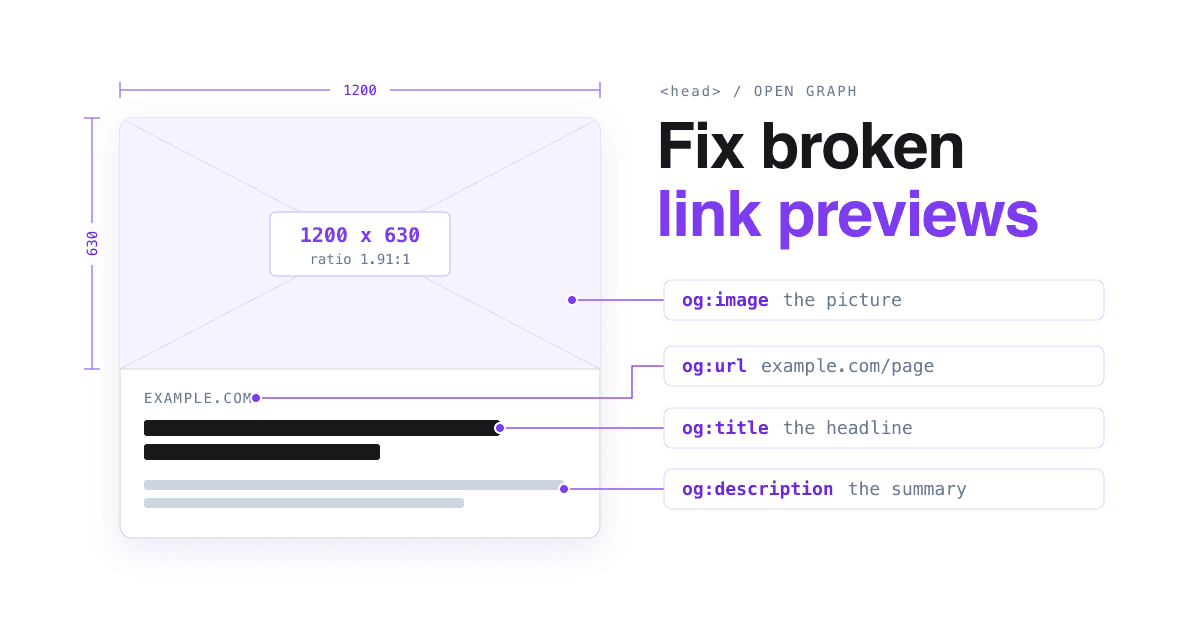
Put six Open Graph tags in the HTML of every page people share: og:type, og:title, og:description, og:image, og:image:alt and og:url. Use one image of 1200 x 630 pixels, under 5 MB. That size meets what Facebook, LinkedIn and Apple's Messages each ask for, and Slack reads the same tags.
What is a link preview made of?
A link preview (also called a link card or unfurl) is the box an app builds when someone shares a URL. The app sends a robot to the page, reads tags from the HTML, and fills each part of the box from one tag.
Those tags come from the Open Graph protocol, a set of <meta> tags placed in the page's <head>. The protocol names four required properties for every page: og:title, og:type, og:image and og:url, and says a page with an image should also describe it in og:image:alt (The Open Graph protocol, ogp.me).
2Blue Fern Studio
3Wedding photography in Leeds
4Natural, unposed wedding photos. See full galleries and 2027 dates.
og:imagethe picture, withog:image:altdescribing itog:site_namethe name of the whole siteog:titlethe name of this pageog:descriptionone or two sentences
Which tags should every page have?
Copy these lines into the <head> of each page and change the values. If you use a site builder, look for its social sharing settings, and check the result with the tests further down.
- Title: the page, not the brand. Apple asks you to keep the site name out of
og:titleand put it inog:site_nameinstead (Apple TN3156). - Width and height: Facebook asks for them, so the image loads properly the first time the page is shared (Meta, A Guide to Sharing for Webmasters).
- The URL: the canonical address of the page, the one you want people to land on (ogp.me).
<meta property="og:type" content="website" />
<meta property="og:site_name" content="Blue Fern Studio" />
<meta property="og:title" content="Wedding photography in Leeds" />
<meta property="og:description" content="Natural, unposed wedding photos. See full galleries and 2027 dates." />
<meta property="og:url" content="https://example.com/weddings" />
<meta property="og:image" content="https://example.com/share/weddings.jpg" />
<meta property="og:image:width" content="1200" />
<meta property="og:image:height" content="630" />
<meta property="og:image:alt" content="A couple laughing under an oak tree" />What does each app read, and where does it trip?
The four apps below all read Open Graph tags, but each documents its own limits. These are the ones that break previews most often.
Reads: og:url, og:title, og:description, og:image
- Without these tags, its crawler "uses internal heuristics to make a best guess" at the title, description and image (Meta).
- The tags must sit in the first 1 MB of the page, or they are cut off (Meta Web Crawlers).
- Images are cached by URL and not updated unless the URL changes.
Requires: og:title, og:image, og:description, og:url
- Image at least 1200 x 627 pixels, ratio 1.91:1, at most 5 MB (LinkedIn Help).
- An image less than 401 pixels wide shows only as a small thumbnail.
- If a correct image still does not appear, your site may be blocking LinkedIn or the image may sit in a protected folder.
Slack
Reads: oEmbed, Twitter Card and Open Graph tags
- Its robot fetches as little of the page as it can, then fetches the image to check it (Slack Robots).
- Results are cached across Slack for around 30 minutes.
- It does not follow robots.txt, so blocking it there does not work; Slack asks site owners to contact it instead.
Apple Messages
Reads: Open Graph tags, plus your icon
- Does not run JavaScript or follow
metaredirects: the tags must be in the HTML the server sends. Server-side redirects are followed (Apple TN3156). - Image at least 900 pixels wide; under 150 pixels it may be ignored or shown as an icon. The page itself is limited to 1 MB.
- Avoid text in the image: it may be shown small enough to be unreadable.
What size should the share image be?
1200 x 630 pixels, under 5 MB. Each app documents a different floor, and that one image clears all of them: Facebook recommends at least 1200 x 630 and a ratio close to 1.91:1, so the full image shows without cropping (Meta, Images in Link Shares); LinkedIn asks for at least 1200 x 627 at 1.91:1 (LinkedIn Help); Apple asks for at least 900 pixels wide (Apple TN3156).
The file limit is lowest on LinkedIn, at 5 MB. Facebook allows 8 MB, and Apple allows 10 MB for all the icons, images and videos of one preview together.
Keep words off the picture, or make them large: apps show the same image at different sizes depending on the context and the device (Apple TN3156).
Smallest width for a large preview image
Largest image file allowed
How do I test a preview and fix a stale one?
-
Check the tags are really in the page
Open the page, choose "View page source" in your browser and search for
og:. If the tags only appear after the page runs JavaScript, Apple's previews will not see them. -
Run Facebook's Sharing Debugger
Paste the URL into the Sharing Debugger. It shows which tags the crawler read, with errors and warnings, and it also triggers a new scrape of the page (Meta).
-
Run LinkedIn's Post Inspector
Paste the URL into the Post Inspector to see the preview LinkedIn builds from your page.
-
Send it to yourself
Paste the link in a Slack message to yourself and in an iMessage. Slack keeps its result for around 30 minutes, so wait before you test a change there again.
-
Changed the picture? Change its file name
Facebook caches images by URL, so a new picture under the old address may never show. Save it as a new file, such as
weddings-2.jpg, updateog:image, and run the debugger again.
Before you share a page: tick each line
og:titlenames the page, and the brand is inog:site_name.og:descriptionis one or two sentences a stranger would understand.og:imageis 1200 x 630, under 5 MB, with width and height tags.og:image:altsays what is in the picture.og:urlis the address you want people to land on.- The tags are in the page source, inside
<head>, well before the first 1 MB of the page. - The Sharing Debugger and Post Inspector both show the right picture and title.
Questions site owners ask
Why does my link still show the old picture?
Facebook caches images by URL and does not update them unless the URL changes (Meta). Give the new image a new file name and run the Sharing Debugger. In Slack, wait about 30 minutes.
What do apps show if my page has no Open Graph tags?
It depends on the app. Facebook guesses the title, description and image (Meta). Apple's Messages shows a grey bubble with the page title, the domain and a small icon (Apple).
Can I use the same image on every page?
You can, and it beats having none. A picture of the product, service or article on each page tells people more about the exact page they are about to open.
Should I put my logo and headline on the image?
Keep text off it, or very large. Apple advises against text in preview images, because they can be shown small enough to be unreadable, and the title and description already carry the words (Apple TN3156).
My page needs a login. What should the preview show?
A plain description of what the page is, with nothing private in it, never "Sign in". Apple asks for meaningful tags that reveal no sensitive content, so every shared link does not read "Sign in" (Apple TN3156).
Sources
- The Open Graph protocol, ogp.me.
- A Guide to Sharing for Webmasters, Images in Link Shares and Meta Web Crawlers, Meta for Developers.
- Make your website shareable on LinkedIn, LinkedIn Help.
- Slack Robots, Slack API documentation.
- TN3156: Create rich previews for Messages, Apple Developer Documentation.
- All pages read on 2026-10-15.