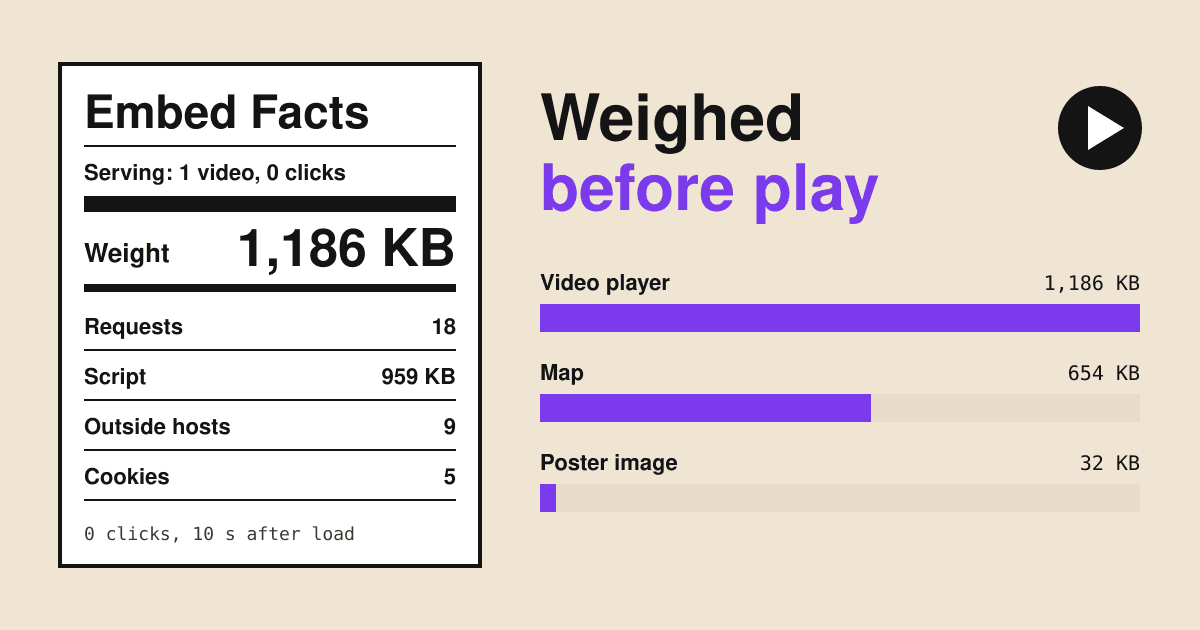
One YouTube video, pasted into a blank page with the code from YouTube's own Share and Embed box, made that page fetch 1,186 KB from nine Google hosts and store five YouTube cookies before anyone touched the play button.
Short answer
Every standard video or map embed downloads its whole player the moment the page loads: about 1.2 MB for YouTube, 0.55 MB for Vimeo and 0.65 MB for a Google Map in our test. The privacy domain youtube-nocookie.com stopped the cookies but not the weight. loading="lazy" helped only when the embed sat far below the screen. The one setup that fetched almost nothing was a poster image that swaps in the player when the visitor clicks: 1 request, 32 KB, no cookies. Use that on pages where the video is extra, and keep a real embed on the page you want Google to show as a video result.
How the test was run
We built ten small pages on a local test server. Each held a heading, one line of text and one embed, written exactly as the provider's embed box or documentation gives it. A blank page with no embed was the control.
- Browser: Chromium 145, headless, 1280 x 800 window, a fresh profile for every load, so no cookie from an earlier run could help.
- What counted: every request to any address other than the test page itself. Weight is what crossed the wire: compressed bodies plus response headers.
- When: we waited 10 seconds after the page finished loading and did not click, scroll or move the mouse. Each page ran three times and we report the middle run.
- Where: a server in Germany, on 12 November 2026. Providers serve different code by country and by day, so your numbers will differ a little. The pattern should not.
The videos were a public Blender Foundation film on YouTube and a Vimeo staff video. The map was the Brandenburg Gate in Berlin, embedded with the keyless maps.google.com/maps?q=...&output=embed form that many site builders still paste.
Eight facts panels, one per embed
Read each panel like the label on a food packet: the big line is what the visitor's phone pays before deciding anything, the rows below say what it is made of.
YouTube, standard embed
Serving: one youtube.com/embed iframe, in view, 0 clicks
- Requests
- 18
- Script
- 959 KB
- Outside hosts
- 9
- Cookies stored
- 5
Ingredients: www.youtube.com, www.google.com, www.gstatic.com, i.ytimg.com, yt3.ggpht.com, fonts.gstatic.com, jnn-pa.googleapis.com, googleads.g.doubleclick.net, static.doubleclick.net
Two of the nine hosts are Google's ad network. Cookies include VISITOR_INFO1_LIVE, kept for 180 days.
YouTube, privacy-enhanced
Serving: one youtube-nocookie.com/embed iframe, in view, 0 clicks
- Requests
- 14
- Script
- 958 KB
- Outside hosts
- 7
- Cookies stored
- 0
Ingredients: www.youtube-nocookie.com, www.google.com, www.gstatic.com, i.ytimg.com, yt3.ggpht.com, fonts.gstatic.com, jnn-pa.googleapis.com
No cookies and no ad-network hosts. The weight is the same to within 3 KB.
YouTube with loading="lazy"
Serving: standard iframe placed about 2,300 px below the first screen
- Requests
- 15
- Script
- 959 KB
- Outside hosts
- 7
- Cookies stored
- 5
Ingredients: www.youtube.com, www.google.com, i.ytimg.com, fonts.gstatic.com, jnn-pa.googleapis.com, googleads.g.doubleclick.net, static.doubleclick.net
Loaded anyway. Moved to about 5,300 px below the first screen, the same iframe fetched nothing until scrolled to.
YouTube behind a click-to-load poster
Serving: a thumbnail and a play button; the iframe is added on click
- Requests
- 1
- Script
- 0 KB
- Outside hosts
- 1
- Cookies stored
- 0
Ingredients: i.ytimg.com (the thumbnail image)
After a click: 16 requests and 1,176 KB from the privacy-enhanced player, still 0 cookies. Save the thumbnail on your own server and the count before a click drops to 0.
Vimeo, standard embed
Serving: one player.vimeo.com iframe, in view, 0 clicks
- Requests
- 25
- Script
- 496 KB
- Outside hosts
- 7
- Cookies stored
- 4
Ingredients: player.vimeo.com, vimeo.com, arclight.vimeo.com, f.vimeocdn.com, i.vimeocdn.com, skyfire.vimeocdn.com, vod-adaptive-ak.vimeocdn.com
Half of YouTube's weight, but the most requests of any video. The vuid analytics cookie came back with a 400-day life.
Vimeo with ?dnt=1
Serving: the same iframe with the do-not-track parameter
- Requests
- 16
- Script
- 495 KB
- Outside hosts
- 5
- Cookies stored
- 3
Ingredients: player.vimeo.com, f.vimeocdn.com, i.vimeocdn.com, skyfire.vimeocdn.com, vod-adaptive-ak.vimeocdn.com
The analytics cookie and two hosts go. The three cookies left are the bot-check ones Vimeo calls essential, one of them kept for 365 days.
Google Maps iframe
Serving: one map of a single address, in view, 0 clicks
- Requests
- 37
- Script
- 448 KB
- Outside hosts
- 7
- Cookies stored
- 0
Ingredients: maps.google.com, maps.googleapis.com, maps.gstatic.com, places.googleapis.com, www.google.com, fonts.googleapis.com, fonts.gstatic.com
Twice the requests of any video, mostly map tiles and fonts. No cookies were stored from our German address, but every request still showed Google the visitor's IP address.
Address plus a Maps link
Serving: the address as text and an "Open in Google Maps" link
- Requests
- 0
- Script
- 0 KB
- Outside hosts
- 0
- Cookies stored
- 0
Ingredients: none
Nothing loads until the visitor taps the link, and on a phone the link opens the Maps app, where directions work better anyway.
Weight before a click, side by side
- YouTube standard1,186 KB
- YouTube privacy-enhanced1,183 KB
- YouTube lazy, 2,300 px down1,182 KB
- Google Maps iframe654 KB
- Vimeo standard556 KB
- Vimeo dnt=1553 KB
- Google Maps lazy, 2,300 px down463 KB
- YouTube poster, before click32 KB
- Maps link0 KB
Four results we did not expect
The privacy domain is not a speed setting
Switching to
youtube-nocookie.comremoved all five cookies and both ad-network hosts, which is what YouTube's help page promises: views in this mode are not used to personalise YouTube or ads. It saved 3 KB of weight. The player still loads in full, because YouTube's developer policies say the embedded player shares basic user data with YouTube as soon as it loads, to show the thumbnail and title and to check playability.Lazy loading has a long reach
loading="lazy"on an iframe works in Chrome, Edge, Firefox and Safari (web.dev), but the browser starts the load well before the frame scrolls into view. At about 2,300 px below the first screen, both the video and the map loaded in full. At about 5,300 px they waited. On a normal page, a map in the footer of a short contact page is close enough to load at once.Cookie lives are capped by the browser, not the provider
Vimeo's cookie list gives
vuida 2-year life. We saw 400 days, because Chrome caps every cookie at 400 days since version 104. If your cookie policy copies provider tables, the numbers there may not match what a visitor's browser keeps.Your speed report may no longer warn you
Lighthouse used to flag these embeds under "Lazy load third-party resources with facades". That audit was removed in Lighthouse 13, so a page can carry a 1.2 MB video player and get no line about it in the report.
The fix: a poster that loads the player on click
A click-to-load poster is a link with a picture in it. Without JavaScript it opens the video on YouTube; with the short script below, a click swaps the picture for the real player, from the privacy-enhanced domain, already playing. Use your own thumbnail file so nothing is fetched from Google before the click, and say in the alt text that it is a YouTube video, as YouTube's branding rules expect.
<a class="video-poster" href="https://www.youtube.com/watch?v=VIDEO_ID"
   data-embed="https://www.youtube-nocookie.com/embed/VIDEO_ID?autoplay=1">
  <img src="/images/cake-video-poster.jpg" width="1280" height="720"
       alt="Play the YouTube video: how we frost a layer cake, 3:12">
</a>

<script>
document.querySelectorAll('a[data-embed]').forEach(function (link) {
  link.addEventListener('click', function (event) {
    event.preventDefault();
    var frame = document.createElement('iframe');
    frame.src = link.dataset.embed;
    frame.title = link.querySelector('img').alt;
    frame.allow = 'autoplay; encrypted-media; picture-in-picture';
    frame.allowFullscreen = true;
    frame.width = 1280;
    frame.height = 720;
    link.replaceWith(frame);
  });
});
</script>
Give the poster and the iframe the same width and height in your CSS (aspect-ratio: 16 / 9 and width: 100%), so nothing jumps when the player arrives. For Vimeo, do the same with player.vimeo.com/video/ID?dnt=1&autoplay=1. Ready-made versions exist, such as lite-youtube-embed, if you would rather not write the script.
Two costs to know before you switch. YouTube's help page says autoplayed embeds do not add to the view count, so a poster with autoplay=1 may count fewer views; drop autoplay and the visitor clicks twice instead. And Google's video search guide says not to rely on clicks to load a video, so a poster can keep a video out of video results.
Which embed to use where
| Page and job of the embed | Use | Why |
|---|---|---|
| A video that is the point of the page and should show in Google video results | Real iframe on youtube-nocookie.com, near the top | Google needs to find the player without a click; the privacy domain removes cookies |
| A video that supports the page: about us, a product page, a testimonial | Click-to-load poster with your own thumbnail | 32 KB or less instead of 1.2 MB, nothing sent before the click |
| Several videos on one page, such as a portfolio | Posters for all of them | Each real iframe adds its own player; three in view would be about 3.5 MB |
| Vimeo showreel | Poster, then ?dnt=1 in the player address | Drops the analytics cookie and two hosts once it loads |
| A contact page that shows where you are | Address as text and an "Open in Google Maps" link | 0 KB; Maps URLs need no key and open the app on phones |
| A store locator where the map is the tool | A map that loads on a "Show map" button | Keeps the 37 requests off visitors who only want the phone number |
If you do keep a live Google Map, Google's keyed Maps Embed API is free with no usage limit, and it is the documented way to embed; the keyless output=embed address we tested is older and undocumented.
A note for sites with visitors in the EU: storing cookies that a page does not strictly need, such as the five YouTube cookies above, needs the visitor's consent first, and the European Data Protection Board reads that rule to cover other ways of reading data from a visitor's device too. A poster that loads nothing is the simplest way to have nothing to ask about until the visitor chooses to watch.
Check your own page in five minutes
- Open the page in a private window in Chrome, so no old cookies count.
- Press F12, open the Network tab and tick "Disable cache".
- In the filter box type
-domain:yourdomain.com(your own domain) so only other sites show. - Reload and wait 10 seconds without clicking. Read the request count and "transferred" total at the bottom of the panel.
- Open Application, then Cookies, and note which other domains already stored something.
- Now click play or the map, and compare. Everything that loaded before your click is what every visitor pays, whether they watch or not.
Questions
Does youtube-nocookie.com make my page faster?
No. In our test it fetched 1,183 KB against 1,186 KB for the standard embed. It removes cookies and ad-network requests, not the player.
Is loading="lazy" enough for a video lower down the page?
Only when the video is far down. At about 2,300 px below the first screen the player loaded in full; at about 5,300 px it waited. A poster works at any distance.
Will a click-to-load poster hurt my video in Google?
It can. Google's video guide says not to rely on clicks to load a video. Keep a real embed on the one page you want ranked for the video, and use posters everywhere else.
Can I use the YouTube thumbnail as my poster?
Yes, but loaded from i.ytimg.com it is still one request to Google with the visitor's IP address. Save a copy, or use your own frame grab, and serve it from your site.
Why did the map store no cookies when the video did?
That is what we saw from a German address on one day. Google decides what each product stores per region, so check your own page with the five-minute steps above.
Sources
- YouTube Help: Embed videos and playlists, privacy-enhanced mode and autoplay
- YouTube API Services Developer Policies
- Vimeo Help: Vimeo Player cookies and the dnt parameter
- Chrome for Developers: cookie Expires and Max-Age capped at 400 days
- Chrome for Developers: Lighthouse third-party facades audit, removed in Lighthouse 13
- web.dev: It is time to lazy-load offscreen iframes
- Google Search Central: Video SEO best practices
- Google Maps Platform: Maps URLs
- Google Maps Platform: Maps Embed API usage and billing
- EDPB Guidelines 2/2023 on the technical scope of Art. 5(3) of the ePrivacy Directive
- Our measurements: ten test pages, Chromium 145, three runs each, 12 November 2026.