A phone picture of your own front door, taken from where customers park, tells a first-time visitor more than any stock picture of smiling strangers around a laptop. The trouble is that most small business sites get their pictures one at a time, whenever someone remembers, so the hero is a wide shot that crops badly on phones, the team page mixes five backgrounds and the Google profile still shows the shop before the refit.
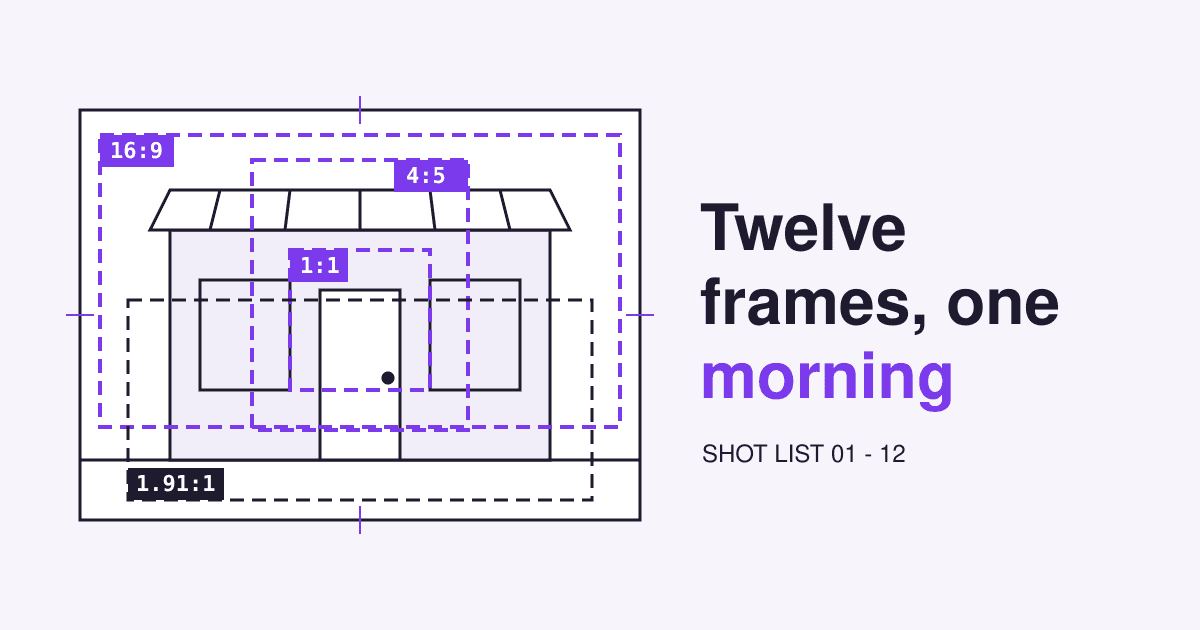
This is a shot list in the shape of a film call sheet: one session, twelve frames, each with the page it lands on, how to frame it and who has to agree to be in it. It works with a recent phone and one helper, and every frame is planned for a crop so nothing gets cut in half later.
Short answer
- Shoot real places and people, not stock. Eyetracking work by Nielsen Norman Group found people study photos of real staff and products and skip decorative stock pictures.
- Plan each frame for its slot. 16:9 for the desktop hero, a 4:5 twin for phones, 1:1 for team and product cards, 1.91:1 for link previews.
- Feed your Google profile from the same session. Google asks for at least three exterior, three interior, three at-work and three team photos, as JPG or PNG between 10 KB and 5 MB, ideally 720 by 720 pixels.
- Get releases signed before the first frame, from staff and from any customer whose face shows.
- Wrap properly: rename files, strip GPS data, export per slot, give the hero
fetchpriority="high"and never lazy-load it.
The call sheet
- Location
- Your own premises, street side first, then inside
- Call time
- An hour before you open: no customers in the way, real daylight in the windows
- Light
- Daylight from windows for people; an overcast day for the street, because it has no hard shadows
- Crew
- You and one helper to hold a white card, watch the background and keep the list
- Kit
- A recent phone with a clean lens, a small tripod or a stack of books, a sheet of white card, tape for floor marks
- Paperwork
- One printed release per person in the frames, signed before shooting
- Wardrobe
- Work clothes people really wear, plain colours, no big logos of other brands
- Coverage
- Three takes per frame; for frames 08 and 09 a landscape and an upright of the same scene
Turn on the grid in the camera settings and lock focus and exposure by pressing on the subject. Shoot at the main lens: digital zoom throws away pixels you need for the crops.
The shot list: twelve frames
Read each strip as a scene: the heading in capitals says where the camera is, "Lands on" says which page uses the result.
-
EXT. STREET, FROM ACROSS THE ROAD - MORNING
01. The way in, from where people arrive
- Lands on
- Contact page next to the map, Google Business Profile exterior photos
- Frame
- 4:3 landscape, whole frontage with a strip of pavement and sky
- Camera
- Standing height, phone level, main lens (no zoom)
- Cast
- Nobody, or people too far away to recognise
Google asks for at least three exterior photos and suggests one from each direction customers might approach. Shoot the corner a driver turns, the side a bus drops people off and the car park, then keep the best one for the website.
-
EXT. ENTRANCE - CLOSE
02. The door, with the number readable
- Lands on
- Contact page, "how to find us" text, booking confirmation emails
- Frame
- 4:5 portrait, door fills two thirds, house number and sign sharp
- Camera
- Two steps back from the door, at eye level
- Cast
- Nobody
This is the picture a first-time customer compares with what is in front of them. Ring bells, side doors and steps belong in it, because they are what people search for when they get there.
-
INT. MAIN ROOM, WIDE FROM THE DOORWAY
03. What a customer sees on stepping in
- Lands on
- Home page "visit us" block, About page, profile interior photos
- Frame
- 16:9 landscape, shot from inside the door frame
- Camera
- Chest height, back against the door frame, 0.5x lens only if lines stay straight
- Cast
- Staff at work are fine with a signed release; customers only from behind
Google's tip for interiors is to truthfully show what it is like to stand inside your business as a customer. Tidy first, switch every light on, then take it from the spot a customer stands in, not from the corner that hides the clutter.
-
INT. OWNER, BY THE WINDOW
04. You, looking at the camera
- Lands on
- About page, byline, profile team photo, email signature
- Frame
- 4:5 portrait from mid chest up, plus a tighter 1:1 head and shoulders from the same take
- Camera
- Lens at eye level, window to one side of you, not behind
- Cast
- The owner
In a Nielsen Norman Group eyetracking test of a team page, a user spent 10% more time on the portraits than on the biographies, though the biographies took 316% more space. The same article reports that users ignore stock photos of generic people.
-
INT. EACH TEAM MEMBER, SAME WALL
05. One frame per person, all matched
- Lands on
- Team page grid, staff profiles on booking pages
- Frame
- 1:1 square, same wall, same distance, same height for everyone
- Camera
- Mark the floor with tape for the person and for you
- Cast
- Every person shown, each with a signed release
A grid of faces reads as one team only when the faces match: same background, same light, eyes on the same line. The tape marks make a new hire's photo next spring match the rest.
-
INT. HANDS AT WORK - CLOSE
06. The work itself, close up
- Lands on
- Service pages, one per service, profile "at work" photos
- Frame
- 4:3 landscape, hands and tool in the middle third
- Camera
- Over the shoulder of the person working
- Cast
- Staff; hands alone usually need no release, check the rule where you are
Google asks for at least three photos at work that show the services you offer. Take one per service on your menu, so each service page gets a picture of that service and not a generic one.
-
INT. A REAL CUSTOMER MOMENT - MEDIUM
07. Someone being served
- Lands on
- Home page, the "how it works" or "what to expect" section
- Frame
- 16:9 landscape, staff face visible, customer from behind or with a release
- Camera
- Medium distance, quiet: no flash, no directing
- Cast
- A customer who agreed in writing, or a friend standing in as one
This is the frame that does the job stock photos pretend to do. A friend who stands in as the customer is honest as long as the picture shows your real room and your real service.
-
HERO, WIDE, ONE SIDE LEFT EMPTY
08. The home page opener, with room for words
- Lands on
- Home page hero on laptops and desktops
- Frame
- 16:9 or wider, subject on the left or right third, the other side calm wall or sky
- Camera
- Step back further than feels right; you crop later, you cannot add room later
- Cast
- Depends on the scene; one person at most
The empty side is where the headline and button will sit. Shoot it with the layout in mind, then shoot frame 09 straight after without moving anything.
-
HERO, SAME SCENE, PHONE TWIN
09. The same opener, turned upright
- Lands on
- Home page hero on phones
- Frame
- 4:5 portrait of the same scene, subject in the middle, headroom on top
- Camera
- Same spot as frame 08, phone turned upright
- Cast
- Same as frame 08
A wide hero cropped down to a phone screen often cuts the subject in half. With a twin you can serve each screen its own crop with the picture element; the code is in the wrap section below.
-
INSERT. PRODUCT OR RESULT, PLAIN SURFACE
10. What people buy, one item at a time
- Lands on
- Product or service cards, price list, profile product photos
- Frame
- 1:1 square, item centred, a hand width of space on every side
- Camera
- Same table, same window, same height for every item
- Cast
- Nobody
Google suggests evenly lit photos of your products. Even light plus the same table for every item gives you a card grid that looks planned, and the 1:1 squares also meet the profile's 720 by 720 pixel recommendation.
-
INSERT. THE THING PEOPLE ASK ABOUT
11. The answer to your most asked question
- Lands on
- FAQ or "plan your visit" page, next to the answer
- Frame
- 4:3 landscape, the thing itself, nothing staged
- Camera
- Wherever shows it plainly
- Cast
- Nobody
Parking, the step-free entrance, the waiting area, the treatment room, the size of a portion: a picture that answers a question carries information, and information-carrying images are the ones users look at.
-
INSERT. SHARE PICTURE, NO WORDS
12. The frame for link previews
- Lands on
- og:image for the home page and the About page
- Frame
- 1.91:1 landscape (1200 by 630 pixels when exported), subject in the centre
- Camera
- Wide enough that a square crop from the middle still works
- Cast
- Your best frame of a real person or place
Google advises against a generic image such as your logo, or an image with text as the preferred image for a page. Messaging apps crop share pictures differently, which is why the subject goes in the middle; the link preview guide covers the tags.
Where each frame lands: the crop guides
Every page slot has its own shape. Frame for the slot, and leave a margin around the subject so one take survives a second crop.
Put the pictures in <img> elements, not CSS backgrounds: Google does not index CSS images, so a hero set as a background never shows up in image search.
Releases: who signs before the shot
A photo of a person who can be recognised is personal data under the GDPR, and in Germany section 22 of the Art Copyright Act (KUG) says a portrait may be published only with the person's consent, which is presumed in case of doubt if they were paid to pose. Rules differ between countries; a signed page per person settles it everywhere.
More on who owns what in the handover inventory, and what happens when a picture you do not own turns up in the copyright demand letter guide.
Wrap: from camera roll to web page
- Pick one take per frame the same day, while you still remember which one had closed eyes.
- Rename the keepers. Google reads file names as very light clues:
bakery-front-door-mill-street.jpgbeatsIMG_4021.JPG. - Strip the location. Phones write GPS coordinates into each file. ExifTool removes them with
-gps:all=; check before uploading to a host that keeps originals. - Export one file per slot at the sizes in the crop guides, in a modern format (the file type guide says which).
- Write the alt text. Describe what the picture tells the visitor; the W3C decision tree says when a picture is decorative and takes an empty
alt="". - Load the hero first. Give it
widthandheightso the page does not jump,fetchpriority="high"(it cut Google Flights' Largest Contentful Paint from 2.6 s to 1.9 s) and neverloading="lazy", which delays images in the first screen. Lazy-load everything below it.
# remove GPS data from every JPEG in the folder (keeps the originals as *_original)
exiftool -gps:all= *.jpg

<!-- home page hero: the 4:5 twin on phones, the 16:9 frame from 700px up -->
<picture>
  <source media="(min-width: 700px)" srcset="/img/hero-wide-2400.webp" width="2400" height="1350">
  <img src="/img/hero-phone-1080.webp" width="1080" height="1350"
       alt="Baker lifting a tray of rye loaves out of the oven, flour on the counter"
       fetchpriority="high">
</picture>

<!-- every picture further down the page -->
<img src="/img/team-anna-720.webp" width="720" height="720" loading="lazy"
     alt="Anna, head baker, at the front counter">
Questions from the set
Is a phone good enough, or do I need a photographer?
For a small business site a recent phone, daylight and this list cover every slot. Hire a photographer for the hero and the portraits if the budget allows, and give them this list so they shoot for your crops.
Can I use stock photos for the gaps?
For textures or a generic background, yes, with a licence you can show. For people, no: a stock face where a visitor expects your staff is filler users skip, and it looks wrong to anyone who later walks through your door.
Can I edit or use AI on the profile photos?
Fix exposure and straighten lines. Google's guidelines ask for photos that are in focus, well lit and free of significant alterations or excessive use of filters or AI, because they should show what a customer will find.
How often should I reshoot?
Whenever the place, the team or the products change: a refit, a new hire, a new menu. Keep the call sheet and the floor marks so the new frames match the old ones.
Sources
- Google Business Profile Help: Manage your Business Profile photos and videos (formats, 10 KB to 5 MB, 720 by 720 recommended).
- Google Business Profile Help: Tips for business-specific photos (minimum counts per photo type, filters and AI).
- Google Search Central: Google image SEO best practices (CSS images, file names, alt text, preferred image).
- Jakob Nielsen, Nielsen Norman Group: Photos as Web Content (2010).
- web.dev: The performance effects of too much lazy loading; Optimize resource loading with the Fetch Priority API; Optimize Cumulative Layout Shift.
- MDN: Responsive images (art direction with the picture element).
- W3C WAI: An alt decision tree.
- Section 22 KunstUrhG; Regulation (EU) 2016/679 (GDPR), Articles 4(1) and 7(3); 17 U.S. Code 204.
- ExifTool documentation (deleting GPS tags with -gps:all=).