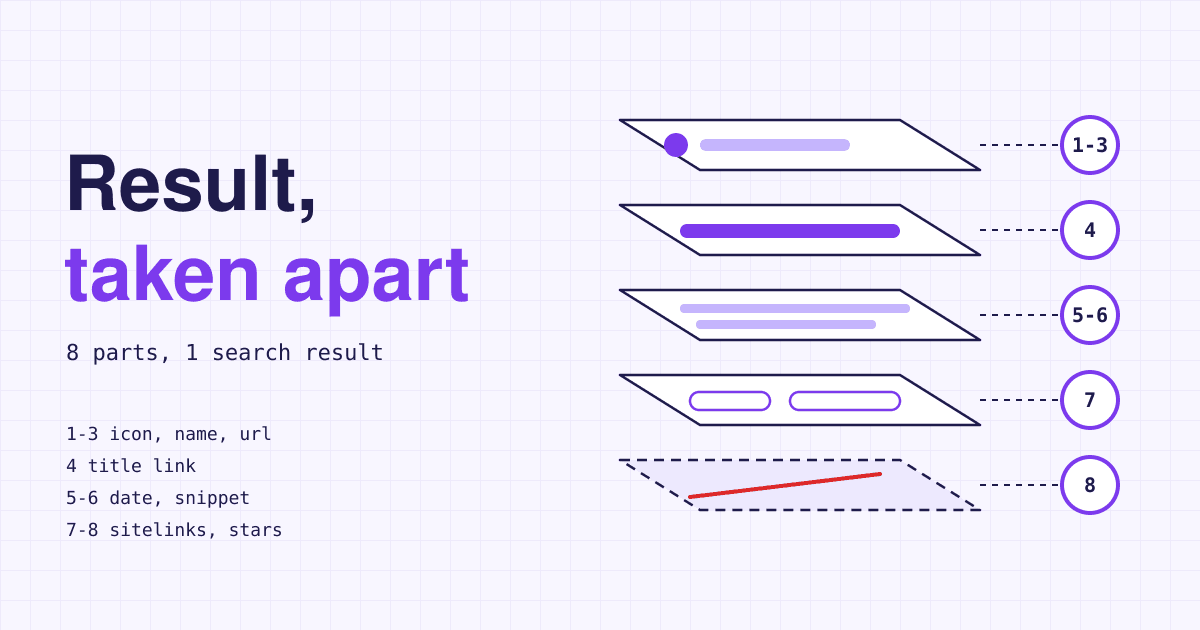
One plain Google result for a small business is put together from as many as eight separate parts, and Google builds each of them from a different place on your site, or from places that are not your site at all.
So when the result for your business looks wrong (an odd title, a grey globe where your logo should be, a description lifted from your cookie banner), the fix is never "change the Google listing". There is no listing to change. You find the part, find what it is built from, and change that. Below, a made-up shop, Fernbrook Bike Repair at example.com, has its result taken apart on the bench, part by part, using what Google's own gallery of search result elements calls each piece.
| No. | Part | Main source on your site | Your grip |
|---|---|---|---|
| 1 | Favicon | The icon link on your home page | Strong |
| 2 | Site name | WebSite markup on your home page | Partial |
| 3 | Visible URL and breadcrumb | Your domain, plus breadcrumb markup | Partial, desktop only |
| 4 | Title link | The page's title element and main heading | Strong |
| 5 | Byline date | A labelled date on the page, plus article markup | Partial |
| 6 | Snippet | The page text, sometimes the meta description | Weak |
| 7 | Sitelinks | Your menu and internal links | Weak |
| 8 | Review stars | Nothing on your own site counts | None |
Two parts are close to yours to set: the favicon, from one line on your home page, and the title link, from each page's title element. Three more you can steer but Google decides: the site name, the breadcrumb (on desktop only since January 2025) and the date. The snippet and sitelinks are Google's choice, nudged by your text and links. Review stars about your own business no longer come from your website at all, whatever widget you install.
The eight parts, removed one at a time
Each part below carries the number it has in the parts list, a grip rating, and three lines: what Google builds it from, the usual way it breaks, and the one thing to do about it. Not every result shows every part: a given result shows only some of them, depending on the device, the search and the page.
1 Favicon
Grip: strong
- Built from
- A
<link rel="icon">tag on your home page (Google also readsapple-touch-icon). There is one favicon per hostname, soexample.com/shopcannot have its own, thoughshop.example.comcan. - Breaks when
- Googlebot cannot crawl the home page, or Googlebot-Image cannot fetch the icon file, often because robots.txt blocks a theme folder. Also when the file is not square, or its address keeps changing.
- Your move
- Use a square file larger than 48 x 48 px in a format Google lists (BMP, GIF, ICO, PNG, JPEG, PPM or TIFF; SVG is not on that list), keep its URL stable, and check robots.txt lets both crawlers in. Google's favicon rules still say it is not guaranteed to appear.
2 Site name
Grip: partial
- Built from
WebSitestructured data on the home page is what Google calls the most important source. It also readsog:site_name, the home page title, headings and other home page text, and how the rest of the web refers to you.- Breaks when
- The name is generic ("Best Dentists In Iowa" is Google's own example of one it is unlikely to pick), it differs between your markup and your home page text, or the www and non-www home pages carry different markup. Google then shows another name or just the domain.
- Your move
- Add
nameandurlinWebSitemarkup on the home page, use that same name in the home page title and heading, and add analternateNamesuch as a short form. One name per domain or subdomain; Google does not support one per subfolder.
3 Visible URL and breadcrumb
Grip: partial, desktop only
- Built from
- Two pieces: your domain, then a breadcrumb trail showing where the page sits in the site. You can state the trail with
BreadcrumbListmarkup. - Breaks when
- On a phone, nothing breaks: since 23 January 2025 mobile results show the domain only, so a trail you worked on appears on desktop results alone.
- Your move
- Use short, readable folder names and breadcrumb markup that matches the breadcrumb a visitor sees on the page. Do not spend more on it than that: people searching on a phone will not see it.
4 Title link
Grip: strong
- Built from
- Mostly the
<title>element. Google lists nine sources in all: the title element, the main visible title, headings such ash1,og:title, other large text, other page text, anchor text on the page, the text of links pointing to the page, andWebSitemarkup. In 2021 Google said it used the title element about 87% of the time. - Breaks when
- Google rewrites the title when it is half empty ("| Fernbrook Bike Repair"), out of date ("2024 prices" on a page that now says 2026), the same on many pages, in another language from the page, or when several headings look equally like the main title. A site name already shown above the title may be dropped from it.
- Your move
- Write a distinct title for each page that matches its one clear
h1, put the site name once at the end after a separator, and avoid repeating keywords. There is no length limit, but the title is cut to fit the screen, so lead with the words that matter.
5 Byline date
Grip: partial
- Built from
- Google's estimate of when the page was published or last changed, from a visible date labelled with words like "Published" or "Last updated", and from
datePublishedanddateModifiedin article markup. - Breaks when
- The visible date and the markup disagree, the page carries a future date or the date of an event it describes, or other dates on the page (a footer, a list of past jobs) confuse the guess. Google's date guidance says to cut those other dates back.
- Your move
- Date your articles and guides plainly, with matching markup. Leave dates off service pages that stay true for years: a date only shows when Google thinks it helps, and an old one on a price page does you no good.
6 Snippet
Grip: weak
- Built from
- Mainly the text of the page itself, picked to match each search, so one page can show different snippets for different searches. Google uses the meta description when it describes the page better than the page text does.
- Breaks when
- The page opens with boilerplate, a cookie notice or a list of keywords, so Google has nothing good to quote, or every page shares one meta description, which Google calls unhelpful.
- Your move
- Write a specific meta description for the home page and your most visited pages, and make the first paragraph of each page say what it offers. To keep a block out of snippets, mark it
data-nosnippet;max-snippetcaps the length.
7 Sitelinks
Grip: weak
- Built from
- Fully automated, from the link structure of your site. Google shows them only when it thinks they help with that search.
- Breaks when
- Menu labels are vague ("Solutions", "More"), important pages are linked from nowhere, or several pages repeat the same content.
- Your move
- Give pages short, plain headings, link your key pages from your menu with concise anchor text, and remove repetition. You cannot pick sitelinks; to drop one, remove the page or mark it
noindex.
8 Review stars
Grip: none
- Built from
- Not your website. Since September 2019 Google does not show review stars for a local business or organisation when the business controls the reviews, either in its own markup or through an embedded review widget. This applies to both single reviews and the average rating.
- Breaks when
- It is already broken, by design: the five-star badge in your footer will not turn into stars under your result. You will not be penalised for the markup; it is simply not shown.
- Your move
- Put your effort where business reviews still show, such as your Business Profile if you serve customers at an address, which that 2019 change did not touch.
Which line of your site feeds which part
Read this grid across: one row per thing on your site, one column per part. "Feeds" means Google's documentation names it as a source for that part. It shows why a single good home page head fixes three parts at once, and why links from other sites can change your title.
| On your site | 1 Icon | 2 Name | 3 URL | 4 Title | 5 Date | 6 Snippet | 7 Sitelinks | 8 Stars |
|---|---|---|---|---|---|---|---|---|
| Title element | Feeds | Feeds | ||||||
| Main heading and large text | Feeds | Feeds | ||||||
| Open Graph title and site name | Feeds | Feeds | ||||||
| Meta description | Feeds | |||||||
| Body text | Feeds | Feeds | ||||||
| WebSite markup on the home page | Feeds | Feeds | ||||||
| Icon link on the home page | Feeds | |||||||
| Breadcrumb markup | Feeds | |||||||
| Visible date and article markup | Feeds | |||||||
| Menu and internal link text | Feeds | Feeds | ||||||
| Links and mentions on other sites | Feeds | Feeds | ||||||
| Review markup or widget about yourself | Ignored |
Everything here assumes Google can crawl the page. A home page blocked by robots.txt, behind a login or marked noindex loses its favicon and site name first, because both are read from the home page only.
The home page head, with the three parts you write
Here is the top of Fernbrook's home page after the teardown. It sets the title link, gives Google a description it may use as the snippet, points at a square icon, and names the site in the form Google reads first. Most site builders have a "SEO" or "search appearance" settings page that writes these lines for you; the code shows what that page should end up producing.
<head>
  <title>Bike Repair and Same-Day Tune-Ups in Fernbrook | Fernbrook Bike Repair</title>
  <meta name="description" content="Walk-in bike repairs at 14 Mill Lane. Most fixes done the same day. Open Tuesday to Saturday, 9 to 6.">
  <link rel="icon" href="/favicon-96.png" sizes="96x96" type="image/png">
  <script type="application/ld+json">
  {
    "@context": "https://schema.org",
    "@type": "WebSite",
    "name": "Fernbrook Bike Repair",
    "alternateName": "Fernbrook Bikes",
    "url": "https://example.com/"
  }
  </script>
</head>
If the same home page also answers at http:// or without www, the markup must be on every copy, not only the one you treat as the main address.
Reassembly: the order to change things in
- Look before you touch. Search your business name on a phone and on a computer and save both screens. Mark each part from the list that looks wrong.
- Fix the home page head first. Title, description, icon and site name markup, as in the code above. The favicon and site name come from the home page alone, so nothing else you do moves them.
- Match each page's title to its heading. One clear
h1per page and a title that says the same thing, with the site name once at the end. - Write descriptions for the pages people find. Home page first, then the handful of pages with the most visits.
- Date only what ages. Articles and guides get a labelled date and matching markup; service pages do not.
- Tidy the menu. Plain labels and links to the pages people look for give Google better sitelinks to choose.
- Ask for a recrawl, then wait. Check the home page with the URL Inspection tool in Search Console and request indexing. Google says changes take from a few days to a few weeks to show.
Questions owners ask about their search result
Why does Google show a title I never wrote?
Because it found a problem with yours, or thinks other text describes the page better for that search: a half-empty title, an old year, the same title on many pages, or two headings of equal weight. Fix those and the title element is used most of the time.
Can I choose which sitelinks appear?
No. Sitelinks are automated. You can only make good ones likelier with clear headings and menu links, and remove a bad one by removing that page or marking it noindex.
Why did the breadcrumb under my result disappear on my phone?
Google stopped showing breadcrumbs in mobile results on 23 January 2025. Mobile results show the domain only; desktop results still show the trail, and breadcrumb markup still works there.
My site shows a review widget with five stars. Why are there no stars on Google?
Since 2019 Google does not show review stars for a business's own reviews of itself, and an embedded widget counts as the business controlling them. Your markup is not penalised; it is just not displayed.
I fixed everything. When will the result change?
Only after Google recrawls the page. Requesting indexing of the home page in Search Console helps, and Google puts the wait at a few days to a few weeks.
Sources
- Google Search Central: Visual elements gallery of Google Search, read 2026-11-12.
- Google Search Central: Influencing your title links in search results and More information on how Google generates titles for web page results, 17 September 2021.
- Google Search Central: Provide a site name to Google Search.
- Google Search Central: Define a favicon to show in search results.
- Google Search Central: Control your snippets in search results.
- Google Search Central: Influence your byline dates in Google Search.
- Google Search Central: Sitelinks.
- Google Search Central: Breadcrumb structured data and Simplifying the visible URL element on mobile search results, 23 January 2025.
- Google Search Central: Making review rich results more helpful, 16 September 2019.
- Google Search Central: Ask Google to recrawl your URLs.