Some pop-ups cost a website nothing in Google Search and some can hold a page down, and the line between them is narrower than most plugin settings suggest.
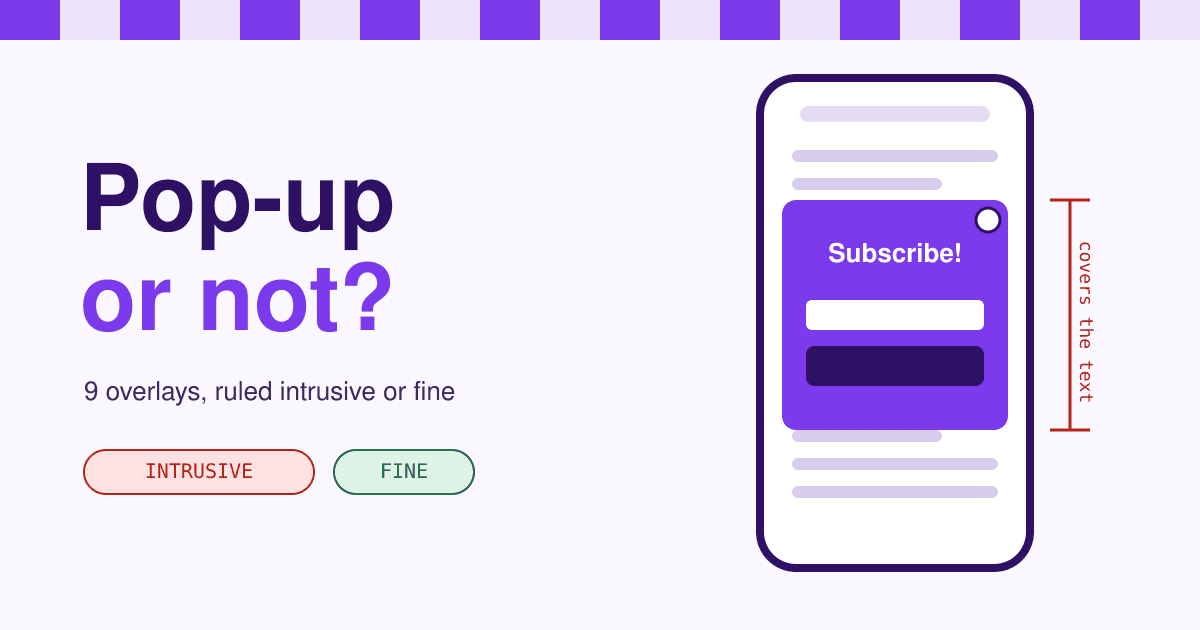
Short answer: Google treats an overlay as intrusive when it stands between a visitor and the content they came for: a pop-up that covers the text as the page opens from a search result or while they read, a full-screen welcome page they must dismiss, or a top of page that only looks like the content is missing. Notices the law requires (cookie consent, age checks), login boxes over private content and small banners that are easy to close are not counted. It is one ranking signal among hundreds, so it rarely sinks a strong page on its own, but it is what visitors remember. Below, nine overlays drawn on a phone, each with its ruling and the fix.
Nine overlays, ruled one by one
The rulings come from two Google texts: the 2016 announcement of the mobile interstitial signal, which started counting on January 10, 2017, and the current Search Central page Avoid intrusive interstitials and dialogs. Where Google says nothing, the case says so.
-
01 Sign-up box the moment the page opens
Intrusive
The textbook case. Google lists a popup that covers the main content "immediately after the user navigates to a page from the search results" as the first technique that makes content less accessible.
Fix Move the offer into the page: a sign-up block after the second section, or a slim banner.
-
02 The same box, half way down the page
Intrusive
Waiting for a scroll or a timer does not change the ruling. Google counts a popup shown "while they are looking through the page" in the same sentence as one shown on arrival.
Fix Put the offer at the end of the article, where reading is done, and let the reader open it.
-
03 Welcome page you must close first
Intrusive
A standalone interstitial the visitor has to dismiss before reaching the content is the second technique on Google's list, and the current guidance says plainly: do not obscure the entire page.
Fix Drop it. If the message matters, make it the first block of the page, above the text, not over it.
-
04 Promo block that fills the first screen
Intrusive
No overlay at all, and still intrusive. Google names a layout where the top of the page "appears similar to a standalone interstitial" while the content sits under the fold.
Fix Cut the block to a band, so the headline and first lines of text show on a phone without scrolling.
-
05 Redirect to a separate consent or sign-up page
Drops pages
The most expensive mistake, because it hides more than one page. Google warns that redirecting every URL to one page for consent or input "will remove all but that one page from search results, as Googlebot can only fetch that page".
Fix Show the notice as an overlay on the page that was asked for, at the same address.
-
06 Cookie consent bar
Exempt
Interstitials that respond to a legal obligation, such as cookie consent, are exempt. The exemption covers the notice, not any size or style: Google still asks that it overlays the content rather than replacing it.
Fix Keep it to the bottom of the screen, and give the page enough bottom padding that it never hides a focused link (see the checks below).
-
07 Age check on an adult or alcohol site
Exempt
A mandatory age gate is exempt too. Google's advice is to lay the gate over the content, never redirect to it, and for adult-only content to let verified Googlebot requests through without the gate.
Fix Overlay, same address, and check your gate plugin does not send every visitor to /age-check.
-
08 Login box over private content
Fine
Not counted, as long as the content behind it is not public anyway. Google's example is email or pages behind a paywall that are not meant to be indexed.
Fix If the page is meant to rank, it cannot sit behind the login. Keep a public summary page for search.
-
09 Slim banner that closes with one tap
Fine
Google's own alternative: banners that use "a reasonable amount of screen space" and are easily dismissible. Google gives no percentage. The Better Ads Standards flag sticky ads that take more than 30% of a phone screen, a fair ceiling to borrow for your own banner.
Fix Keep it well under a third of the screen, with a close button at least 44 pixels square.
Your own pop-up and a pop-up ad are judged by different rules
Your newsletter, offer or app prompt
Judged by Google Search's interstitial guidance above. The cost is ranking and returning visitors. Google's page experience questions still ask "Do your pages avoid using intrusive interstitials?"
A pop-up ad sold by a third party
Judged by the Better Ads Standards, which count only promotional content placed for a third party. Pop-up ads fail them on phones and desktops. Since February 15, 2018, Chrome has filtered ads on sites whose Ad Experience Report shows Failing, so one ad format can switch off all of a site's ads in Chrome.
A sign-up that passes, part by part
If you want a box at all, let the visitor open it. A dialog that appears because someone tapped "Get the newsletter" answers a request instead of blocking one. Parts 1 to 3 are marked on the drawing; 4 and 5 are behaviour, so they have no marker.
- A slim banner, not a box. Top or bottom, a fraction of the screen, one tap to close.
- The offer in the page. An inline block after the text reaches readers who finished it, and hides nothing.
- A close button you can hit. At least 44 by 44 pixels, labelled "Close" for screen readers, with a plain "No thanks" that does not mock the reader.
- Escape closes it, and focus comes back. The WAI-ARIA dialog pattern moves focus into a dialog when it opens, closes it on Escape, and returns focus to the button that opened it.
- A no is remembered. Once closed, it stays closed for weeks, not until the next page.
The HTML dialog element opened with showModal() gives you point 4 almost free: Escape closes it and the browser handles focus. A minimal version, opened only by a click:
<button type="button" id="join">Get the newsletter</button>

<dialog id="join-box" aria-labelledby="join-title">
  <h2 id="join-title">One email a month</h2>
  <!-- your sign-up form here -->
  <form method="dialog"><button>No thanks</button></form>
</dialog>

<script>
  document.getElementById('join').addEventListener('click', () =>
    document.getElementById('join-box').showModal())
</script>
Check your own site in ten minutes
Arrive the way a searcher does
On a phone, in a private window, search for a phrase from one of your pages and tap your own result. Watch the first five seconds: does anything cover the text?
Read half a page
Scroll slowly to the middle and wait thirty seconds. Scroll and timer triggers show up here, which is case 02.
See what Googlebot saw
In Search Console, run URL Inspection, then Test live URL and View tested page. The screenshot shows the page as Google rendered it, overlay included.
Tab through with the cookie bar open
On a computer, press Tab through the page before accepting cookies. If a focused link disappears behind the bar, the page fails WCAG 2.4.11 Focus Not Obscured, which gives a cookie banner as an example of what fails. Bottom padding the height of the bar fixes it.
If you run ads, open the Ad Experience Report
Google's Ad Experience Report has a Desktop and a Mobile view. For a site reviewed as Failing it lists the ad experiences found, with a picture or a short video where Google has one.
Questions about pop-ups and Google
Is there a Google penalty for pop-ups?
Not a manual action. It is a ranking signal that Google said, when it launched, is one of hundreds, and that a page with great, relevant content may still rank highly. The larger cost is visitors who leave and do not come back.
Does it apply on desktop?
The 2017 signal was announced for pages reached from mobile search results. The current guidance page does not limit itself to phones, and its advice, do not obscure the whole page, reads the same on a laptop.
Are exit-intent pop-ups safe?
Google's pages do not mention them. Shown as a visitor moves to leave, one does not block arrival. Phones have no cursor leaving the window, though, so a mobile version needs another trigger, and a timer that fires while someone reads is case 02.
Will my pop-up plugin take care of this?
Google suggests common plugins because their makers can ship fixes for everyone at once. The plugin does not choose the trigger for you: set it to open on a click, or show as a banner, rather than on page load or scroll.
Sources
- Google Search Central: Avoid intrusive interstitials and dialogs, read 2026-11-07.
- Google Search Central Blog: Helping users easily access content on mobile, August 23, 2016, updated January 10, 2017.
- Google Search Central: Understanding page experience in Google Search results, read 2026-11-07.
- Coalition for Better Ads: Better Ads Standards, Pop-up Ads (mobile) and Large Sticky Ads (mobile), read 2026-11-07.
- Google Ad Manager: Better Ads Standards feature brief, on Chrome ad filtering since February 15, 2018.
- Google Web Tools Help: Introduction to the Ad Experience Report, read 2026-11-07.
- W3C: Understanding SC 2.4.11 Focus Not Obscured (Minimum) and the ARIA Authoring Practices dialog (modal) pattern.