A logo saved as a JPEG goes soft at the edges, a screenshot saved as a photo file blurs its text, and an animation saved as a GIF can weigh more than six times the same clip as a video.
Which image format should I use?
Short answer
Photos: AVIF or WebP, with a JPEG fallback. Screenshots and anything with text: lossless WebP or PNG. Logos, icons and charts: SVG. Animations: a muted MP4 or WebM video, not a GIF. MDN's guide puts the rule for photo-type pictures in one line: "For raster images, prefer WebP or AVIF, which generally provide better compression than PNG, JPEG, and GIF" (MDN, Image file type and format guide).
Two terms decide most of these picks:
- Lossy compression throws away detail the eye is unlikely to miss, so files get much smaller. MDN: photographs "can usually tolerate lossy compression, because the discarded detail is harder to see".
- Lossless compression keeps every pixel. MDN: "For screenshots, diagrams, logos, and line art, prefer lossless encoding, as blurring and colored fringes around text and sharp edges are very visible."
Search is not a reason to hold back: "Google Search supports images referenced in the src attribute of img in the following file formats: BMP, GIF, JPEG, PNG, WebP, SVG, and AVIF" (Google Search Central, Image SEO best practices).
What format does each kind of picture need?
Six kinds of picture cover most small business sites. Each frame shows the kind, the pick (circled) and why.
-
Photos
AVIF or WebP
Fallback: JPEG
Team, product and place photos are where lossy compression shines. MDN calls JPEG "often a good fallback format for photographs".
-
Cut-outs on a see-through background
WebP or AVIF
Fallback: PNG, never JPEG
Both new formats keep transparency. JPEG cannot: MDN says PNG is "the fallback for any image needing transparency, as JPEG has no alpha channel".
-
Screenshots and text
Lossless WebP
Or: PNG
Text and hard edges show every lossy artefact. Google measures lossless WebP at 26% smaller than PNG (Google, WebP).
-
Logos and icons
SVG
Only pixels? Lossless WebP, PNG fallback
An SVG is drawn from shapes, so it stays sharp at every size. MDN: "SVG files are ideal for diagrams, icons, and other images which can be accurately drawn at any size."
-
Charts and diagrams
SVG
Exported as pixels: lossless WebP or PNG
Export the chart as SVG when your tool offers it. A chart saved as a pixel picture follows the screenshot rule.
-
Animations
MP4 or WebM video
Not: GIF
In web.dev's example "the initial GIF is 3.7 MB, compared to the MP4 version, which is 551 KB, and the WebM version, which is only 341 KB" (web.dev, Replace animated GIFs with video).
What can JPEG, PNG, GIF, WebP, AVIF and SVG each do?
The six formats your site is likely to meet, side by side. Compression, transparency and animation are from MDN's format guide; browser support is from webstatus.dev for WebP and AVIF, and from MDN for the rest.
| Format | Compression | Transparency | Animation | Browsers | Use it for |
|---|---|---|---|---|---|
| JPEG | Lossy | No | No | All | The photo fallback |
| PNG | Lossless | Yes, full alpha | Only as APNG, an extension of PNG | All | Screenshots, cut-out fallback |
| GIF | Lossless, 256 colors at most | One color fully see-through | Yes | All | Nothing new: use video |
| WebP | Lossy or lossless | Yes | Yes | Baseline, widely available since March 2023 | Photos and screenshots |
| AVIF | Lossy or lossless | Yes | Yes | Baseline, widely available since July 2026 (webstatus.dev) | Photos, first choice |
| SVG | Not pixel-based: text drawing commands, can be gzip-compressed | Yes | Possible, not covered here | All | Logos, icons, diagrams |
"Baseline, widely available" means "30 months have passed" since a feature first worked in all of the core browsers (web.dev, Baseline). AVIF reached it on 25 July 2026, 30 months after Edge 121 completed the set in January 2024.
How much smaller are WebP and AVIF files?
Smaller files matter most for the picture at the top of the page: in 2025, images were the largest element on screen (the LCP element Google measures) on 76.0% of mobile pages (Web Almanac 2025, Performance). Google and the Chrome team measured these savings:
- 25-34%smaller: lossy WebP against JPEG "at equivalent SSIM quality index"Google, WebP
- 26%smaller: lossless WebP against PNGGoogle, WebP
- >50%savings: AVIF against JPEG, as seen by the Chrome team "and others"web.dev, Using AVIF
- 3.7 MB to 551 KBone animated GIF saved as an MP4 video (341 KB as WebM)web.dev, GIFs to video
These are Google's own tests, not a promise for your pictures. web.dev says it plainly: "the exact savings will depend on the content, encoding settings, and quality target". Export one real photo from your site in each format and compare the files.
Which image formats do websites use today?
Mostly the old ones. Of all images on mobile pages in the HTTP Archive's 2024 crawl, JPEG and PNG made up 60.8% together, while AVIF was 1.0%.
So if your site still sends only JPEG and PNG, it is in good company, and moving photos to WebP or AVIF at a similar visual quality can make pages lighter.
How do I serve AVIF and WebP with a fallback?
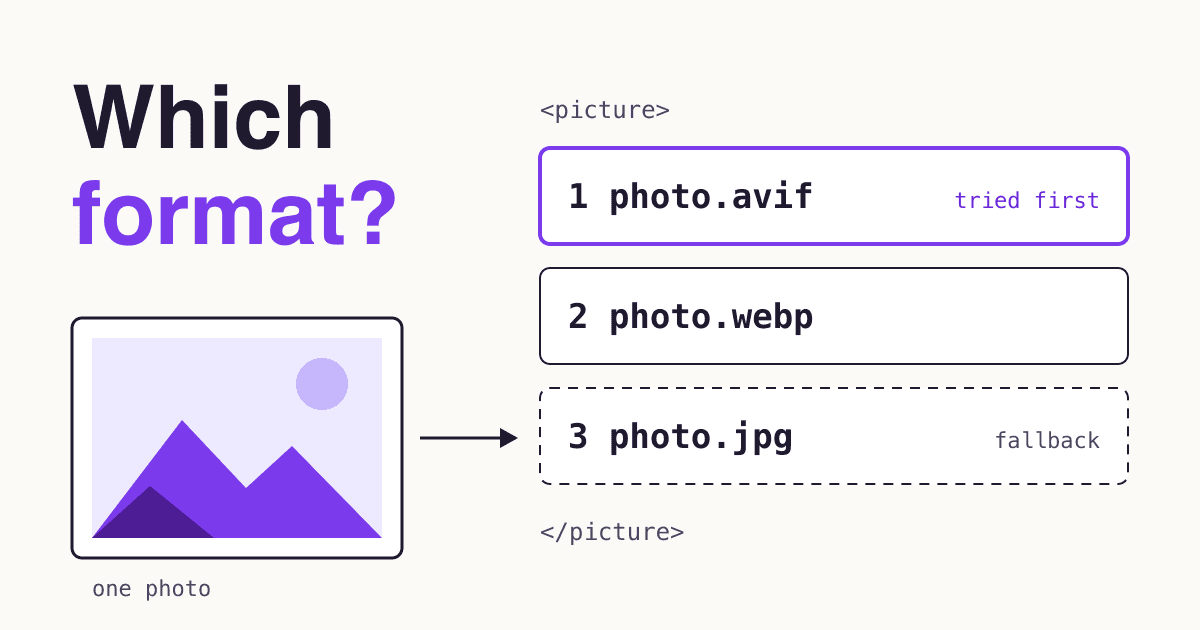
Use the <picture> element: list the new formats first and keep a normal <img> last.
<picture>
  <source srcset="/img/team.avif" type="image/avif">
  <source srcset="/img/team.webp" type="image/webp">
  <img src="/img/team.jpg" alt="Our team outside the shop"
       width="1200" height="800">
</picture>
A browser that cannot show a format moves on: "If the user agent does not support the given type, the <source> element is skipped", and when nothing matches, "the URL of the <img> element's src attribute is selected" (MDN, the picture element). The alt, width and height on the <img> count for every format.
On WordPress you can upload the new formats as files: WebP since version 5.8, "as long as your hosting service supports WebP" (WordPress 5.8 adds WebP support), and AVIF since 6.5, "as long as your hosting environment supports AVIF" (WordPress 6.5 adds AVIF support).
For an animation, the video version of the same pattern is the one web.dev gives: <video autoplay loop muted playsinline> with a WebM and an MP4 <source>.
Which format fits this one picture?
Answer the questions in order and stop at the first yes.
Is it a logo, icon or diagram that you have (or can export) as a vector file?
Yes SVG.
Does it move?
Yes MP4 or WebM video, muted and looping, in place of a GIF.
Is it mostly text, sharp edges or flat color, like a screenshot?
Yes Lossless WebP, or PNG.
Does it need a see-through background?
Yes WebP or AVIF with transparency, PNG as the fallback.
None of the above: it is a photo.
Then AVIF, then WebP, with JPEG as the fallback, in one
<picture>.
What should I check before I upload a picture?
- The format comes from the questions above, not from whatever the camera or design tool saved.
- The size matches the space. Export at the width the picture is shown, plus a larger copy for sharp screens, and list both in
srcset: it lets you "offer the browser several image files" with "different numbers of pixels" (MDN, responsive images). - Width and height are set. "Always include width and height size attributes on your images and video elements" (web.dev, Optimize CLS). Without them, the text jumps when the picture loads.
- Only pictures further down are lazy. Add
loading="lazy"to those, but "Don't lazy-load images that are likely to be in-viewport when the page loads, especially LCP images" (web.dev, image lazy loading). - It has alt text that says what it shows. Missing alt text is one of the errors in our accessibility fix list.
- The page passes the image check. Run Lighthouse or PageSpeed Insights and read the "Improve image delivery" insight; its advice: "Encoding your images in these newer formats is a good strategy to reduce the download size of images" (Chrome for Developers, Improve image delivery).
Questions site owners ask about image formats
Do I still need a JPEG fallback?
It costs one line, and it covers the rest. On 24 October 2026, caniuse put browser support at 96.35% of global usage for AVIF and 97.18% for WebP (caniuse, AVIF, caniuse, WebP). MDN's advice: "use the <picture> element to provide a PNG or JPEG fallback" if you need to reach browsers without the new formats.
Is AVIF always smaller than WebP?
No source promises that. MDN says "Generally, AVIF has better compression than WebP", and web.dev reports more than 50% savings against JPEG but both depend on the picture: the result "will depend on the content, encoding settings, and quality target". Sending both in one <picture>, AVIF first, is the safe default.
What about JPEG XL?
Not as your only file yet. caniuse lists Chrome 155 and Firefox 158 with it on by default and Safari 17 and later with partial support (no progressive decoding, still images only), but Edge as not supported, for 60.19% of global usage in total (caniuse, JPEG XL). MDN lists Edge 155 as supporting it, so the two sources disagree on Edge. If you try it, put it first inside <picture> with AVIF, WebP or JPEG after it; MDN advises providing such an alternative.
Will Google index my WebP, AVIF and SVG images?
Google Search supports all three for images in <img>, next to BMP, GIF, JPEG and PNG (Image SEO best practices). Supported means the format is no obstacle; it does not promise that every image gets indexed.
Sources
- MDN: Image file type and format guide
- MDN: the picture element
- MDN: Using responsive images in HTML
- Google Search Central: Image SEO best practices
- Google for Developers: WebP, an image format for the Web
- web.dev: Using AVIF to compress images on your site
- web.dev: Replace animated GIFs with video for faster page loads
- web.dev: Optimize Cumulative Layout Shift
- web.dev: Browser-level image lazy loading for the web
- Chrome for Developers: Improve image delivery
- HTTP Archive Web Almanac 2024: Media
- HTTP Archive Web Almanac 2025: Performance
- web.dev: Baseline
- webstatus.dev: WebP and AVIF
- caniuse: WebP, AVIF and JPEG XL
- Make WordPress Core: WordPress 5.8 adds WebP support
- Make WordPress Core: WordPress 6.5 adds AVIF support
All pages checked on 24 October 2026.