The same small square has to work in a browser tab, next to your name in Google and on a phone's home screen, and the files behind it run from 32 to 512 pixels wide.
Short answer
Three files cover most websites: favicon.ico at 32 x 32 pixels, icon.svg, and apple-touch-icon.png at 180 x 180 pixels, each linked from the <head>. If people can install your site as an app, add a web app manifest with three more PNGs: 192 x 192, 512 x 512 and a 512 x 512 maskable icon. This is the set Andrey Sitnik recommends in "How to Favicon in 2026" (Evil Martians, January 2026).
What sizes does a favicon need?
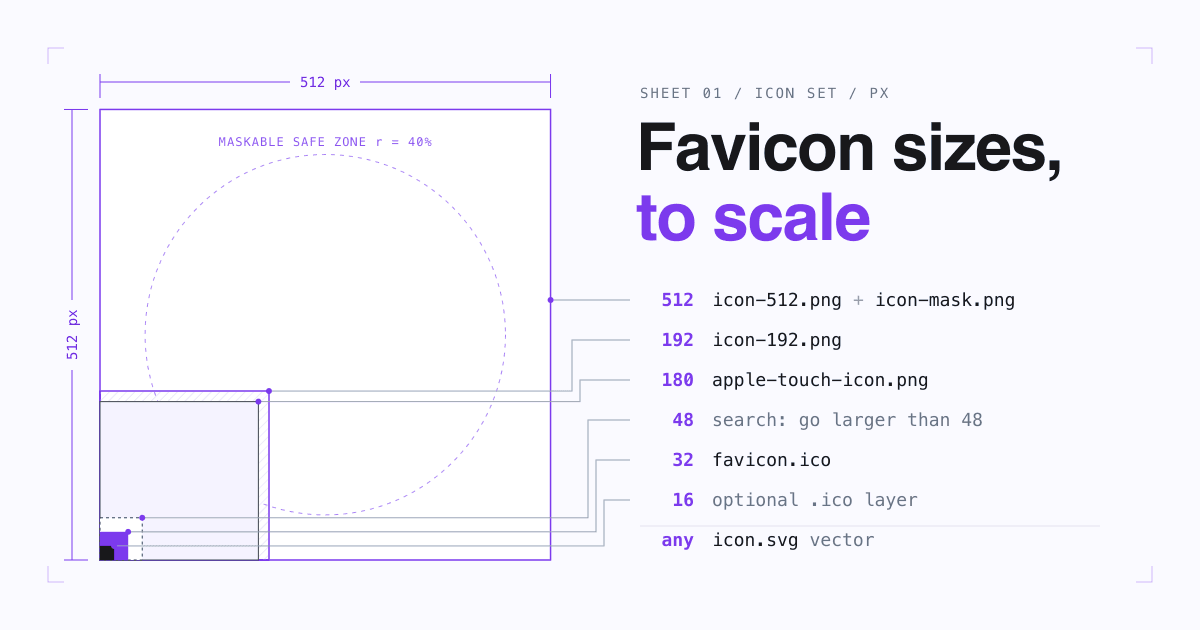
Each file has one job, so each has its own size. The drawing below puts them on one sheet, to scale against each other.
- 512 x 512 manifest icon and maskable icon
- 192 x 192 manifest icon
- 180 x 180 Apple touch icon
- 48 x 48 Google recommends a favicon larger than this
- 32 x 32 favicon.ico
| File | Pixels | Who reads it | Needed when |
|---|---|---|---|
favicon.ico | 32 x 32 | Browsers that ask for /favicon.ico on their own; Google Search, which does not list SVG among its formats | Always |
icon.svg | Any (vector) | Chrome and Edge 80+, Firefox 41+, Safari 26+ | Always |
apple-touch-icon.png | 180 x 180 | iPhone and iPad when someone adds the site to the Home screen; Google also reads this link | Always |
icon-192.png | 192 x 192 | Chromium browsers, to install the site as an app | Installable site |
icon-512.png | 512 x 512 | Chromium browsers, to install the site as an app | Installable site |
icon-mask.png | 512 x 512 | Android launchers that crop icons to their own shape | Installable site |
Sources: file set and sizes from Evil Martians; browser versions from Can I use (read 2026-10-16); the 192 and 512 minimum for Chromium from web.dev; Google's formats and link types from Google Search Central.
Which HTML tags load the icons?
Three lines in the <head> of every page load the three files. The sizes value on the ICO line and the 180 x 180 comment are from the Evil Martians guide.
<link rel="icon" href="/favicon.ico" sizes="32x32">
<link rel="icon" href="/icon.svg" type="image/svg+xml">
<link rel="apple-touch-icon" href="/apple-touch-icon.png"><!-- 180x180 -->
For an installable site, add one more line, <link rel="manifest" href="/manifest.webmanifest">, and add this icons array to that file. The manifest also needs fields such as name, start_url and display before a browser offers to install the site (web.dev).
{
  "icons": [
    { "src": "/icon-192.png", "type": "image/png", "sizes": "192x192" },
    { "src": "/icon-mask.png", "type": "image/png", "sizes": "512x512", "purpose": "maskable" },
    { "src": "/icon-512.png", "type": "image/png", "sizes": "512x512" }
  ]
}
Two safety nets help if a tag goes missing. The HTML standard lets a browser fetch /favicon.ico from the site root when a page has no icon link (HTML Living Standard, link type "icon"), and Apple's guide says an apple-touch-icon.png in the root folder covers every page (Safari Web Content Guide). Keep both files at the root.
Where does each file show up?
A
Browser tab and bookmarks
The SVG in browsers that support it, the ICO in the rest. Can I use puts SVG favicon support at 92.06% of users; Safari added it in version 26.
B
Google search results
One icon per hostname, taken from the links on your home page. Google reads icon, shortcut icon, apple-touch-icon and apple-touch-icon-precomposed links.
C
iPhone and iPad Home screen
The 180 x 180 Apple touch icon, when a visitor adds your page to the Home screen. Apple calls these links Web Clips.
D
Installed app on Android and desktop
The 192 and 512 PNGs from the manifest. When only these two sizes are given, Chrome scales them to fit the device, and for the splash screen it picks the icon closest to the screen's resolution.
E
Android launcher shapes
The maskable icon, cropped to the launcher's own shape, which differs between devices. Without one, Android resizes your icon and places it on a white background.
Sources: Google Search Central, Apple, web.dev on manifests, web.dev on maskable icons, Evil Martians.
Why does a logo turn to mush at 16 pixels?
A tab draws your icon on a tiny grid, and every thin line or letter must land on whole pixels. A full logo with a leaf and a wordmark becomes grey noise; one bold letter on a solid square stays readable. The Evil Martians guide suggests asking a designer for a version of the logo made for small pixel grids when the shrunk logo looks blurry.
Both drawings are invented examples for a made-up brand, drawn pixel by pixel for this page.
What does Google need to show your favicon in search results?
Google lists these rules in its favicon guidelines (last updated 2026-08-28). Meeting all of them makes the icon eligible; Google says it is still not guaranteed to appear.
- The icon link is on your home page. A subdomain home page counts; a folder such as
/newsdoes not. - Square (1:1) and at least 8 x 8 pixels. Google recommends larger than 48 x 48.
- A supported format: BMP, GIF, ICO, PNG, JPEG, PPM or TIFF. SVG is not on the list, so keep a raster file linked too.
- Googlebot-Image can crawl the icon file and Googlebot can crawl the home page: neither is blocked.
- The icon URL is stable: you do not change it often.
- It represents your brand. Google replaces icons it deems inappropriate with a default icon.
After a change, Google has to recrawl the home page, which can take several days to several weeks. You can request indexing of the home page with the URL Inspection tool in Search Console.
How do you make all six files from one drawing?
Draw one square master
Start from a square version of the mark, built from a few bold shapes and no small text.
Export the SVG, with a dark mode
Save the master as
icon.svg. Aprefers-color-scheme: darkmedia query inside the SVG can switch a dark fill to a light one, as the Evil Martians guide shows.Make the 32 x 32 ICO from the small-grid version
Look at it at real size in a tab. If the 32 pixel file blurs when the browser scales it down, add a hand-made 16 x 16 version.
Make the 180 x 180 Apple touch icon
Add about 20 pixels of padding around the mark and a background color: Evil Martians says it looks better that way.
Make the 192 and 512 PNGs
Export the master at both sizes for the manifest.
Make the 512 maskable icon
Keep everything important inside a central circle with a radius of 40% of the width (web.dev). On a 512 canvas that is a circle about 409 pixels wide (Evil Martians). Let the background run to the edges, because the launcher crops them.
Upload, link, then leave the URLs alone
Put the files at the root, add the tags above, and keep the URLs stable so Google does not have to relearn them.
A favicon is part of how your site looks wherever it is shared. The same goes for the preview card a chat app draws for your link: see Open Graph tags that fix link previews.
Favicon words, defined
- Favicon
- The small square icon that identifies a website in browser tabs, bookmarks and search results.
- ICO
- An image file format that can hold several sizes of one icon; the classic favicon format.
- Apple touch icon
- The PNG that iPhone and iPad use when someone adds a page to the Home screen, linked with
rel="apple-touch-icon". - Web app manifest
- A JSON file, linked with
rel="manifest", that tells browsers the name and icons to use when a site is installed as an app. - Maskable icon
- An icon with extra padding that a launcher may crop to its own shape; Android calls these adaptive icons.
- Safe zone
- The central circle of a maskable icon, 40% of the icon's width in radius, that is never cropped.
Common favicon questions
Do I still need favicon.ico if I have an SVG?
Yes. Google Search does not list SVG among the formats it supports, Safari only reads SVG icons from version 26, and older browsers that ignore SVG icons use the ICO.
Why does Google still show the old favicon or a globe?
Google picks the icon up when it recrawls your home page, which can take several days to several weeks. Check that the link is on the home page, that neither file is blocked from crawling, and that the icon is square and in a supported format.
Can a section of my site have its own favicon in Google?
Only if it is on its own hostname. Google shows one favicon per hostname, so shop.example.com can have its own, but example.com/shop cannot.
Can the favicon change in dark mode?
The SVG one can, with a prefers-color-scheme media query inside the file. The ICO and PNG files cannot, so pick colors that stand out on both light and dark tabs.
Sources
- Define a favicon to show in search results, Google Search Central, last updated 2026-08-28.
- How to Favicon in 2026: Three files that fit most needs, Andrey Sitnik, Evil Martians, 2026-01-21.
- SVG favicons, Can I use.
- Link type "icon", HTML Living Standard, WHATWG.
- Configuring Web Applications, Safari Web Content Guide, Apple.
- Add a web app manifest and Adaptive icon support in PWAs with maskable icons, web.dev.
- All pages read on 2026-10-16.