Every uptime promise is a downtime budget in disguise: 99.9% leaves 0.1% of the time for your site to be unreachable, which is 43 minutes and 12 seconds in a 30-day month and 8 hours and 46 minutes in a year.
Component 01 / Definition
What does 99.9% uptime mean?
Short answer
Uptime is the share of time your website answers visitors. At 99.9% ("three nines") the host may be down 0.1% of the time and still keep its promise: up to 43 minutes in a 30-day month. A hosting SLA (service level agreement) is the contract that says what you get when the host misses that number, and in the SLAs we read below the answer is almost always a credit on a future bill, not a refund, and in most cases only if you claim it in time.
Google's Site Reliability Engineering book defines time-based availability as uptime divided by uptime plus downtime, and gives the same kind of budget: a target of 99.99% "can be down for up to 52.56 minutes in a year and stay within its availability target" (Google SRE book, Embracing Risk). Two words get mixed up often, so here they are side by side:
- SLO (service level objective)
- The target itself: "a target value or range of values for a service level" (SRE book, Service Level Objectives). 99.9% is an SLO.
- SLA (service level agreement)
- The contract around the target: "an explicit or implicit contract with your users that includes consequences of meeting (or missing) the SLOs they contain" (same chapter).
- Service credit
- The usual consequence: a share of your monthly fee taken off a future invoice.
- Excluded downtime
- Outages the SLA does not count, most often scheduled maintenance. Each host defines its own list.
Component 02 / Downtime budget
How much downtime does each level of uptime allow?
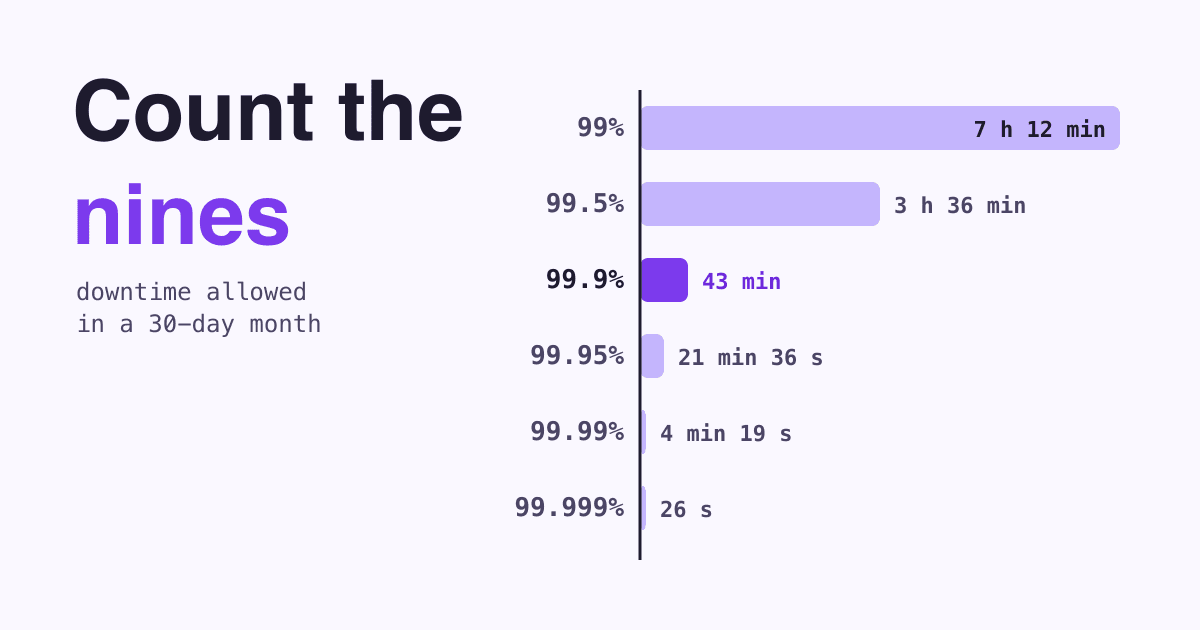
Each extra nine cuts the allowed downtime by ten. The bars below show the monthly budget on one scale; the table gives the same numbers per day, week, month and year. This is plain arithmetic: the downtime share (100% minus the uptime) times the length of the period, with a 30-day month and a 365-day year. A 31-day month adds about 3%, so 99.9% then allows 44 minutes 38 seconds.
- 99%7 h 12 min
- 99.5%3 h 36 min
- 99.9%43 min 12 s
- 99.95%21 min 36 s
- 99.99%4 min 19 s
- 99.999%26 s
| Uptime | Per day | Per week | Per 30-day month | Per year |
|---|---|---|---|---|
| 99% | 14 min 24 s | 1 h 40 min 48 s | 7 h 12 min | 3 d 15 h 36 min |
| 99.5% | 7 min 12 s | 50 min 24 s | 3 h 36 min | 1 d 19 h 48 min |
| 99.9% | 1 min 26 s | 10 min 5 s | 43 min 12 s | 8 h 45 min 36 s |
| 99.95% | 43 s | 5 min 2 s | 21 min 36 s | 4 h 22 min 48 s |
| 99.99% | 9 s | 1 min | 4 min 19 s | 52 min 34 s |
| 99.999% | under 1 s | 6 s | 26 s | 5 min 15 s |
The budget is an average, not a daily allowance. One outage of 2 hours 9 minutes in a quarter, and no other downtime, still averages 99.9% over those 90 days, because 0.1% of 90 days is 129.6 minutes. Most SLAs measure per calendar month, though, and in a single month the same outage is almost 3 times the 99.9% budget.
Component 03 / The contract
What do hosting SLAs actually promise?
We read six public SLAs on 22 October 2026: two managed WordPress hosts, a CDN and three cloud server products. The promise ranges from 99.5% to 100%, yet the pattern is nearly the same everywhere: a credit, a claim you file yourself, a deadline and a cap. AWS is the one exception we found to the claim: it automatically does not charge for a single EC2 instance in any hour it was unavailable for more than six minutes.
| Service | Promise | What a miss pays | You must | Not counted |
|---|---|---|---|---|
| Kinsta (managed WordPress) | 99.9% unless your order form says more | Credits start once downtime "must exceed 43 minutes": 5% of the monthly fee for 43 to 59 minutes, 10% for 60 to 119, 15% for 120 to 179, scaled by the share of your sites that were down | Ask in writing "within 30 days of Downtime", in the platform chat | Maintenance done from 2 am to 5 am in the data center's time zone, emergency maintenance, scheduled outages, outages caused by outside providers, traffic beyond your plan |
| WP Engine (managed WordPress) | 99.95% "excluding any Excused Downtime" | 5% of the monthly fee for each hour or part of an hour beyond the target (its own example: 1 to 60 minutes over = 5%, 61 to 120 = 10%), up to 100% | Contact support "within 30 days of the event" | Scheduled and emergency maintenance, beta services, force majeure, and other excused downtime its SLA lists |
| Cloudflare Business plan (CDN) | 100%: will serve your content "100% of the time without qualification" | A credit in proportion to the outage minutes and the share of your users affected, capped at one month of fees in any 12 months | Tell support within five business days, file the claim by the end of the next billing month | Problems in your own or third-party hardware or software (your origin host included), causes outside its reasonable control, your own planned downtime |
| AWS EC2 (one server) | 99.5% per instance (99.99% for servers run across several availability zones) | 10% below 99.5%, 30% below 99%, 100% below 95%, as credit on future EC2 bills; only credits over 1 US dollar are issued | Open a case in AWS Support "by the end of the second billing cycle after which the incident occurred", with your request logs as evidence | Its list of SLA exclusions, such as events outside its reasonable control |
| Google Compute Engine (one server) | 99.9% for a single instance of most machine families | 10% below 99.9%, 25% below 95%, 100% below 90%, capped at that month's bill | Notify support within 60 days and send log files showing the downtime, or lose the credit | Its listed SLA exclusions |
| DigitalOcean Droplets (one server) | 99.99% per Droplet | 100% of the affected Droplet's charges if uptime falls below 99.99%, as credit on future invoices, not refundable | Claim within two billing cycles of the month of the downtime | Scheduled maintenance, downtime you caused |
Quotes are from each provider's SLA page as read on 22 October 2026; providers change these pages, so check the current version before you rely on one.
Component 04 / The money
How much does an SLA pay back when your site goes down?
An SLA is a small discount on next month, not insurance for lost sales.
Take a single site on a managed WordPress plan with a 99.9% SLA like Kinsta's, and a 2-hour outage in one month. 120 minutes falls in the 15% row, so the credit is 15% of that month's fee. On a plan that costs 30 dollars a month (an example price, not Kinsta's), that is 4.50 dollars, taken off a later invoice. Kinsta says its credits "have no intrinsic or cash value" (Kinsta SLA), and AWS says its credits do not entitle you "to any refund or other payment" (AWS SLA).
- 30 daysto ask Kinsta or WP Engine for a credit
- 5 business daysto tell Cloudflare about an incident
- 60 daysto notify Google Compute Engine, with your log files
Two more details decide whether you see anything at all. First, who measures: Kinsta's "Downtime will be calculated based on Kinsta's monitoring" and WP Engine's credits "are based on our monitoring", while Cloudflare, AWS and Google Compute Engine rely on evidence you send. Second, apart from that AWS hourly rule, nobody claims for you: Cloudflare writes that it "is not responsible for comprehensive monitoring of Customer Content; this responsibility lies with Customer" (Cloudflare Business SLA). Your own monitoring log is what lets you notice an outage and argue a claim.
Component 05 / Search
Does downtime hurt your Google rankings?
A short outage does not take your pages out of Google; a long one can. Google's crawling documentation describes what happens as server errors go on:
- During errors
"5xx and 429 server errors prompt Google's crawlers to temporarily slow down with crawling." Timeouts, reset connections and DNS errors count the same way: Google treats them "similarly to 5xx server errors" (Google, HTTP status codes; Google, network and DNS errors).
- Pages already indexed
"Already indexed URLs are preserved in the index, but eventually dropped" if the errors last (same page).
- Errors that persist
"Google's indexing pipeline removes from the index URLs that persistently return a server error." For 5xx errors Google gives no fixed time; for a server that does not answer at all (timeouts, DNS failures) it says unreachable URLs "will be removed from Google's index within days".
- Site back up
Once the server answers with 2xx again, "Google gradually increases the crawl rate for the site", so recovery is gradual, not instant.
How do you take a site offline on purpose without hurting search?
For planned work, answer with a 503 status, which MDN describes as the code for a server that is "down for maintenance or overloaded" (MDN, 503 Service Unavailable), and add a Retry-After header with the expected time back; MDN notes that "some crawlers and spiders, like the Googlebot, honor the Retry-After header" (MDN, Retry-After). Google's guidance for pausing a business online recommends limiting features rather than switching the site off; if you must take it offline, it sets these limits (Google, pause your business online):
Offline 1 to 2 days
Return "an informational error page with a 503 HTTP response status code". Use static HTML and the retry-after header "with a best effort date or duration".
Offline longer
Provide "an indexable home page" with a 200 status that explains the situation. Google calls disabling the whole site "an extreme measure" that should last "a few days at most".
Never send the 503 for robots.txt. Google: "Don't return a 503 HTTP response status code for the robots.txt file because this blocks all crawling."
Component 06 / More nines?
Is 99.9% enough, or should you pay for 99.99%?
For most small business sites, 99.9% with a fast fix matters more than an extra nine on paper. Google's SRE book argues that "100% is probably never the right reliability target", partly because visitors cannot see the difference past a point: "a user on a 99% reliable smartphone cannot tell the difference between 99.99% and 99.999% service reliability" (SRE book). Their experience is dominated by less reliable parts, such as the mobile network or their own device.
99.9% is usually fine when
- The site is a brochure, a blog or a portfolio
- Visitors can come back in an hour and lose nothing
- You have monitoring, so you hear about an outage before your clients do
Look at 99.95% or more when
- The site takes orders or bookings around the clock
- An hour down costs more than a higher hosting plan
- Ads or campaigns send paid traffic to it at all hours
Component 07 / Monitoring
How do you measure your website's real uptime?
Do not rely on the host's dashboard alone: watch the site from outside, the way a visitor reaches it. Free tools are enough to start.
Pick an outside monitor
UptimeRobot's free plan has 50 monitors checked every 5 minutes, and its terms allow "commercial and business use". Better Stack's free tier, for personal projects, has 10 monitors and heartbeats and one status page. Uptime Kuma is free, open source and self-hosted: run it on a different server than your site, or it goes down with it.
Watch the page that earns money
Add a monitor for your home page and one for the page that matters most, such as the booking form or checkout. A home page can load while the page behind it fails.
Mind the interval
A monitor that checks every 5 minutes can miss an outage shorter than 5 minutes and rounds every outage to its checks. That is fine for a 99.9% budget of 43 minutes; a 99.99% budget of 4 minutes needs checks every minute or faster, which UptimeRobot sells as its paid "60-second monitoring interval".
Send alerts to two places
Email plus a phone app or chat message, so a single missed notification does not cost you hours.
Keep the log, and diary the claim deadline
Each outage with its start and end time is your evidence. Google Compute Engine asks for "log files showing Downtime Periods", AWS for your request logs, and every SLA above has a claim deadline, from five business days to two billing cycles.
Component 08 / Questions
Uptime questions website owners ask
Is 99.9% uptime good for a small business website?
Yes, for most sites. It allows about 43 minutes of downtime a month. What matters more is that you notice an outage in minutes, which free monitoring gives you.
Does scheduled maintenance count as downtime?
Usually not. Kinsta, WP Engine and DigitalOcean exclude scheduled maintenance from their SLAs, and Kinsta does not count maintenance done from 2 am to 5 am in the data center's time zone. Read the exclusions of your own host.
Can I get a refund when my host misses its uptime promise?
Not in the six SLAs above. They pay credits on future bills, in most cases only when you claim in time, and Kinsta states its credits are not redeemable for cash. AWS at its discretion may issue its credit to your card, and automatically skips the charge for EC2 instance hours with more than six minutes unavailable.
Will a few hours of downtime remove my site from Google?
Unlikely. Google slows crawling during server errors and keeps already indexed pages for a while; URLs that keep failing are removed, within days when the server does not answer at all. Crawling speeds up again gradually once the site is back.
What should my site show while it is down for maintenance?
A short static page with a 503 status and a Retry-After header, for 1 to 2 days at most. For longer, Google advises an indexable home page with a 200 status. Never return 503 for robots.txt.
How is uptime calculated?
Uptime divided by total time: uptime / (uptime + downtime). Hosts differ in what they leave out; WP Engine, for example, subtracts excused downtime from the minutes in the month before it divides.
Component 09 / Sources
Sources
All read on 22 October 2026. Downtime figures in the chart and table are our arithmetic.
- Google SRE book: Embracing Risk
- Google SRE book: Service Level Objectives
- Kinsta: Service Level Agreement (updated 25 September 2025)
- WP Engine: Service Level Agreement (updated 12 May 2021)
- Cloudflare: Business Service Level Agreement
- Amazon Compute Service Level Agreement (updated 25 May 2022)
- Google Compute Engine Service Level Agreement (modified 14 October 2026)
- DigitalOcean: Droplet SLA (updated 3 June 2025)
- Google: how HTTP status codes affect crawling (updated 4 February 2026)
- Google: network and DNS errors (updated 18 December 2025)
- Google Search Central: pause your business online (updated 10 December 2025)
- MDN: 503 Service Unavailable and Retry-After
- UptimeRobot pricing and terms; Better Stack pricing; Uptime Kuma