
Core Web Vitals for startup websites: what to fix first
A plain-language field guide to the three speed metrics Google measures on real visitors. Written for founders and small teams who need a site that feels fast, not a perfect lab score.
By the SitePatent Editorial Team. Published , revised . 16 minute read, 14 sources.
The short answer
What Core Web Vitals scores does a startup website need?
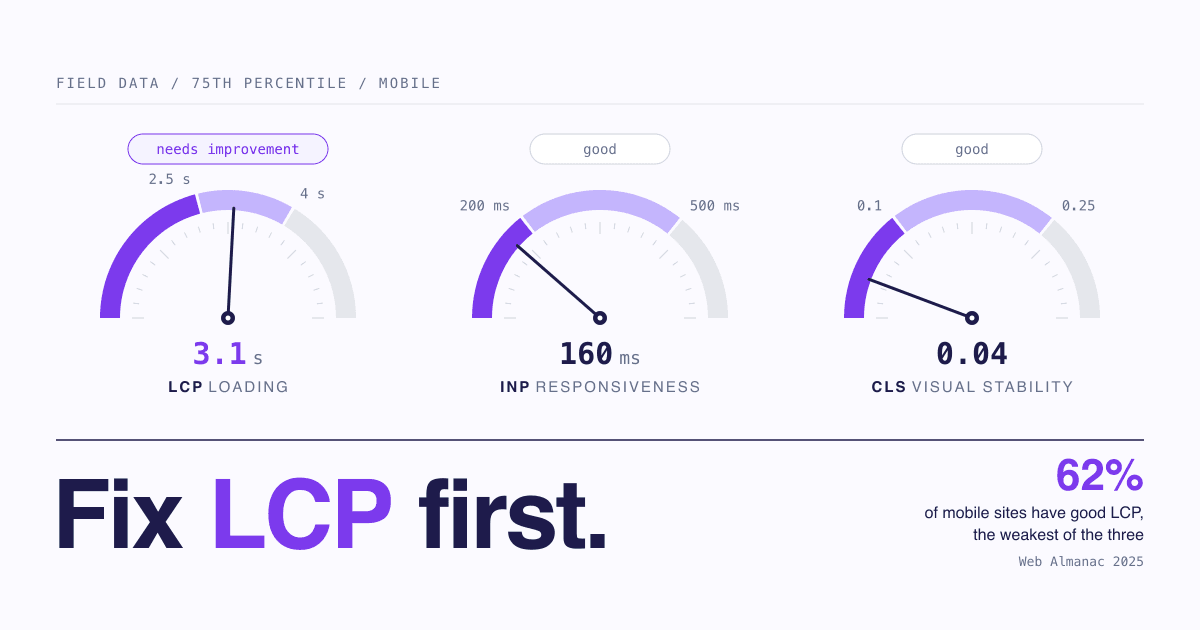
Aim for the "good" band on all three metrics for at least 75% of real visits: Largest Contentful Paint within 2.5 seconds, Interaction to Next Paint of 200 milliseconds or less, and Cumulative Layout Shift of 0.1 or less.[1] Judge that on field data, measured separately for mobile and desktop. A Lighthouse score of 100 is not required and is not the goal.
- Time to measure
- About 15 minutes
- Cost
- Free tools
- Pass mark
- Good at the 75th percentile
- Best for
- Marketing sites and landing pages
What you will leave with
- The three metrics and their exact bands: LCP 2.5 s / 4 s, INP 200 ms / 500 ms, CLS 0.1 / 0.25.
- Why a new site often shows no field data at all, and what to use until it does.
- What Google's documentation says about ranking: Core Web Vitals are used, relevance still comes first, and good scores do not guarantee a top position.
- In 2025, 48% of websites passed all three on mobile and 56% on desktop, so passing is normal, not elite.[4]
- The fixes that move a typical marketing site, and the point at which to stop.
What are Core Web Vitals, in plain terms?
Three numbers that describe how a page feels to a real visitor: how fast the main content appears (LCP), how quickly the page reacts to a tap or click (INP), and how much the layout jumps around (CLS).
A visitor judges your site before reading a word of it. A hero that takes four seconds to appear, a button that ignores the first tap, a signup form that slides down just as they reach for it: each one reads as "this product is not finished". Core Web Vitals put numbers on those three moments, and the bands are the same for every site, whether it has ten visitors a day or ten million.
Figure 1Core Web Vitals thresholds, measured at the 75th percentile of visits
| Metric | What it measures | Good | Needs improvement | Poor |
|---|---|---|---|---|
| LCP - Largest Contentful Paint | What it measuresLoading: when the largest image or text block in view finishes rendering | Good2.5 s or less | Needs improvementOver 2.5 s, up to 4 s | PoorOver 4 s |
| INP - Interaction to Next Paint | What it measuresResponsiveness: delay between a click, tap or key press and the next visual update | Good200 ms or less | Needs improvementOver 200 ms, up to 500 ms | PoorOver 500 ms |
| CLS - Cumulative Layout Shift | What it measuresVisual stability: how much visible content moves unexpectedly (a unitless score) | Good0.1 or less | Needs improvementOver 0.1, up to 0.25 | PoorOver 0.25 |
How many websites actually pass Core Web Vitals?
About half. The HTTP Archive Web Almanac reports that 48% of websites had good Core Web Vitals on mobile in 2025 and 56% on desktop, based mainly on July 2025 data.[4]
Figure 2Share of websites with good Core Web Vitals, 2021 to 2025
- Mobile
- Desktop
| Period | Mobile | Desktop |
|---|---|---|
| 2021 | 32% | 41% |
| 2022 | 31% | 44% |
| 2023 | 36% | 48% |
| 2024 | 44% | 55% |
| 2025 | 48% | 56% |
These figures come from the Chrome User Experience Report, so they describe sites with enough Chrome traffic to be measured. Most of the chapter counts one result per origin (a whole site), not per page.[4]
One detail matters for a startup: home pages do worse than the rest of a site. On page-level data, 45% of mobile home pages had good Core Web Vitals against 56% of secondary pages.[4] The home page carries the hero, the video and every script marketing ever asked for. It is usually your slowest page and your most visited.
Figure 3Websites rated good on each metric, mobile, 2025
LCP (loading)Desktop: 74%
62%INP (responsiveness)Desktop: 97%
77%CLS (visual stability)Desktop: 72%
81%
What is the difference between lab data and field data?
Lab data is one simulated page load on a fixed device and network. Field data is what real visitors experienced. Google's pass or fail assessment uses field data, and web.dev says field data is what you should use to prioritise.[5]
Lab data (Lighthouse)
- A page loaded "in a controlled environment" with predefined device and network conditions.[5]
- Available for any URL, including a site that launched this morning.
- Cannot measure INP, because no user interacts. Total Blocking Time stands in as a proxy.[1]
- Only sees layout shifts above the fold during load.[5]
- Produces the 0 to 100 score and a list of likely causes.
Field data (CrUX)
- Collected by "monitoring all users who visit a page", on their own devices and networks.[5]
- Only exists once a page or site has enough eligible Chrome visitors.[6]
- Reported over the previous 28-day collection period, so it reacts slowly.[3]
- Measures real INP, and CLS across the whole visit, including after scrolling.[5]
- Produces the pass or fail assessment, but not the cause.
The call: Use field data to decide whether you have a problem. Use lab data to find the cause and to check a fix before real visitors confirm it.
The vocabulary you will meet in the tools
- CrUX
- The Chrome User Experience Report: anonymised measurements from opted-in Chrome users. It does not include Chrome on iOS or other Chromium browsers such as Edge.[6]
- PageSpeed Insights (PSI)
- A free Google tool that shows both for a URL: CrUX field data on top, a Lighthouse lab run below.[3]
- Lighthouse
- The lab tool behind the 0 to 100 performance score. A score of 90 or above is rated good, 50 to 89 needs improvement, below 50 poor.[3]
- Origin
- Your whole site taken together. When a single page has too little data, PSI falls back to origin-level data, "which encompasses all user experiences on all pages of the website".[3]
- TTFB
- Time to First Byte: how long the server takes to start answering. Not a Core Web Vital, but the first part of LCP. PSI lists it as experimental, with 800 ms or less rated good.[3]
- TBT
- Total Blocking Time: a lab-only measure of how long scripts block the page during load. It carries 30% of the Lighthouse score, the largest single weight.[10]
Do Core Web Vitals affect Google rankings?
Yes, but not ahead of relevance. Google's documentation says Core Web Vitals are used by its ranking systems, and also that it seeks to show the most relevant content even when page experience is sub-par. It does not say how much weight they carry.[8]
What Google Search Central says (wording as of October 2026)
- They are used. "Core Web Vitals are used by our ranking systems."[8]
- There is no single score. "There is no single signal. Our core ranking systems look at a variety of signals that align with overall page experience."[8]
- Relevance wins. "Google Search always seeks to show the most relevant content, even if the page experience is sub-par."[8]
- It can help where good content is plentiful. Google notes that for many queries there is lots of helpful content available, and that in such cases "having a great page experience can contribute to success in Search".[8]
- Good scores guarantee nothing. Good results in the Search Console report or third-party tools do not, in Google's words, "guarantee that your pages will rank at the top of Google Search results".[8]
- Google recommends it anyway. The Core Web Vitals page highly recommends that site owners achieve good scores, and says doing so "aligns with what our core ranking systems seek to reward".[9]
Our reading of those statements: page experience matters most when several pages answer a query about equally well, and it does not rescue a page that answers it worse. Google publishes no figure for the size of the effect, so treat any precise claim about it with suspicion.
In our view the stronger reason to care is the visitor, not the ranking. Someone who clicks through from a search result, a newsletter or a directory such as SitePatent has spent one click of trust. The first two seconds decide whether they spend another.
How do I measure my own site in 15 minutes?
Run your three most important URLs through PageSpeed Insights on mobile, read the field section first, and write down six numbers. Everything else follows from those.
How to measure Core Web Vitals on a small site in 15 minutes
Pick three URLs1 min
Your home page, your pricing or signup page, and the page that gets the most search or ad traffic.
Run each through PageSpeed Insights, mobile tab4 min
Mobile first: fewer sites pass there (48% against 56% on desktop in 2025).[4] Check desktop afterwards.
Read the field section before the score3 min
The top block is CrUX data from the previous 28-day collection period. Note LCP, INP and CLS and whether the assessment passed. Check whether it says the data is for this URL or for the origin.[3]
If there is no field data, use the lab run2 min
Scroll to the Lighthouse section and note LCP, CLS and Total Blocking Time. TBT is only a proxy for INP, so treat it as a hint.[1]
Identify the LCP element2 min
The lab diagnostics show which element counted as largest (look for the LCP entry). On most pages it is an image: 76% of mobile pages in 2025.[4]
Open the Core Web Vitals report in Search Console3 min
It groups similar URLs and gives each group the status of its worst metric. Only indexed URLs appear, and it is a sample, not a full list.[7]
Symptom to first check
If PSI shows no field data
Expected on a new or low-traffic site. Work from lab LCP and CLS and re-check once traffic grows.
If LCP is slow and TTFB is over 800 ms
Start with the server, not the image: caching, hosting region, a CDN. web.dev notes a high TTFB can make a 2.5 second LCP "challenging, or even impossible".[11]
If LCP is slow and TTFB is fine
Look at the hero image: is it lazy-loaded, set as a CSS background, or injected by JavaScript? Then look at its file size.
If CLS is good in the lab but poor in the field
The shift happens after load or after scrolling, which the lab does not see.[5] Suspect the cookie banner, a chat widget, embeds and anything inserted late.
If INP is poor on mobile only
Too much JavaScript for a mid-range phone. Audit third-party tags first, then your own bundle.
If Lab score is low but the field assessment passes
Real visitors are fine. Stop, or fix only what is cheap.
Which fixes matter most on a marketing site?
Fix the hero image first, then reserve space for anything that loads late, then remove scripts you do not need. On a typical marketing site those three cover most of the gap.
Figure 4Most common causes of a failing metric on a marketing site, and the fix
| Metric | Common cause | Fix |
|---|---|---|
| LCP | Common causeHero image is lazy-loaded | FixRemove loading="lazy" from it. web.dev: "Never lazy-load your LCP image".[11] |
| LCP | Common causeHero image is not in the HTML (CSS background, slider, data-src) | FixUse a plain <img> in the HTML source and add fetchpriority="high".[11][13] |
| LCP | Common causeSlow server response | FixCache the HTML and serve it from a CDN. web.dev calls a CDN the best way to both serve content close to users and cache it, the two main ways to cut TTFB.[13] |
| CLS | Common causeImages and video without dimensions | FixAlways set width and height, or reserve space with CSS aspect-ratio.[12] |
| CLS | Common causeEmbeds, iframes, banners and widgets injected late | FixReserve the space up front, for example with min-height.[12] |
| CLS | Common causeWeb font swaps in and changes line lengths | FixPreload the critical font, tune the fallback with size-adjust, or use font-display: optional.[12] |
| INP | Common causeThird-party tags competing for the main thread | FixRemove the tags nobody uses; web.dev advises pruning old tag-manager tags and unused code.[13] Loading the rest after the page is usable is our suggestion. |
| INP | Common causeA heavy framework hydrating a mostly static page | FixShip less JavaScript and break long tasks into smaller ones.[13] For a mostly static page, rendering on the server is usually the larger fix (our judgement). |
web.dev, citing the 2024 Web Almanac, reports that about 35% of image LCP sources were not discoverable in the initial HTML, and that about 66% of pages had at least one unsized image.[13] These are defaults that page builders and component libraries produce unless someone checks.
Heavy JavaScript frameworks are the expensive case. If your marketing pages render in the browser, the visitor waits for the bundle before seeing the hero and again before the page responds. Moving to server rendering or static output is real engineering work, so confirm the need with field data first.
Brief for whoever maintains your site
Paste into a ticket after you have measured. Fill in the brackets.
Goal: pass Core Web Vitals on mobile for [home page URL], [pricing URL], [top landing page URL].
Pass mark: LCP 2.5 s or less, INP 200 ms or less, CLS 0.1 or less, at the 75th percentile of real visits.

Current numbers (PageSpeed Insights, mobile, [date]):
- Field data available: [yes, URL-level / yes, origin-level / no]
- LCP: [ ]  INP: [ ]  CLS: [ ]  TTFB: [ ]
- LCP element: [e.g. hero image, headline text]

Please check, in this order:
1. The LCP image is a normal img tag in the HTML, not lazy-loaded, with fetchpriority high.
2. Every image, video, iframe and embed has width and height or reserved space.
3. The cookie banner, chat widget and announcement bar do not push content down when they appear.
4. Third-party scripts: list each one, who asked for it, and whether it can be removed or loaded later.

Out of scope: reaching a Lighthouse score of 100. We stop when the three metrics are in the good band.
What do founders get wrong about speed scores?
They optimise the lab score on a fast laptop, test only the home page on desktop, and treat one run as the truth. Each of these hides the problem real visitors have.
Mistakes worth avoiding
- Avoid: Treating 100 as the target. Lighthouse's own documentation says a perfect score "is extremely challenging to achieve and not expected", and that going from 99 to 100 takes about as much metric improvement as going from 90 to 94.[10]
- Avoid: Trusting a single run. The score moves between runs because conditions change: network routing, the device, browser extensions, antivirus software, A/B tests and ads.[10] Run it three times and read the metrics.
- Avoid: Reading the lab score as Google's verdict. The pass or fail assessment is built on field data. TBT is 30% of the lab score[10] and is not a Core Web Vital, so a page can score poorly in the lab and still pass in the field.
- Avoid: Lazy-loading everything. A blanket lazy-load setting catches the hero too. In 2025 about 16%-17% of pages lazy-loaded their LCP image.[4]
- Avoid: Expecting a fix to show tomorrow. Field data covers the previous 28 days, and Search Console validation starts a 28-day monitoring session.[3][7] Verify in the lab now, then wait.
When is my site fast enough to stop optimising?
Stop when your key pages are in the good band for all three metrics on mobile and desktop field data. If you have no field data, stop when lab LCP and CLS are good on mobile and nothing visibly jumps or stalls.
The thresholds exist so that you can stop. There is no band above "good", and the assessment gives no extra grade for a 1.2 second LCP over a 2.3 second one. Past that line you are optimising for your own satisfaction.
A workable rule of thumb for a small team: one focused day to measure and take the cheap fixes, a re-check after 28 days, then a ten-minute check each quarter and after any redesign or new marketing tag. Regressions tend to arrive with a new script or a new hero.
Good-enough checklist
0 of 12 done
Measured
Loading (LCP)
Stability (CLS)
Responsiveness (INP)
Stop
Then put the time back into being found: a fast page nobody visits generates no field data and no customers. Our guides on where to promote your startup and startup directories are the practical next reads. Listing pages on SitePatent link out to Google PageSpeed as an external tool, so it is worth passing before you submit.
5 quick answers
Common questions
Short answers to the follow-up questions readers ask most.
Not here? Ask usNot about the assessment itself. Until a site has enough eligible Chrome visitors, the Chrome User Experience Report holds no data for it, so there is nothing to pass or fail. One lab check before launch is still worth it: the cheap fixes are easiest early, and your first visitors feel them either way.
Sources
- [1]Web Vitalsweb.dev (Google), 2024
- [2]How the Core Web Vitals metrics thresholds were definedweb.dev (Google), 2025
- [3]About PageSpeed InsightsGoogle for Developers, 2024
- [4]Web Almanac 2025: PerformanceHTTP Archive, 2026
- [5]Why lab and field data can be different (and what to do about it)web.dev (Google), 2022
- [6]CrUX methodologyChrome for Developers, 2024
- [7]Core Web Vitals reportGoogle Search Console Help
- [8]Understanding page experience in Google Search resultsGoogle Search Central, 2026
- [9]Understanding Core Web Vitals and Google search resultsGoogle Search Central, 2025
- [10]Lighthouse performance scoringChrome for Developers
- [11]Optimize Largest Contentful Paintweb.dev (Google), 2025
- [12]Optimize Cumulative Layout Shiftweb.dev (Google), 2025
- [13]The most effective ways to improve Core Web Vitalsweb.dev (Google), 2024
- [14]Vodafone: A 31% improvement in LCP increased sales by 8%web.dev (Google), 2021
How this guide was put together. Thresholds, the 75th-percentile rule, tool behaviour and the ranking statements were checked against web.dev, Chrome for Developers, PageSpeed Insights documentation and Google Search Central pages opened on 11 October 2026. Pass rates come from the HTTP Archive Web Almanac 2025 performance chapter, which is based mainly on July 2025 Chrome User Experience Report data. The Vodafone figures are one company's published A/B test. The Vodafone LCP values (8.3 s and 5.7 s) appear in a chart image on that page, not in its text. The fix priorities, the symptom-to-check rules, the stopping rule and the re-check schedule are editorial judgement, not measurements.