
Email and domain security basics for a new startup
A one-afternoon setup for founders who are not email or security specialists: the DNS records, headers and files that keep your mail out of spam and your site free of browser warnings, and what each one does and does not protect against.
By the SitePatent Editorial Team. Published , revised . 20 minute read, 17 sources.
The short answer
What should a new startup domain set up to look credible to mailbox providers and browsers?
Publish one SPF record, turn on DKIM signing at every service that sends your mail, and add a DMARC record at p=none with a reporting address, then tighten it to quarantine and reject once reports are clean. Serve the whole site over HTTPS with an HSTS header, add a handful of security headers, publish a security.txt file, a real privacy policy and a contact address on your own domain.
- Time needed
- One afternoon, then weeks of DMARC monitoring
- Cost
- Free (DNS records and headers)
- Skill level
- Can edit DNS and site config
- Best done
- Before your first customer email
What you will leave with
- SPF, DKIM and DMARC check three different things. DMARC is the only one tied to the From address your recipient actually sees.
- Gmail and Yahoo require SPF or DKIM from every sender. Bulk senders must add both, plus DMARC and one-click unsubscribe on marketing mail. Enforcement began in February 2024.[1][5]
- Gmail treats you as a bulk sender for good once you send close to 5,000 messages to personal Gmail accounts in 24 hours, even once.[2]
- Start DMARC at
p=none, read the reports, then move to quarantine and only then to reject. Jumping straight to reject is how real invoices get lost. - None of this stops lookalike domains or display-name spoofing. The DMARC standard says so itself.[10]
What should a new startup domain set up in its first week?
Email authentication first, then HTTPS with HSTS, then the small files and pages that tell a stranger a real company is behind the domain. Done right, nobody notices any of it.
This work is invisible when it is correct and loud when it is not. A missing DKIM signature shows up as a password reset in the spam folder. A lapsed certificate shows up as a full-page "Your connection is not private" error in Chrome.[16]
The scale of filtering explains why mailbox providers are strict. The figures below are Google's own, published in October 2023 when it announced the bulk-sender rules.
- Drop in unauthenticated messages reaching Gmail users after Gmail began requiring some form of authentication (Google, 2023)[3]
- 75%
- Share of spam, phishing and malware Gmail says its defenses stop before the inbox (Google, 2023)[3]
- 99.9%
- Unwanted emails Gmail says it blocks every day (Google, 2023)[3]
- Nearly 15 billion
- Messages to personal Gmail accounts in 24 hours (or close to it) that make a domain a bulk sender[2]
- 5,000
Figure 1Where to spend the afternoon: effort against how visible a failure is
Customers see it Visibility when it fails, Minutes Effort to set up
Quick, and failure is publicStart here
SPF record, DKIM signing, DMARC at p=none, HTTP to HTTPS redirect, a contact address on your own domain.
Customers see it Visibility when it fails, Days or weeks Effort to set up
Slow, and failure is public
DMARC at quarantine and reject across every service that sends as you. Worth it, but only after reports are clean.
Rarely noticed Visibility when it fails, Minutes Effort to set up
Quick, and rarely noticed
security.txt, the basic security headers, a short HSTS max-age. Cheap credibility with technical buyers.
Rarely noticed Visibility when it fails, Days or weeks Effort to set up
Slow, and rarely noticed
A strict Content-Security-Policy and HSTS preload. Good goals, not week-one work.
What do SPF, DKIM and DMARC each do?
SPF lists the servers allowed to send for your domain, DKIM signs each message with a key published in your DNS, and DMARC ties both to the visible From address and tells receivers what to do when neither lines up.
- SPF
- A DNS TXT record naming the hosts allowed to send mail for a domain. Receivers check it against the envelope sender (MAIL FROM) and HELO identities, not the From line a person reads.[8]
- DKIM
- A cryptographic signature added to each message. It lets the owner of the signing domain claim some responsibility for the message; the public key sits in DNS under
selector._domainkey.example.com.[9] - DMARC
- A policy published as a TXT record at
_dmarc.example.com. It is tied to the domain in the From header, and itsptag asks receivers fornone,quarantineorreject. The current standard is RFC 9989, published in May 2026, which replaced the original 2015 specification.[10] - Alignment
- The From domain must match a domain that SPF or DKIM authenticated. Relaxed alignment (the default) accepts the same organizational domain, so
mail.example.comaligns withexample.com. Strict requires an exact match.[10]
Figure 2SPF, DKIM and DMARC compared: what each checks, stops and misses
| SPF | DKIM | DMARC | |
|---|---|---|---|
| What it checks | SPFIs the sending server authorised for the envelope sender domain? | DKIMWas the message signed by the domain in the signature, and is the signature valid? | DMARCDid SPF or DKIM pass for a domain aligned with the visible From domain? |
| DNS record | SPFOne TXT record on the sending domain | DKIMTXT record at selector._domainkey | DMARCTXT record at _dmarc |
| What it stops | SPFUnlisted servers passing as your envelope sender | DKIMUndetected changes to the signed parts of a message | DMARCMail that uses your exact domain in the From line without passing aligned SPF or DKIM, once the policy is quarantine or reject |
| What it does not stop | SPFA forged visible From address. SPF never looks at it. | DKIMAnything on its own: a failed signature does not force rejection, and the signing domain need not match the From domain. | DMARCLookalike domains and display-name attacks, which the standard puts out of scope. At p=none it only reports. |
The detail most founders miss is that passing is not the same as aligning. A newsletter tool can pass SPF for its own bounce domain and sign with its own DKIM key, and your message still fails DMARC, because neither result is for your domain. A DMARC pass needs an SPF or DKIM pass for a domain that is aligned with the From domain.[10]
So get DKIM right at every sender: set each service to sign with your domain, usually called "custom domain" or "domain authentication".
What DNS records do I need to publish?
Three kinds: one SPF TXT record on the domain, one DKIM record per sending service (the service generates it), and one DMARC TXT record at _dmarc. Copy the templates below and replace every placeholder.
SPF record (one per domain)
First check whether the domain already has a TXT record starting with v=spf1. If it does, edit that record; never add a second one. List every service that sends with your domain as the envelope sender.
Type:  TXT
Host:  example.com   (many DNS panels want @ here)
Value: v=spf1 include:MAIL-PROVIDER-SPF-HOST include:SECOND-SENDER-SPF-HOST ~all

MAIL-PROVIDER-SPF-HOST is the hostname your mailbox provider documents for SPF.
Delete the second include if you have only one sender.
DMARC record, monitoring only
Publish this once SPF and DKIM have been live for two days. It changes nothing about delivery; it starts the reports.
Type:  TXT
Host:  _dmarc.example.com   (many DNS panels want just _dmarc)
Value: v=DMARC1; p=none; rua=mailto:[email protected]

Keep v=DMARC1 first and separate tags with semicolons.
Use a mailbox on the same domain as the record. A reporting address on another domain only works if that domain publishes a matching authorisation record, which DMARC report services set up for you.
DMARC record, stricter stages
Replace the monitoring record with these in order, only after reports show your real mail passing. Never publish two DMARC records at once: receivers discard them all.
Stage 2 (optional) - ask for quarantine on a sample of failing mail:
v=DMARC1; p=quarantine; pct=10; rua=mailto:[email protected]

Stage 3 - quarantine all failing mail:
v=DMARC1; p=quarantine; rua=mailto:[email protected]

Stage 4 - reject failing mail:
v=DMARC1; p=reject; rua=mailto:[email protected]
There is no DKIM template because you do not write that record. Each sending service generates a key pair, keeps the private half and shows you the DNS record to publish under its own selector. Gmail requires a key of 1024 bits or longer and recommends 2048 where your provider supports it; Yahoo also sets 1024 bits as its minimum.[1][5]
A caution on the pct tag in stage 2. It comes from the original DMARC specification, and Google's rollout guide still uses it.[4] The standard published in May 2026 removed it, saying it "was usually not accurately applied" except at 0 or 100, and tells receivers to ignore tags they do not recognise.[10] A receiver following the new standard will therefore quarantine all failing mail, not a tenth of it. Publish any quarantine record only when you could live with that.
On the SPF ending: -all is an explicit statement that other hosts are not authorised, ~all a weaker "probably not".[8] We suggest ~all and letting DMARC do the enforcing, since a DMARC policy can be rolled out gradually and SPF cannot.
How do I move DMARC from p=none to reject safely?
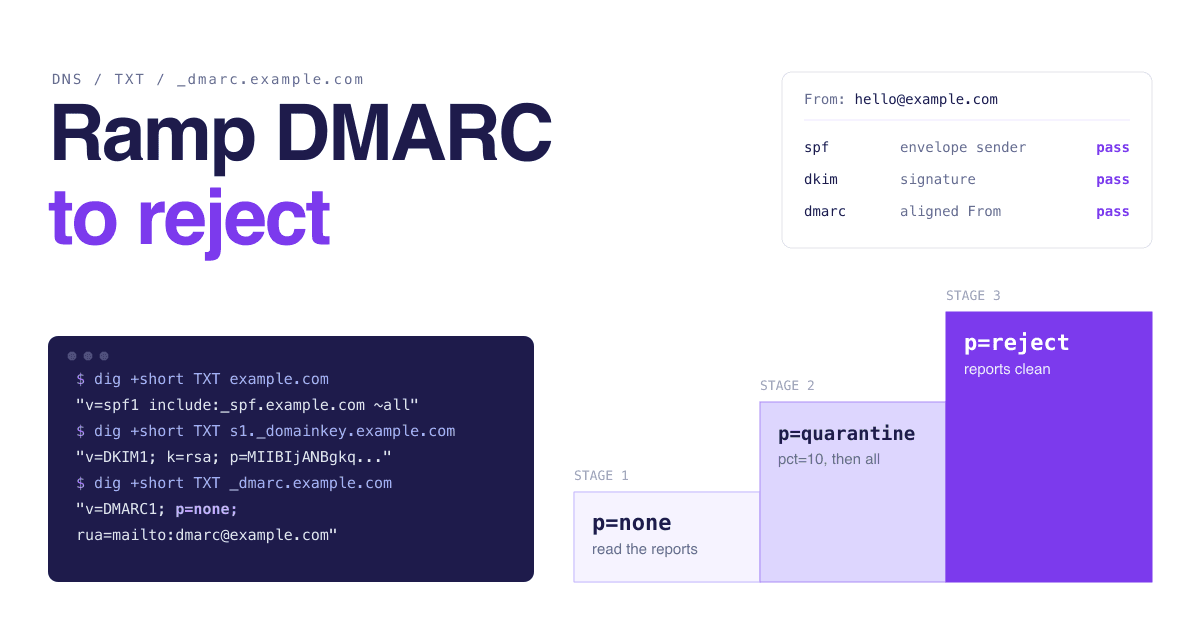
In stages: monitor at p=none, fix every legitimate sender the reports reveal, quarantine a small percentage, raise it to 100, then switch to reject.
DMARC rollout, following Google's recommended sequence
Day 0
SPF and DKIM live
Publish the SPF record and turn on DKIM at every sender. Google says to set these up at least 48 hours before DMARC.[4]
Day 2
p=none with a rua address
Mail is delivered as before. Google recommends at least one week at this stage, reviewing reports daily.[4]
Week 2 or later
Following weeks
Raise pct to 100
Increase the percentage over time until quarantine covers all failing mail.[4] Check reports after each step.
When stable
p=reject
Failing messages are rejected by receiving servers and never delivered. Google's guide treats reject as something you can use in place of quarantine if required, and attaches a caution to it.[4] It is the strongest request you can make against exact-domain spoofing.
One week is Google's figure, and it assumes your mail streams all show up within a week. The DMARC standard is more cautious: depending on how often you send, "it may take many months of consuming DMARC aggregate reports" before you are sure all your mail is authenticated.[10] In our view a small startup should wait for at least a full billing cycle before quarantine: the monthly invoice run, the quarterly investor update and the rarely-used helpdesk are exactly the senders that surface late.
What do Gmail, Yahoo and Outlook require from senders?
At Gmail and Yahoo, every sender needs SPF or DKIM, valid forward and reverse DNS and a spam rate under 0.3%. Bulk senders also need both SPF and DKIM, a DMARC record, alignment and one-click unsubscribe on marketing mail. Outlook.com requires SPF, DKIM and DMARC from domains sending more than 5,000 emails a day.
Figure 3What Gmail and Yahoo require from every sender
| Requirement | Gmail | Yahoo |
|---|---|---|
| Authentication | GmailSPF or DKIM | YahooSPF or DKIM at a minimum |
| Spam rate | GmailBelow 0.3% in Postmaster Tools | YahooBelow 0.3% |
| DNS | GmailValid forward and reverse DNS (PTR) records for sending domains or IPs | YahooValid forward and reverse DNS record for sending IPs |
| Message format | GmailRFC 5322 | YahooRFCs 5321 and 5322 |
Figure 4What bulk senders must add
| Requirement | Gmail (more than 5,000 a day) | Yahoo (bulk senders) |
|---|---|---|
| Authentication | Gmail (more than 5,000 a day)SPF and DKIM | Yahoo (bulk senders)Both SPF and DKIM |
| DMARC | Gmail (more than 5,000 a day)Required; the policy can be none | Yahoo (bulk senders)Valid policy of at least p=none, and DMARC must pass |
| Alignment | Gmail (more than 5,000 a day)From domain aligned with the SPF or DKIM domain | Yahoo (bulk senders)From domain aligned with the SPF or DKIM domain; relaxed alignment is acceptable |
| Unsubscribe | Gmail (more than 5,000 a day)One-click unsubscribe and a clearly visible link in the body, on marketing and subscribed messages | Yahoo (bulk senders)Working list-unsubscribe header with one-click on marketing and subscribed messages, a visible link in the body, honored within 2 days |
The dates and definitions that matter
- Who counts as bulk at Gmail Any sender of close to 5,000 messages or more to personal Gmail accounts (addresses ending in @gmail.com or @googlemail.com) within 24 hours. Subdomains count toward the primary domain, and reaching the level once makes the status permanent.[2][1]
- February 1, 2024 Gmail's requirements took effect.[1] Yahoo began enforcement the same month and said it would roll it out gradually through the first half of the year.[5]
- June 1, 2024 Gmail's deadline for one-click unsubscribe on commercial and promotional messages. From June 2024, bulk senders above a 0.3% user-reported spam rate are ineligible for mitigation.[2]
- May 5, 2025 Outlook.com rules took effect: domains sending more than 5,000 emails a day to Outlook.com accounts must pass SPF and DKIM and publish DMARC of at least
p=none, aligned with SPF or DKIM. Non-compliant mail goes to the junk folder and may be rejected with error550; 5.7.515.[6] Microsoft's announcement says this covers its consumer addresses at hotmail.com, live.com and outlook.com.[7] - November 2025 Gmail began ramping up enforcement on non-compliant traffic, with disruptions that include temporary and permanent rejections.[2]
Figure 5User-reported spam rate thresholds
Gmail: stay below
0.1%Gmail: never reach
0.3%Yahoo: stay below
0.3%
A startup sending a few hundred receipts a day is not a bulk sender, and transactional messages such as password resets are excluded from Gmail's one-click unsubscribe rule.[2] We still suggest meeting the bulk list from day one. The records are free, and the day a launch email pushes you over the line is a bad day to learn DNS.
How do I set up HTTPS, HSTS and security headers?
Redirect every HTTP request to HTTPS, add a Strict-Transport-Security header with a short max-age that you lengthen later, then add four or five response headers at your host or CDN.
Chrome labels a page "Not secure" when the connection is not encrypted, and tells the user that the site owner must fix it with HTTPS.[16] HSTS closes the remaining gap: it tells the browser to use HTTPS only for that host, and to upgrade any later HTTP attempt automatically.[13]
It has one sharp edge. On an HSTS host the browser offers no way to click through a certificate error, and includeSubDomains extends that to every subdomain.[13] So ramp up. The HSTS preload site recommends stages of 5 minutes (max-age=300), 1 week (max-age=604800) and 1 month (max-age=2592000), fixing what breaks and waiting out each stage before moving on.[14] Our addition: confirm that old subdomains such as a status page or a staging host serve HTTPS before you add includeSubDomains.
Figure 6A short list of security headers, with the values OWASP recommends
| Header | Recommended value | What it does |
|---|---|---|
Strict-Transport-Security | Recommended valuemax-age=63072000; includeSubDomains; preload as the end state | What it doesTells browsers to reach the site over HTTPS only |
X-Content-Type-Options | Recommended valuenosniff | What it doesMakes browsers follow the declared content type and not guess it |
X-Frame-Options | Recommended valueDENY | What it doesStops other sites framing your pages (clickjacking). OWASP prefers the CSP frame-ancestors directive where possible. |
Referrer-Policy | Recommended valuestrict-origin-when-cross-origin | What it doesLimits how much referrer information is sent with requests |
Permissions-Policy | Recommended valuegeolocation=(), camera=(), microphone=() | What it doesSwitches off browser features the site does not use |
Content-Security-Policy | Recommended valueNo single value; it depends on your site | What it doesDeclares which origins may load content, to mitigate script injection |
X-XSS-Protection header, or turning it off explicitly. Headers reduce classes of browser attack; they do not fix vulnerable code. Source[15]Do I need security.txt, a privacy policy and a custom-domain email?
Yes to all three. They take under an hour together, and each answers a question a careful buyer, researcher or mailbox provider asks about a company they have never heard of.
security.txt (RFC 9116)
Save as a plain text file served at https://example.com/.well-known/security.txt and set a reminder to renew the Expires date.
Contact: mailto:[email protected]
Expires: YYYY-MM-DDT00:00:00Z
Preferred-Languages: en
Canonical: https://example.com/.well-known/security.txt

Replace YYYY-MM-DD with a date less than a year from today.
RFC 9116 defines the file so that organizations can describe how to report a vulnerability to them. It must live under /.well-known/, be served over HTTPS as text/plain, and contain the two required fields, Contact and Expires. The RFC recommends an expiry less than a year ahead.[12] Only publish an address that somebody reads.
A free mailbox address
- You cannot publish SPF, DKIM or DMARC for a domain you do not control.
- Gmail tells senders not to impersonate Gmail From: headers and says it "will begin using a DMARC quarantine enforcement policy", so mail a third-party tool sends as your @gmail.com address is likely to land in spam.[1]
- The address says nothing about which company you are.
An address on your own domain
- Every message builds reputation for a domain you own and keep if you change mail provider.
- The address matches the site the reader just visited.
- Role addresses (support, billing, security) survive staff changes.
The call: Use your own domain for anything a customer receives or replies to. The first two points on the left are mechanics and Google's stated policy; the rest is our judgement.
What a real privacy policy and contact page contain (our checklist, not legal advice)
- The legal name of whoever runs the site and a way to reach them that is not only a form.
- What you collect, including analytics and the email tools named in your SPF record, and why.
- How to ask for deletion, and the address that request goes to.
These details travel with you. A profile on SitePatent or any other directory sends people to your domain, and the contact address and policy pages are often the next things a cautious visitor opens.
How do I check that everything is working?
Query the DNS records, send yourself a real message and read its headers, then look at the response headers your site returns. All of it is free and takes about 20 minutes.
How to verify email authentication and site headers with free tools
Query the records3 min
In a terminal, run
dig +short TXT example.comand confirm exactly one line starts withv=spf1. Rundig +short TXT _dmarc.example.comand confirm exactly onev=DMARC1record. Any web-based DNS lookup shows the same answers.Send a real message to a Gmail inbox5 min
Send from each system separately: your mailbox, your app's transactional sender, your helpdesk, your billing tool. Each is its own mail stream and can fail on its own.
Open the full headers2 min
In Gmail on a computer, open the message, click More next to Reply, then "Show original". The full header opens in a new window. If it is hard to read, copy it into Google's Admin Toolbox Messageheader tool.[17]
Read the Authentication-Results line5 min
Look for
spf=pass,dkim=passanddmarc=pass. Then check alignment: the domain shown for DKIM (header.i=orheader.d=) or for SPF (smtp.mailfrom=) should be your domain or a subdomain of it, not your provider's, and should matchheader.from=.Check the site3 min
Run
curl -sI http://example.comand expect a redirect tohttps://. Runcurl -sI https://example.comand look forstrict-transport-securityand the other headers. Openhttps://example.com/.well-known/security.txtin a browser.
Common symptoms and the first thing to check
If SPF shows permerror
You have more than one
v=spf1record, the record needs more than 10 DNS-querying terms, or it has a syntax error. All three produce permerror.[8]If spf=pass and dkim=pass, but dmarc=fail
Alignment. Both passed for your provider's domain. Turn on custom-domain DKIM signing at that sender.
If One tool's mail lands in spam and the rest is fine
That tool is a separate mail stream with no DKIM for your domain. Find it in your DMARC reports and authenticate it.
If Outlook.com bounces with 550; 5.7.515
The sending domain does not meet the required authentication level. Check SPF, DKIM and DMARC for that stream.[6]
If Visitors cannot get past a certificate warning on a subdomain
HSTS with
includeSubDomainsis doing its job. Fix the certificate on that host; there is no bypass to offer them.[13]
Which mistakes break a new domain most often?
Four: a second SPF record, an SPF record past the 10-lookup limit, DMARC set to reject on day one, and third-party senders nobody remembered. All four are quiet until mail disappears.
- Avoid: Publishing a second SPF record Each new tool's setup guide says "add this TXT record". Do that twice and SPF evaluation returns permerror, because a domain must not have multiple records.[8] Merge the new
include:into the record you already have. - Avoid: Exceeding 10 DNS lookups The
include,a,mx,ptrandexistsmechanisms and theredirectmodifier all count, and implementations must return permerror past 10.[8] Includes nest, so four vendors can be enough. Remove senders you no longer use. - Avoid: Jumping straight to p=reject It looks like the secure choice, and rejected mail is never delivered.[4] Without a monitoring period you find the unauthenticated sender when a customer says the invoice never arrived.
- Avoid: Forgetting third-party senders The CRM, the helpdesk, the billing system, the form builder, the calendar tool. Each one that puts your domain in the From line needs DKIM for your domain before DMARC tightens.
- Avoid: Treating this as protection against all impersonation A lookalike domain with its own valid records passes everything. DMARC does not address visually similar domains or display-name attacks.[10]
What this page deliberately leaves out: it will not make unwanted mail welcome. Authentication proves who sent a message, and the spam-rate limits measure whether recipients wanted it.
When the list below is ticked, the domain is ready to be shown to strangers. That is the point to add it to places founders are found, such as the ones in our guide on where to promote a startup and the directory comparison, or to browse how other products present themselves on SitePatent.
One-afternoon domain credibility checklist
0 of 16 done
Email authentication
Marketing mail (if we send any)
Website
Company signals
5 quick answers
Common questions
Short answers to the follow-up questions readers ask most.
Not here? Ask usThe all-senders rules do. Gmail and Yahoo both ask every sender for SPF or DKIM, valid forward and reverse DNS, and a spam rate under 0.3 percent. The extra rules, including DMARC and one-click unsubscribe, are written for bulk senders, but both providers recommend DMARC for everyone. Publishing all three records costs nothing and means a sudden jump in volume does not catch you unprepared.
Sources
- [1]Email sender guidelinesGoogle Workspace Admin Help
- [2]Email sender guidelines FAQGoogle Workspace Admin Help
- [3]New Gmail protections for a safer, less spammy inboxGoogle (The Keyword), 2023
- [4]Recommended DMARC rolloutGoogle Workspace Admin Help
- [5]Sender Requirements & RecommendationsYahoo Sender Hub
- [6]Policies, Practices, and GuidelinesMicrosoft (Outlook.com Postmaster)
- [7]Strengthening Email Ecosystem: Outlook's New Requirements for High-Volume SendersMicrosoft Tech Community (Defender for Office 365 Blog), 2025
- [8]RFC 7208: Sender Policy Framework (SPF) for Authorizing Use of Domains in Email, Version 1IETF, 2014
- [9]RFC 6376: DomainKeys Identified Mail (DKIM) SignaturesIETF, 2011
- [10]RFC 9989: Domain-Based Message Authentication, Reporting, and Conformance (DMARC)IETF, 2026
- [11]RFC 9990: DMARC Aggregate ReportingIETF, 2026
- [12]RFC 9116: A File Format to Aid in Security Vulnerability DisclosureIETF, 2022
- [13]Strict-Transport-Security headerMDN Web Docs
- [14]HSTS Preload List Submissionhstspreload.org (Chromium project)
- [15]HTTP Security Response Headers Cheat SheetOWASP Cheat Sheet Series
- [16]Check if a site's connection is secureGoogle Chrome Help
- [17]Trace an email with its full headerGmail Help
How this guide was put together. Every threshold, date and rule on this page was checked on 11 October 2026 against the first-party page or RFC cited next to it: the Gmail, Yahoo and Outlook.com sender pages, the SPF, DKIM, DMARC and security.txt specifications, MDN, the HSTS preload site and OWASP. DMARC statements follow RFC 9989 (May 2026), which replaced RFC 7489; how each mailbox provider treats the retired `pct` tag was not tested. The Outlook.com policy page is served from a Microsoft office.com host that the Outlook.com postmaster address redirects to. The Gmail statistics are Google's own figures from 2023 and describe Gmail only. Provider rules change, so confirm them at the source before relying on them. The priority grid, the rollout pacing beyond Google's stated week, the privacy and contact checklist and the advice on record endings are editorial judgement, and nothing here is legal advice.