
Trust signals for a new startup website, in priority order
A ranked, sourced list of what first-time visitors check before they believe a company is real, written for founders who have no customers, no press and no brand yet.
By the SitePatent Editorial Team. Published , revised . 18 minute read, 12 sources.
The short answer
What trust signals does a brand-new startup website need?
Start with identity: a named person or company, a working contact route and the jurisdiction you operate from. Then remove risk: HTTPS, a privacy policy, visible prices and plain cancellation terms. Then remove doubt: no typos, no broken links, a tidy design. Customer proof and independent mentions come last because they take time. Never invent them.
- Time needed
- 60 minutes for the first pass
- Cost
- Free
- Skill level
- No code needed
- Best for
- Sites with zero customers
What you will leave with
- Identity, contact details and up-front pricing are the cheapest signals you control, and the published research has pointed at them since 1999.
- In a 2002 study of 2,684 people, the "design look" of a site came up in 46.1 percent of credibility comments[2]. Looks are judged first, so fix them before you add proof.
- Google tells its quality raters that small sites "may have little or no reputation information" and that this "is not indicative of high or low quality"[8]. Missing identity is a different problem.
- A testimonial from someone who does not exist is prohibited under a US FTC rule in effect since October 21, 2024[10][11]. Showing nothing is safer than showing something invented.
- You can run a full trust pass in about an hour with the steps, the About-page template and the page-by-page audit below.
What do first-time visitors check before they trust a new website?
They check, roughly in this order, whether the site looks professionally made, whether a real and reachable organization stands behind it, whether costs and terms are stated up front, and whether anyone outside the site vouches for it.
Most of the foundational research on web credibility is old. The Stanford Guidelines for Web Credibility are dated May 2002 and rest on "three years of research that included over 4,500 people"[1]. Jakob Nielsen published his four ways a design communicates trustworthiness in March 1999[3]. Treat the exact percentages as history, not as a measurement of your visitors.
The reason to read it anyway is that later work keeps finding the same things. When Nielsen Norman Group ran a new usability study in 2016, it reported that the same four factors from 1999 still shaped how people judged sites[4]. The technology changed. The questions people ask of a stranger did not.
- of credibility comments mentioned the site's "design look", in a study of 2,684 people published in 2002[2]
- 46.1%
- people took part in the three years of research behind the 10 Stanford guidelines (2002)[1]
- 4,500+
- of US online shoppers surveyed had abandoned a checkout in the previous 3 months because they did not trust the site with their card details (1,026 respondents, 2025)[7]
- 19%
- times the word "reviews" came up across 20 usability sessions on About Us content (published 2019)[5]
- 40+
Figure 1Four bodies of credibility research and what each says a site must show
| Source | Year | How it was produced | What it says matters |
|---|---|---|---|
| Stanford Guidelines for Web Credibility | Year2002 | How it was producedThree years of research with over 4,500 people[1] | What it says mattersA real organization, easy contact, professional design, no errors "no matter how small they seem" |
| Nielsen Norman Group, trustworthiness factors | Year1999, revisited 2016 | How it was producedA 1999 column by Jakob Nielsen[3], then a 2016 usability study run in Singapore[4] | What it says mattersDesign quality, up-front disclosure, complete and current content, connection to the rest of the web |
| Nielsen Norman Group, About Us research | Year2019 | How it was producedThree rounds, over 70 users, 100 sites tested and 65 more reviewed[5] | What it says mattersA clear statement of what the company does, findable contact options, people, authentic imagery |
| Google Search Quality Rater Guidelines | Year2025 | How it was producedInstructions to human raters, dated September 11, 2025[8] | What it says mattersWho is responsible for the site, contact and customer service information, independent reputation |
Which trust signals matter most for a brand-new startup?
Identity first, then safety, then quality, then proof, then third-party presence. The order is not about which is strongest. It is about which you can make true today.
The ranking below is editorial judgement built on the research above, not a finding from any one study. Proof from real customers is probably the strongest signal a business can have, and it sits fourth because a site with zero customers cannot produce it honestly. The time estimates assume a small site you can edit yourself.
Figure 2Trust signals for a new startup site, ranked by what you can honestly ship first
| Signal | What it tells a visitor | Where it goes | Time to add |
|---|---|---|---|
| 1. Named founder or company | What it tells a visitorA specific, accountable party exists | Where it goesAbout page, footer | Time to add10 minutes |
| 2. Contact route that works | What it tells a visitorSomeone will answer if something breaks | Where it goesHeader or footer, contact page | Time to add10 minutes |
| 3. Legal entity and jurisdiction | What it tells a visitorWhich country's rules apply to this purchase | Where it goesFooter, terms | Time to add5 minutes |
| 4. HTTPS on every page | What it tells a visitorThe connection is not being read in transit | Where it goesHosting settings | Time to addUsually already on |
| 5. Privacy policy | What it tells a visitorWhat happens to an email address after signup | Where it goesFooter, next to forms | Time to add30 to 60 minutes |
| 6. Visible prices and totals | What it tells a visitorNo surprise at the last step | Where it goesPricing page, linked from the header | Time to add20 minutes |
| 7. Cancellation and refund terms | What it tells a visitorHow to get out, and what it costs | Where it goesPricing page, terms | Time to add20 minutes |
| 8. No typos, no broken links | What it tells a visitorThe operators pay attention | Where it goesWhole site | Time to add20 minutes |
| 9. Real product screenshots | What it tells a visitorThe product exists and looks like this | Where it goesHome page | Time to add30 minutes |
| 10. Checkable proof | What it tells a visitorOther people used it and said so in public | Where it goesHome page, linked to the source | Time to addWeeks |
| 11. Independent profiles and mentions | What it tells a visitorThe company exists outside its own site | Where it goesOther sites, linked from the footer | Time to addDays to months |
What should you do first when you have zero customers?
Do the low-effort, high-credibility work first: say who you are, how to reach you, what it costs and how to leave. All of it can be true on day one.
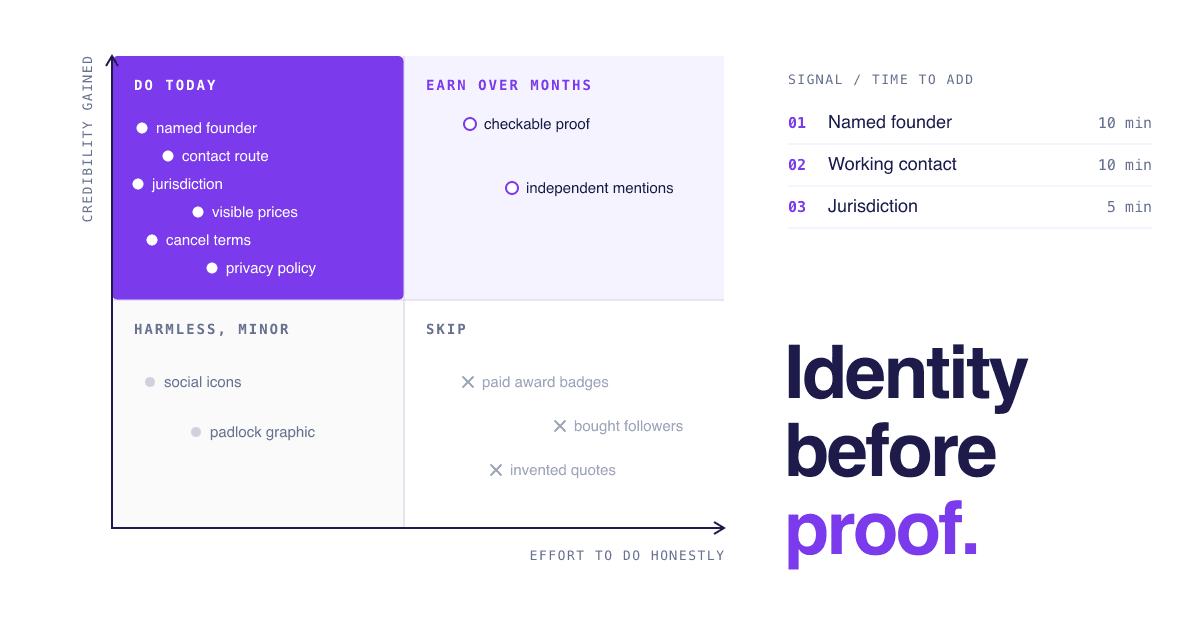
Figure 3Trust signals by effort and credibility gained
Much credibility Credibility gained, Low effort Effort to do honestly
Do todayStart here
Named founder, working contact route, jurisdiction, visible prices, cancellation terms, privacy policy, fixing typos and dead links.
Much credibility Credibility gained, High effort Effort to do honestly
Earn over months
Customer quotes linked to a public source, independent reviews, write-ups by people you do not pay, a usage number anyone can verify.
Little credibility Credibility gained, Low effort Effort to do honestly
Harmless, minor
Social icons, a generic padlock graphic, a "made in" line. Fine to have. Do not expect them to carry weight.
Little credibility Credibility gained, High effort Effort to do honestly
Skip
A full rebrand before the basics, stock "team" photos, paid award badges, bought followers, anything invented.
What you can honestly show with no customers
- Your name and face A real photo and two lines on why you built this. Nielsen Norman Group lists stock photography among the things that hurt About Us pages and authentic imagery among those that help[5].
- The stage you are at "Launched in October 2026, in early access" is a credible sentence. A vague "trusted by teams worldwide" is not.
- The product itself Unedited screenshots, a short recording, a public changelog with dates. Stanford's guidelines recommend showing content has been updated or reviewed recently[1].
- Your own track record Previous work, open-source repositories and a professional profile that predates the startup, linked so they can be checked.
- Sources for your claims If the home page says the product is faster or cheaper, link to the evidence. Stanford's first guideline is to make accuracy easy to verify[1].
Design sits in an awkward place here. The 2002 study found people reached for appearance first, with comments about information structure and information focus the next most common[2]. That does not mean you need a designer. It means a default template used cleanly, with consistent spacing and one typeface, beats a custom design with rough edges. Messaging clarity and page speed have their own guides on this site, so this page leaves both there.
What makes people trust a site enough to pay?
Seeing the full cost early, knowing how to cancel or return, and a checkout that looks intact. In the one large survey we found, extra costs were named about twice as often as distrust of the site.
Figure 4Selected reasons US online shoppers gave for abandoning a cart or checkout
Extra costs too high (shipping, tax, fees)
40%Did not trust the site with card information
19%Website had errors or crashed
17%Returns policy was not satisfactory
13%Could not see or calculate total cost up front
12%
These are e-commerce checkout figures from one US survey, so do not read them as SaaS benchmarks. The pattern is still useful: most of these reasons concern cost disclosure, terms and polish, which are largely in your control. Nielsen wrote in 1999 that a site should reveal shipping charges before the order is placed[3]. The software equivalent is showing the price, the billing period, any setup fee and tax handling before the signup form.
Security is judged by feel. Baymard notes that every field on an HTTPS page is equally encrypted, yet users treat some parts of a page as more secure than others, and concludes the issue is "perceived security of the fields, not their actual technical security"[7]. In its testing, unrelated layout bugs led some people to believe a site had been hacked[7].
How do search engines and careful buyers judge a site with no reputation?
They look for who is responsible for the site and then for what independent sources say. Having no reputation yet is treated as neutral. Hiding who you are is not.
Google's Search Quality Rater Guidelines are instructions for human evaluators, not the ranking algorithm. They ask raters to weigh experience, expertise, authoritativeness and trust (E-E-A-T), and Google says "trust is most important" of the four[9]. Google also says that E-E-A-T "isn't a specific ranking factor" and that rater data is not used directly in its ranking algorithms[9]. Read the guidelines as a detailed description of what a careful stranger looks for, written by a company that has studied the question at length.
On that reading, the guidance is reassuring for a new site. It says small websites "may have little or no reputation information" and that "this is not indicative of high or low quality"[8]. What it does not excuse is missing identity where money changes hands.
Figure 5What Google asks quality raters to look for, and what a new startup can publish
| What the guidelines say | What to publish |
|---|---|
| "It should be clear" who is responsible for the website[8] | What to publishCompany or founder name on the About page and in the footer |
| Contact and customer service information are "extremely important for websites that handle money"[8] | What to publishA support email you answer, plus response hours, on the pricing and contact pages |
| For shopping sites, raters look for "policies on payment, exchanges, and returns"[8] | What to publishBilling, cancellation and refund terms in plain words, linked from pricing |
| Pages with payment functionality "should receive a Low rating" when customer service or contact information is unsatisfying[8] | What to publishMore than a bare contact form: a named route to a person |
| When a site and "reputable independent sources" disagree, raters are told to "trust the independent sources"[8] | What to publishNothing on your site that an outside search would contradict |
Buyers do their own version of this. In the sessions Nielsen Norman Group reported in 2019, participants who could not find an answer on a company's site often gave up and said they would "just Google it", and many compared on-site testimonials against third-party review sites[5]. The 2016 study found people trust testimonials on external sites more than those on the company's own pages[4].
So build a small, accurate footprint outside your site: a company page on a professional network, a public code repository if you have one, a founder profile, and a listing in a product directory. A public profile on SitePatent is one such presence signal among several. It is a page about your product on a site you do not control, not a review, an endorsement or a ranking promise. On SitePatent a free listing requires the site's badge on your website, is published by a daily check once that badge is on the page you submitted and the listing is at least a week old, and carries a public "Unverified" label; paid plans work differently, see pricing. For where else to appear, see where to promote your startup and the audited list of startup directories.
Which fake trust signals backfire?
Invented testimonials, borrowed logos, bought followers and fake urgency. Each is easy for a curious visitor to check, and a US federal rule now covers fake testimonials and bought followers.
The US Federal Trade Commission announced a final rule on fake reviews and testimonials on August 14, 2024, approved by a 5-0 vote[10]. It went into effect on October 21, 2024, and authorizes courts to impose civil penalties for knowing violations[11]. It covers reviews and testimonials that misrepresent they are by someone who does not exist, "such as AI-generated fake reviews"[10]. This is a summary of a US rule, not legal advice, and other countries have their own consumer law.
Fake signal
- A quote from "Sarah K., Marketing Lead" who does not exist
- A testimonial from a co-founder or employee with no disclosure
- "As seen in" logos of outlets that never covered you
- A countdown timer that resets on reload
Honest replacement
- No testimonial block until a real person agrees to be named
- The same words, labelled with the relationship
- A link to the one real mention you have, even a small one
- A real deadline with a date, or no deadline
The call: Empty space reads as "new". A fabricated claim, once noticed, reads as "dishonest" and taints the true claims around it.
What the regulator has said about specific tactics
- Avoid: Insider testimonials The rule covers testimonials from company insiders that "fail to clearly and conspicuously disclose the giver's material connection to the business"[10]. FTC staff guidance adds that family members asked to review a business should clearly disclose the relationship too[11].
- Avoid: Bought social proof The rule prohibits buying or selling "fake indicators of social media influence, such as followers or views"[10]. The ban on buying is limited to buyers who knew or should have known the indicators were fake and who use them to misrepresent their influence for a commercial purpose[10].
- Avoid: Fake urgency The FTC's summary of its 2022 staff report, "Bringing Dark Patterns to Light", names "countdown timers designed to make consumers believe they only have a limited time to purchase" when the offer is not actually time-limited[12].
- Avoid: Partial prices The same report describes companies that "advertise only part of a product's total price to lure consumers in"[12].
Borrowed logos are not named in the FTC material we read, so calling them risky is our judgement. The practical case is enough: a visitor who searches your name next to the outlet finds nothing, and Google's raters are told to believe independent sources over a site's own claims[8]. Collecting real reviews is a separate job with its own guide on this site. Until you have them, leave the space out.
How do you add the basics in 60 minutes?
Work in one sitting: write the identity block, expose contact, state price and exit terms, then proofread and click every link. Nothing here needs a developer.
A 60-minute trust pass for a new startup website
Write the identity block10 min
One sentence each: what the product does, who runs it, where the company is registered. Put it on the About page and a short form in the footer. Nielsen Norman Group recommends a tagline on the home page and one or two short, scannable paragraphs at the top of About[5].
Expose a contact route5 min
Add a visible email address, not only a form, and say when you reply. Send a test message from another account and confirm it arrives.
State price and exit terms15 min
On the pricing page show the amount, currency, billing period and tax handling. Directly under it, write how to cancel and what happens to a payment already made.
Check the legal basics5 min
Confirm every page loads over HTTPS, and that privacy policy and terms are linked from the footer and from any form that collects an email address.
Remove anything you cannot prove5 min
Delete placeholder testimonials, template logo strips, round usage numbers and any "limited time" label without a real date.
Proofread and click every link15 min
Read each page aloud once and click every link in the header, footer and body. Stanford's tenth guideline warns that typos and broken links cost more credibility than people expect[1].
Look at it as a stranger5 min
Open the site in a private window on a phone. In 30 seconds, can you tell who runs it, what it costs and how to reach them? If not, move those three facts higher.
About page founder note
Paste onto your About page and replace every bracket. Delete any line you cannot make true.
Hi, I'm [first and last name]. I built [product] because [the specific problem you ran into, in one sentence].

What it does: [one plain sentence, no adjectives].

Who it's for: [the kind of person or team], especially if you [situation].

Where we are: [product] launched in [month, year]. It's run by [just me / a team of N] from [city, country]. [We have N customers so far / We're in early access and onboarding people one at a time].

Who's behind it: Before this I [one or two verifiable facts: past role, project, repository]. You can check that here: [link to a profile you had before the startup].

The company: [legal entity name], registered in [country / state][, company number if you have one].

Talk to a person: [email address]. I read every message and usually reply within [timeframe].

What happens to your data and your money: [one sentence each], with the detail in our [privacy policy] and [terms].

Last updated: [date].
How do you audit your own site for trust, page by page?
Go through the home page, pricing, About and footer with the list below and tick only what a stranger could confirm without contacting you.
Trust audit by page
0 of 18 done
Home page
Pricing page
About page
Footer, on every page
What to do with what the audit finds
If You cannot tick an identity or contact item
Fix it today. These cost minutes and every source on this page treats them as basic.
If A home page item fails because the claim is not true yet
Remove the claim. Do not soften it into something vaguer.
If You sell to businesses and take payment on the site
Add response hours and a second contact route. Rater guidance treats thin contact information on payment pages as a reason for a low rating[8].
If Everything is ticked and you still have no outside presence
Create two or three accurate public profiles, including a directory listing you can submit yourself, and stop there until customers arrive.
5 quick answers
Common questions
Short answers to the follow-up questions readers ask most.
Not here? Ask usThey can change how secure a page feels, which is not the same as making it secure. Baymard found that visitors judge security by appearance and that even a homemade seal with no third-party meaning scored well in its surveys. Use only marks you are entitled to show, such as the name of your real payment processor, and put the effort into a clean, bug-free checkout instead.
Sources
- [1]Stanford Guidelines for Web CredibilityStanford Persuasive Technology Lab (B.J. Fogg), 2002
- [2]How Do People Evaluate a Web Site's Credibility?Consumer Reports, 2002
- [3]Trust or Bust: Communicating Trustworthiness in Web DesignNielsen Norman Group (Jakob Nielsen), 1999
- [4]Trustworthiness in Web Design: 4 Credibility FactorsNielsen Norman Group (Aurora Harley), 2016
- [5]"About Us" Information on WebsitesNielsen Norman Group (Anna Kaley and Jakob Nielsen), 2019
- [6]50 Cart Abandonment Rate StatisticsBaymard Institute, 2025
- [7]How Users Perceive Security During the Checkout FlowBaymard Institute (Jamie Holst)
- [8]Search Quality Rater Guidelines (General Guidelines)Google, 2025
- [9]Creating helpful, reliable, people-first contentGoogle Search Central, 2026
- [10]Federal Trade Commission Announces Final Rule Banning Fake Reviews and TestimonialsFederal Trade Commission, 2024
- [11]The Consumer Reviews and Testimonials Rule: Questions and AnswersFederal Trade Commission, 2024
- [12]FTC Report Shows Rise in Sophisticated Dark Patterns Designed to Trick and Trap ConsumersFederal Trade Commission, 2022
How this guide was put together. We checked each figure and quotation against the text of the cited page or PDF on October 11, 2026; the three FTC pages were read as Internet Archive copies of the originals. Much of the credibility research dates from 1999 to 2002 and the checkout figures come from a US e-commerce survey, so none of the percentages measure your visitors or software purchases specifically. The priority order, time estimates, effort matrix, audit checklist and template are editorial judgement, not research findings. The notes on the FTC rule summarize US material and are not legal advice.